

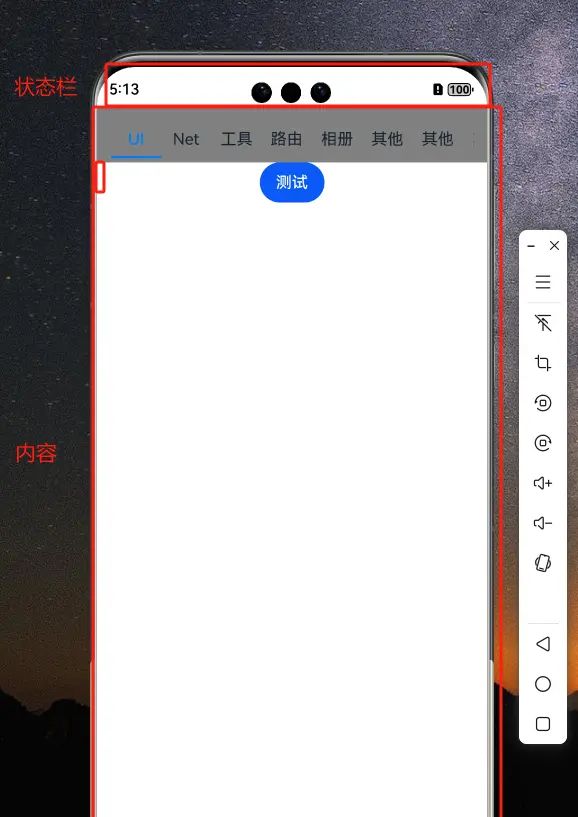
手机软件开发过程中,作为开发者或多或少的都需要处理内容显示的位置.手机系统代码提供了 状态栏,导航栏 以及内容展示区域,供开发者展示.非系统开发的App 展示的内容区域是固定的.但是一些全屏,和隐藏,显示状态栏的操作又是一些常见的需求.
所以,就需要根据具体需求对状态栏和导航栏进行设置.
1:思路:
1:全App进行全屏设置
2:保存状态栏和导航栏的高度
3:根据不同的需求进行避让操作(内容padding top和bottom)
2:具体实现
2.1 将系统的Window 设置成全屏模式
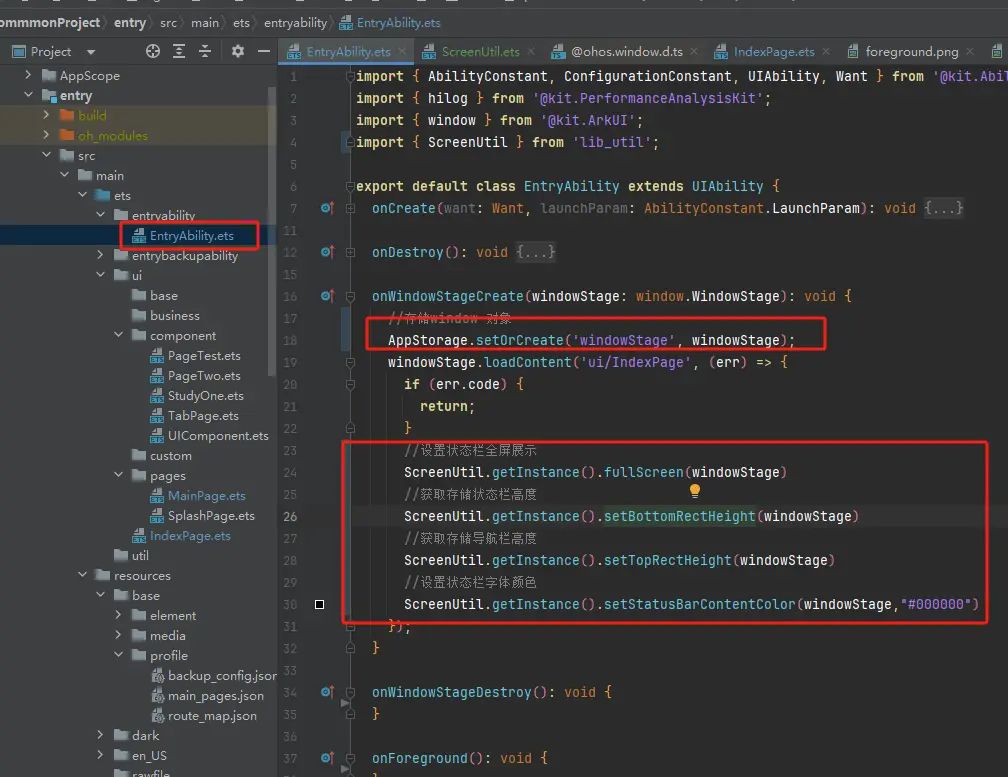
2.2 存储状态栏的宽和高

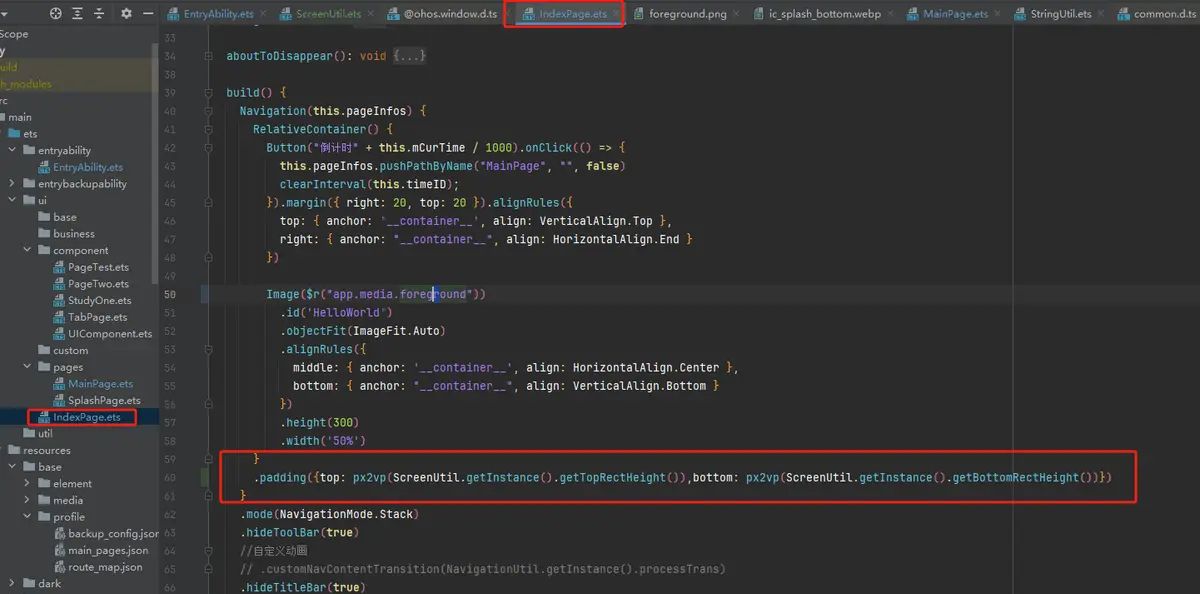
2.3 具体页面设置 避让的区域
用到的工具类
import { window } from "@kit.ArkUI";
import { BusinessError } from "@kit.BasicServicesKit";

/**
 * 屏幕处理工具类
 */
export  class ScreenUtil{
  private static mInstance: ScreenUtil

  constructor() {
  }

  public static getInstance(): ScreenUtil {

    if (!ScreenUtil.mInstance) {
      ScreenUtil.mInstance = new ScreenUtil()
    }
    return ScreenUtil.mInstance
  }


  /**
   * 设置全屏
   * @param windowStage
   */
  public fullScreen(windowStage: window.WindowStage){
    let windowClass: window.Window = windowStage.getMainWindowSync(); // 获取应用主窗口
    // 1. 设置窗口全屏
    let isLayoutFullScreen = true;
    windowClass.setWindowLayoutFullScreen(isLayoutFullScreen).then(() => {
      console.info( Succeeded in setting the window layout to full-screen mode. );
    }).catch((err: BusinessError) => {
      console.error( Failed to set the window layout to full-screen mode. Cause:  + JSON.stringify(err));
    });
  }
  /**
   * 动态设置避让区域
   * @param windowStage
   */
  public  setAvoidBottomAndTop(windowStage: window.WindowStage){
    // 动态避让
    let windowClass: window.Window = windowStage.getMainWindowSync(); // 获取应用主窗口
    windowClass.on( avoidAreaChange , (data) => {
      if (data.type === window.AvoidAreaType.TYPE_SYSTEM) {
        let topRectHeight = data.area.topRect.height;
        AppStorage.setOrCreate( topRectHeight , topRectHeight);
      } else if (data.type == window.AvoidAreaType.TYPE_NAVIGATION_INDICATOR) {
        let bottomRectHeight = data.area.bottomRect.height;
        AppStorage.setOrCreate( bottomRectHeight , bottomRectHeight);
      }
    });
  }
  /**
   * 设置底部导航的高度
   * @param windowStage
   */
  public setBottomRectHeight(windowStage: window.WindowStage){
    let windowClass: window.Window = windowStage.getMainWindowSync(); // 获取应用主窗口
    let type = window.AvoidAreaType.TYPE_NAVIGATION_INDICATOR; // 以导航条避让为例
    let avoidArea = windowClass.getWindowAvoidArea(type);
    let bottomRectHeight = avoidArea.bottomRect.height; // 获取到导航条区域的高度
    AppStorage.setOrCreate( bottomRectHeight , bottomRectHeight);
  }
  /**
   * 顶部状态栏避让的高度
   * @param windowStage
   */
  public setTopRectHeight(windowStage: window.WindowStage){
    let windowClass: window.Window = windowStage.getMainWindowSync(); // 获取应用主窗口
    let type = window.AvoidAreaType.TYPE_SYSTEM; // 以状态栏避让为例
    let avoidArea = windowClass.getWindowAvoidArea(type);
    let topRectHeight = avoidArea.topRect.height; // 获取状态栏区域高度
    AppStorage.setOrCreate( topRectHeight , topRectHeight);
  }
  /**
   * 获取顶部 庄改蓝高度
   * @returns
   */
  public  getTopRectHeight():number{
    return AppStorage.get( topRectHeight ) as number;
  }
  /**
   * 获取底部导航栏高度
   * @returns
   */
  public  getBottomRectHeight():number{
    return AppStorage.get( bottomRectHeight ) as number;
  }

  /**
   * 设置状态栏隐藏
   * @param windowStage
   */
  public  hideStatus(windowStage: window.WindowStage){
    let windowClass: window.Window = windowStage.getMainWindowSync();
    windowClass.setSpecificSystemBarEnabled( status , false).then(() => {
      console.info( Succeeded in setting the status bar to be invisible. );
    }).catch((err: BusinessError) => {
      console.error(`Failed to set the status bar to be invisible. Code is ${err.code}, message is ${err.message}`);
    });
  }
  /**
   * 隐藏导航栏
   * @param windowStage
   */
  public  hideNavigationIndicator(windowStage: window.WindowStage){
    let windowClass: window.Window = windowStage.getMainWindowSync();
    windowClass.setSpecificSystemBarEnabled( navigationIndicator , false).then(() => {
      console.info( Succeeded in setting the navigation indicator to be invisible. );
    }).catch((err: BusinessError) => {
      console.error(`Failed to set the navigation indicator to be invisible. Code is ${err.code}, message is ${err.message}`);
    });
  }

/**
 * 设置状态栏颜色  #008000
 * @param windowStage
 * @param color
 */
  public  setStatusColor(windowStage: window.WindowStage,color: string){
    windowStage.getMainWindowSync().setWindowBackgroundColor(color);
  }
  /**
   * 导航栏颜色
   * @param windowStage
   * @param color
   */
  public  setNavigationBar(windowStage: window.WindowStage,color: string){

    // 获取当前应用窗口
    let windowClass: window.Window = windowStage.getMainWindowSync();
    // 将状态栏和导航栏的背景色设置为跟应用窗口一样的颜色
    windowClass.setWindowSystemBarProperties({
      // 颜色属性为ARGB,将蒙尘设置为0%使其透明
      // 导航栏颜色
      navigationBarColor: color,
    })
  }
  /**
   * 状态栏颜色
   * @param windowStage
   * @param color
   */
  public  setStatusBarColor(windowStage: window.WindowStage,color: string){
    // 获取当前应用窗口
    let windowClass: window.Window = windowStage.getMainWindowSync();
    // 将状态栏和导航栏的背景色设置为跟应用窗口一样的颜色
    windowClass.setWindowSystemBarProperties({
      // 颜色属性为ARGB,将蒙尘设置为0%使其透明
      // 导航栏颜色
      statusBarColor: color,
    })
  }

/**
 * 状态栏字体颜色
 * @param windowStage
 * @param color
 */
  public  setStatusBarContentColor(windowStage: window.WindowStage,color: string){

    // 获取当前应用窗口
    let windowClass: window.Window = windowStage.getMainWindowSync();
    // 将状态栏和导航栏的背景色设置为跟应用窗口一样的颜色
    windowClass.setWindowSystemBarProperties({
      // 颜色属性为ARGB,将蒙尘设置为0%使其透明
      // 导航栏颜色
      statusBarContentColor: color,
    })
  }

}
© 版权声明
文章版权归作者所有,未经允许请勿转载。如内容涉嫌侵权,请在本页底部进入<联系我们>进行举报投诉!
THE END

![[干货] 微信定时发布工具推荐 - 宋马](https://p3-sign.toutiaoimg.com/8699/4299707035~tplv-tt-origin-web:gif.jpeg?_iz=58558&from=article.pc_detail&lk3s=953192f4&x-expires=1752965094&x-signature=0LzG69qv5rqMfQ9PWL4B%2F8o94Xo%3D)





















暂无评论内容