

使用ue打包web页面,只能使用旧版本,新版本没有打包html选项,应该是编辑器主要完善效果,导致轻量级的html很多东西不兼容。新版本提供了推流的方式替代。
示例工程里有个PixelStreaming的示例项目,直接下载打开那个项目。据说新工程直接在插件里下这个插件也是可以直接用的,但我没试。

打开后可以在编辑器里直接推流。
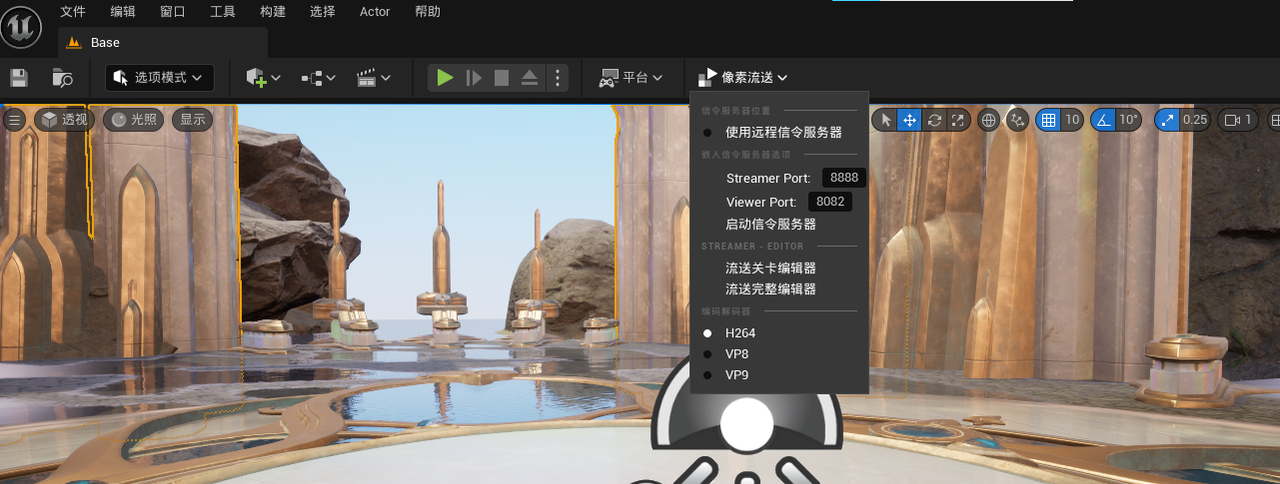
两个端口号应该是需要唯一,不清楚之后遇到的bug是不是和这块有关。viewerport就是在浏览器里要输入的端口号,可以推送关卡编辑页面或者整个编辑器。
接下来是打包,直接平台,windows,打包,结果报错。
LogUObjectHash: Compacting FUObjectHashTables data took   0.80ms
LogTurnkeySupport: Project requires temp target (已启用PixelStreaming插件)
LogLauncherProfile: Unable to use promoted target - ../../../../../UEProject/WebTest/Binaries/Win64/UnrealGame.target does not exist.
LogMonitoredProcess: Running Serialized UAT: [ cmd.exe /c ""D:/UE/UE_5.3/Engine/Build/BatchFiles/RunUAT.bat"  -ScriptsForProject="D:/UEProject/WebTest/WebTest.uproject" Turnkey -command=VerifySdk -platform=Win64 -UpdateIfNeeded -EditorIO -EditorIOPort=52370  -project="D:/UEProject/WebTest/WebTest.uproject" BuildCookRun -nop4 -utf8output -nocompileeditor -skipbuildeditor -cook  -project="D:/UEProject/WebTest/WebTest.uproject"  -unrealexe="D:UEUE_5.3EngineBinariesWin64UnrealEditor-Cmd.exe" -platform=Win64 -installed -stage -archive -package -build -clean -pak -iostore -compressed -prereqs
-archivedirectory="D:/UEProject/WebTest/build" -clientconfig=Development" -nocompile -nocompileuat ]
UATHelper: 打包 (Windows): Running AutomationTool...
UATHelper: 打包 (Windows): Using bundled DotNet SDK version: 6.0.302
UATHelper: 打包 (Windows): Starting AutomationTool...
UATHelper: 打包 (Windows): Parsing command line: -ScriptsForProject=D:/UEProject/WebTest/WebTest.uproject Turnkey -command=VerifySdk -platform=Win64 -UpdateIfNeeded -EditorIO -EditorIOPort=52370 -project=D:/UEProject/WebTest/WebTest.uproject BuildCookRun -nop4 -utf8output -nocompileeditor -skipbuildeditor -cook -project=D:/UEProject/WebTest/WebTest.uproject -unrealexe=D:UEUE_5.3EngineBinariesWin64UnrealEditor-Cmd.exe -platform=Win64 -installed -stage -archive -package -build -clean -pak -iostore -compressed -prereqs -archivedirectory=D:/UEProject/WebTest/build -clientconfig=Development -no
compile -nocompileuat
UATHelper: 打包 (Windows): Initializing script modules...
UATHelper: 打包 (Windows): Total script module initialization time: 0.13 s.
UATHelper: 打包 (Windows): Executing commands...
UATHelper: 打包 (Windows): Installed Sdk validity:
UATHelper: 打包 (Windows): Win64: (Status=Valid, MinAllowed_Sdk=10.0.00000.0, MaxAllowed_Sdk=10.9.99999.0, Current_Sdk=10.0.26100.0, Allowed_AutoSdk=10.0.18362.0, Current_AutoSdk=, Flags="InstalledSdk_ValidVersionExists")
UATHelper: 打包 (Windows): Scanning for envvar changes...
UATHelper: 打包 (Windows): ... done!
UATHelper: 打包 (Windows): Cleaning Temp Paths...
UATHelper: 打包 (Windows): BUILD SUCCESSFUL
UATHelper: 打包 (Windows): Setting up ProjectParams for D:UEProjectWebTestWebTest.uproject
UATHelper: 打包 (Windows): ********** BUILD COMMAND STARTED **********
UATHelper: 打包 (Windows): Running: D:UEUE_5.3EngineBinariesThirdPartyDotNet6.0.302windowsdotnet.exe "D:UEUE_5.3EngineBinariesDotNETUnrealBuildToolUnrealBuildTool.dll" WebTest Win64 Development -Project="D:UEProjectWebTestWebTest.uproject" -Clean -NoHotReload "D:UEProjectWebTestWebTest.uproject" -NoUBTMakefiles  -remoteini="D:UEProjectWebTest"  -skipdeploy  -log="C:UsersLCAppDataRoamingUnreal EngineAutomationToolLogsD+UE+UE_5.3UBT-WebTest-Win64-Development.txt"
UATHelper: 打包 (Windows): Log file: C:UsersLCAppDataRoamingUnreal EngineAutomationToolLogsD+UE+UE_5.3UBT-WebTest-Win64-Development.txt
UATHelper: 打包 (Windows): Cleaning WebTest binaries...
UATHelper: 打包 (Windows): Took 0.52s to run dotnet.exe, ExitCode=0
UATHelper: 打包 (Windows): Running: D:UEUE_5.3EngineBinariesThirdPartyDotNet6.0.302windowsdotnet.exe "D:UEUE_5.3EngineBinariesDotNETUnrealBuildToolUnrealBuildTool.dll" WebTest Win64 Development -Project=D:UEProjectWebTestWebTest.uproject -Manifest=D:UEProjectWebTestIntermediateBuildManifest.xml  -remoteini="D:UEProjectWebTest"  -skipdeploy  -log="C:UsersLCAppDataRoamingUnreal EngineAutomationToolLogsD+UE+UE_5.3UBT-WebTest-Win64-Development_2.txt"
UATHelper: 打包 (Windows): Log file: C:UsersLCAppDataRoamingUnreal EngineAutomationToolLogsD+UE+UE_5.3UBT-WebTest-Win64-Development_2.txt
UATHelper: 打包 (Windows): Creating makefile for WebTest (no existing makefile)
LogPixelStreamingServers: From Streamer id=110: {"type":"ping","time":1749087767}
LogPixelStreamingServers: Sending to streamer id=110: {"type":"pong","time":1749087767}
UATHelper: 打包 (Windows): Writing manifest to D:UEProjectWebTestIntermediateBuildManifest.xml
UATHelper: 打包 (Windows): Building WebTest...
UATHelper: 打包 (Windows): Using Visual Studio 2022 14.44.35208 toolchain (D:Visual StudioVCToolsMSVC14.44.35207) and Windows 10.0.26100.0 SDK (C:Program Files (x86)Windows Kits10).
UATHelper: 打包 (Windows): [Upgrade]
UATHelper: 打包 (Windows): [Upgrade] Using backward-compatible build settings. The latest version of UE sets the following values by default, which may require code changes:
UATHelper: 打包 (Windows): [Upgrade]     CppStandard = CppStandardVersion.Default        => Updates C++ Standard to C++20 (Previously: CppStandardVersion.Cpp17).
UATHelper: 打包 (Windows): [Upgrade]     WindowsPlatform.bStrictConformanceMode = true   => Updates MSVC strict conformance mode to true (Previously: false).
UATHelper: 打包 (Windows): [Upgrade] Suppress this message by setting 'DefaultBuildSettings = BuildSettingsVersion.V4;' in WebTest.Target.cs, and explicitly overriding settings that differ from the new defaults.
UATHelper: 打包 (Windows): [Upgrade]
UATHelper: 打包 (Windows): Determining max actions to execute in parallel (10 physical cores, 16 logical cores)
UATHelper: 打包 (Windows):   Executing up to 10 processes, one per physical core
UATHelper: 打包 (Windows):   Requested 1.5 GB memory per action, 3.93 GB available: limiting max parallel actions to 2
UATHelper: 打包 (Windows): ------ Building 5 action(s) started ------
UATHelper: 打包 (Windows): [1/5] Resource Default.rc2
UATHelper: 打包 (Windows): [2/5] Compile [x64] SharedPCH.Core.Cpp17.cpp
UATHelper: 打包 (Windows): Detected compiler newer than Visual Studio 2022, please update min version checking in WindowsPlatformCompilerSetup.h
UATHelper: 打包 (Windows): D:UEUE_5.3EngineSourceRuntimeCorePublicExperimentalConcurrentLinearAllocator.h(31): error C4668: û�н���__has_feature������ΪԤ�������꣬�á�0���滻��#if/#elif��
UATHelper: 打包 (Windows): D:UEUE_5.3EngineSourceRuntimeCorePublicExperimentalConcurrentLinearAllocator.h(31): error C4067: Ԥ������ָ����������� - Ӧ���뻻�з�
UATHelper: 打包 (Windows): Total time in Parallel executor: 2.50 seconds
UATHelper: 打包 (Windows): Total execution time: 4.20 seconds
UATHelper: 打包 (Windows): Took 4.29s to run dotnet.exe, ExitCode=6
UATHelper: 打包 (Windows): UnrealBuildTool failed. See log for more details. (C:UsersLCAppDataRoamingUnreal EngineAutomationToolLogsD+UE+UE_5.3UBT-WebTest-Win64-Development_2.txt)
UATHelper: 打包 (Windows): AutomationTool executed for 0h 0m 6s
UATHelper: 打包 (Windows): AutomationTool exiting with ExitCode=6 (6)
UATHelper: 打包 (Windows): BUILD FAILED
PackagingResults: Error: Unknown Error
根据豆包的分析主要是两个文件有问题。WindowsPlatformCompilerSetup.h和ConcurrentLinearAllocator.h
WindowsPlatformCompilerSetup.h里面主要是有个判断版本的地方有问题,但是修改过没什么用。
主要看ConcurrentLinearAllocator.h文件。日志里显示的乱码,但是我整个工程都没有中文路径。询问豆包,__has_feature在 MSVC 里并不被支持。
所以要进行修改,原文件和修改后的如下
#if PLATFORM_HAS_ASAN_INCLUDE
#include <sanitizer/asan_interface.h>
#if defined(__SANITIZE_ADDRESS__)
#define IS_ASAN_ENABLED 1
#elif __has_feature(address_sanitizer)
#define IS_ASAN_ENABLED 1
#else
#define IS_ASAN_ENABLED 0
#endif
#else
#define ASAN_POISON_MEMORY_REGION(addr, size) ((void)(addr), (void)(size))
#define ASAN_UNPOISON_MEMORY_REGION(addr, size) ((void)(addr), (void)(size))
#define IS_ASAN_ENABLED 0
#endif
修改后
#if PLATFORM_HAS_ASAN_INCLUDE
#include <sanitizer/asan_interface.h>
#if defined(__SANITIZE_ADDRESS__)
#define IS_ASAN_ENABLED 1
#elif defined(_MSC_VER)
// MSVC 不支持 __has_feature,禁用检查
#define IS_ASAN_ENABLED 0
#elif __has_feature(address_sanitizer)
#define IS_ASAN_ENABLED 1
#else
#define IS_ASAN_ENABLED 0
#endif
#else
#define ASAN_POISON_MEMORY_REGION(addr, size) ((void)(addr), (void)(size))
#define ASAN_UNPOISON_MEMORY_REGION(addr, size) ((void)(addr), (void)(size))
#define IS_ASAN_ENABLED 0
#endif
保存后打包成功。
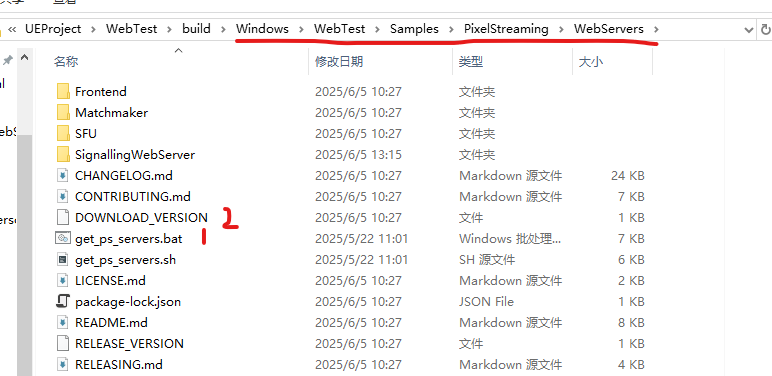
打包之后的文件如下,按照别的文档这个文件夹里应该只有两个文件,需要点.bat文件生成这些,但是我这打包完直接就有很多文件,打开.bat所有文件都被删除了,只剩下3个文件,再重复点击不好使了,这时候删除download_version再点则成功。
进入到SignallingWebServer文件夹里,点开config可以配置端口
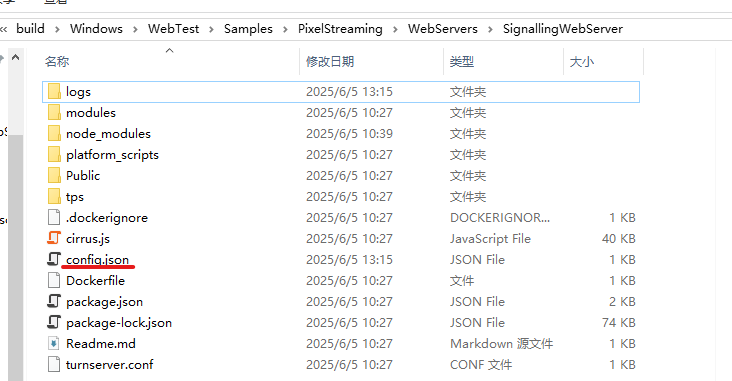
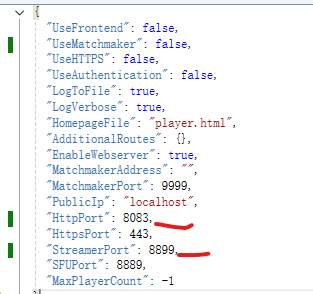
8083是要在浏览器里输入的端口。8899原本默认的8888,但是不知道哪块有冲突,我这改成了8899。
进入platform_scripts文件夹再进入cmd文件夹,打开run_local.bat,等待完成,服务就启动了。
这时候回到打包的文件目录,把exe文件创建个快捷方式。
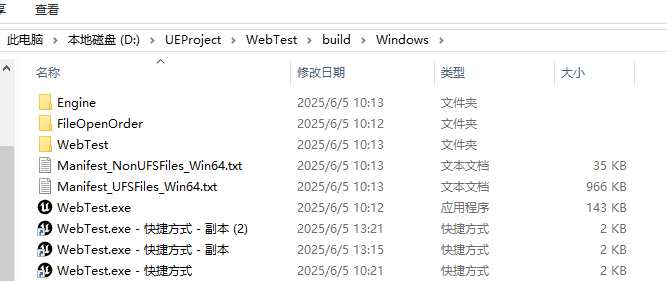
在快捷方式的属性里添加上
-AuditMixer -forceres -ResX=1920 -ResY=1080 -PixelStreamingIp=localhost -PixelStreamingPort=8899 -RenderOffScreen
我这里-RenderOffScreen命令添加了就打不开,所以删掉,直接放前面的那一段。里面8899与config里的相同。
双击打开快捷方式,再在浏览器里输入localhost:8083就可以看见推流了。
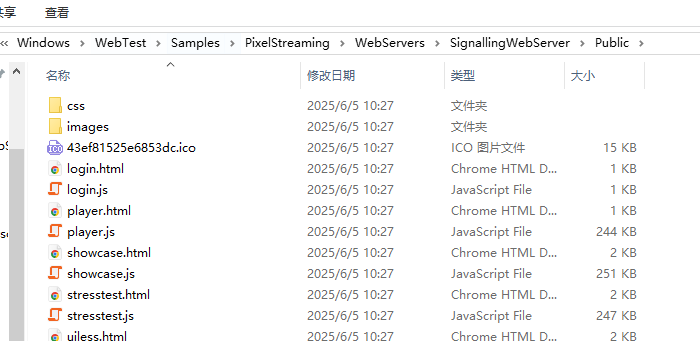
在这个文件夹里可以修改推流的页面显示,根据自己需求修改。




















暂无评论内容