

<template>
  <div class="home">
    <div class="btn-area">
      <button @click="switchImgHandle(1)">竖图</button
      ><button @click="switchImgHandle(2)">横图</button
      ><button @click="handleRotate">旋转</button
      ><button @click="imgScaleHandle(0.25)">放大</button
      ><button @click="imgScaleHandle(-0.25)">缩小</button
      ><button @click="handleReset">重置</button>
    </div>
    <div class="image-box" ref="maskBox" @mousedown="onmousedownHandle">
      <img
        :src="imageUrl"

        :style="{
          width: imgW +  px ,
          height: imgH +  px ,
          top: top +  px ,
          left: left +  px ,
          transform: scale,
        }"
      />
    </div>
  </div>
</template>

<script>
export default {
  name: "HomeView",
  data() {
    return {
      imageUrl: "",
      imageUrl1: require("@/assets/img1.jpg"),
      imageUrl2: require("@/assets/img2.jpg"),
      imgW: 0,
      imgW: 0,
      imgH: 0,
      deg: 0,
      top: 0,
      left: 0,
      scale: "scale(1)",
      size: 0,
      mousewheelevt: null,
    };
  },
  mounted() {
    this.imageUrl = this.imageUrl1; //初始化图片this.initImage();// 兼容火狐浏览器
    this.mousewheelevt = /Firefox/i.test(navigator.userAgent)
      ? "DOMMouseScroll"
      : "mousewheel"; // 为空间区域绑定鼠标滚轮事件 =》 处理函数是wheelHandle// 如果你监听了window的scroll或者touchmove事件,你应该把passive设置为true,这样滚动就会流畅许多
    this.$refs.maskBox.addEventListener(this.mousewheelevt, this.wheelHandle, {
      passive: true,
    });
  },
  beforeDestroy() {
    //撤销监听
    this.$refs.maskBox.removeEventListener(
      this.mousewheelevt,
      this.wheelHandle,
      { passive: true }
    );
  },
  methods: {
    /** * 切换图片 *flag: 1竖图 2 横图 */
    switchImgHandle(flag) {
      if (flag === 1) {
        this.imageUrl = this.imageUrl1;
      } else {
        this.imageUrl = this.imageUrl2;
      }
      this.handleReset();
    },
    /** * 获取图片的url * @param {string} url */
    getImgSize(url) {
      return new Promise((resolve, reject) => {
        let imgObj = new Image();
        imgObj.src = url;
        imgObj.onload = () => {
          resolve({ width: imgObj.width, height: imgObj.height });
        };
      });
    },
    /** * 初始化图片 */
    async initImage() {
      if (!this.imageUrl) {
        return;
      }
      let { width, height } = await this.getImgSize(this.imageUrl); // 设置原始图片的大小
      let realWidth = width;
      let realHeight = height; // 获取高宽比例
      const whRatio = realWidth / realHeight;
      const hwRatio = realHeight / realWidth; //获取盒子的大小
      const boxW = this.$refs.maskBox.clientWidth;
      const boxH = this.$refs.maskBox.clientHeight;
      if (realWidth >= realHeight) {
        this.imgH = hwRatio * boxW;
        const nih = this.imgH;
        if (nih > boxH) {
          this.imgH = boxH;
          this.imgW = whRatio * boxH;
        } else {
          this.imgW = boxW;
        }
        this.top = (boxH - this.imgH) / 2;
        this.left = (boxW - this.imgW) / 2;
      } else {
        this.imgW = (boxH / realHeight) * realWidth;
        this.imgH = boxH;
        this.left = (boxW - this.imgW) / 2;
      }
    },
    /** * 旋转 */
    handleRotate() {
      this.deg += 90;
      if (this.deg >= 360) {
        this.deg = 0;
      }
      this.size = 0;
      this.scale = `scale(1) rotateZ(${this.deg}deg)`;
    },
    /** * 图片的缩放 *zoom >0 放大 *zoom <0 缩小 */
    imgScaleHandle(zoom) {
      this.size += zoom;
      if (this.size < -0.5) {
        this.size = -0.5;
      }
      this.scale = `scale(${1 + this.size}) rotateZ(${this.deg}deg)`;
    },
    /** * 重置 */
    handleReset() {
      this.imgW = 0;
      this.imgH = 0;
      this.top = 0;
      this.left = 0;
      this.deg = 0;
      this.scale = "scale(1)";
      this.size = 0;
      this.initImage();
    },
    /** * 鼠标滚动 实现放大缩小 */
    wheelHandle(e) {
      const ev = e || window.event; // 兼容性处理 => 火狐浏览器判断滚轮的方向是属性 detail,谷歌和ie浏览器判断滚轮滚动的方向是属性 wheelDelta
      // dir = -dir;
      // dir > 0 => 表明的滚轮是向上滚动,否则是向下滚动 => 范围 (-120 ~ 120)
      const dir = ev.detail ? ev.detail * -120 : ev.wheelDelta; //滚动的数值 / 2000 => 表明滚动的比例,用此比例作为图片缩放的比例
      this.imgScaleHandle(dir / 2000);
    },
    /** * 处理图片拖动 */
    onmousedownHandle(e) {
      const that = this;
      this.$refs.maskBox.onmousemove = function (el) {
        const ev = el || window.event; // 阻止默认事件
        ev.preventDefault();
        that.left += ev.movementX;
        that.top += ev.movementY;
      };
      this.$refs.maskBox.onmouseup = function () {
        // 鼠标抬起时将操作区域的鼠标按下和抬起事件置为null 并初始化
        that.$refs.maskBox.onmousemove = null;
        that.$refs.maskBox.onmouseup = null;
      };
      if (e.preventDefault) {
        e.preventDefault();
      } else {
        return false;
      }
    },
  },
};
</script>

<style scoped>
.home {
  width: 1000px;
  margin: 50px auto;
}
.btn-area {
  display: flex;
  justify-content: center;
  width: 100%;
  margin-bottom: 50px;
}
.btn-area button {
  width: 100px;
  height: 40px;
  font-size: 18px;
  margin-right: 10px;
}
.image-box {
  position: relative;
  margin: 0 auto;
  width: 1000px;
  height: 700px;
  border: 1px solid #333;
  overflow: hidden;
}
.image-box img {
  position: absolute;
  cursor: pointer;
}
</style>

以上代码引自 https://blog.csdn.net/Android_boom/article/details/128713466
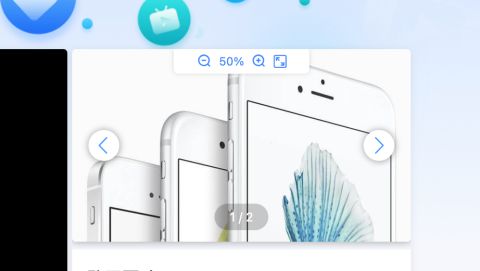
自己项目中使用到了此组件并且做了针对本项目的处理
列如鼠标拖动图片超出区域后 没有监听到鼠标抬起导致的 图片一直跟着鼠标走的问题
另外一个就是在组件区域内鼠标滚轮滑动实现放大缩小的时候 阻止整个页面跟着滚动等
实现全屏和容器区域内内使用判断
全屏部分还需优化 暂且记录一下
代码如下
<template>
  <div :class="[showType ===  big  ?  big  :  normal ,  img-bg ]" v-if="dialogVisibleImg">
    <!-- 顶部操作栏 -->
    <div class="img-top">
      <div class="handle-box">
        <!-- 旋转 -->
        <i class="el-icon-refresh-left" @click="handleRotate(2)"></i>
        <i class="el-icon-refresh-right" @click="handleRotate(1)"></i>
        <!-- 缩小 -->
        <i class="el-icon-zoom-out" v-if="size <= -0.45" style="opacity: 0.3"></i>
        <i class="el-icon-zoom-out" v-else @click="imgScaleHandle(-0.15)" ></i>
        <span>
          {{ size.toFixed(2)*100+50 +  %  }}
        </span>
        <!-- 放大 -->
        <i class="el-icon-zoom-in" v-if="size >= 0.9" style="opacity: 0.3"></i>
        <i class="el-icon-zoom-in" v-else @click="imgScaleHandle(0.15)" ></i>
        <!-- 下载-->
        <!-- <a :href="bigImg+ ?response-content-type=application%2Foctet-stream "     @click="downLoadFile()" style="width: 24px;height: 24px;margin-right: 32px;"><img src="@/livePC/assets/img/preview/xiazai-icon.png" alt="图片预览组件 可放大缩小 旋转 拖动 滚轮滑动">
        <img class="icon" v-if="showType ===  normal "  src="@/livePC/assets/img/preview/qp.svg"  @click="setDialogShowType(null,  big )">
        <img class="icon" v-else src="@/livePC/assets/img/preview/exitqp.svg"  @click="setDialogShowType(null,  normal )">
      </div>
    </div>
    <!-- 左右切换箭头 -->
    <div class="img-change">
      <div class="left" @click="lastImg">
        <i class="el-icon-arrow-left"></i>
      </div>
      <div class="right" @click="nextImg">
        <i class="el-icon-arrow-right"></i>
      </div>

    </div>
    <!-- 计数器 -->
    <div class="img-count">
      <!-- <i @click="lastImg" class="el-icon-arrow-left" style="margin-right: 24px"></i> -->
      <p class="show-page" style="color: #fff">
      {{imgIndex+1}} / {{imgList.length}}
      </p>
      <!-- <i @click="nextImg" class="el-icon-arrow-right" style="margin-left: 24px"></i> -->
    </div>
    <!--内容展示区域 -->
    <div class="img-bg-box">
      <div v-if="!isNotImg" class="img-bg-box-img" >
        <div class="img-content" ref="maskBox" @mousedown="onmousedownHandle">
          <!-- :style="{ width : bigImgWidth + px , transform: rotateZ( +deg+ deg) , -->
          <img
            ref="downFile"
            :src="imgList[imgIndex].url"

            :style="{
              width: bigImgWidth + % ,
              transform: scale,
              top: top +  px ,
              left: left +  px ,
            }"/>
        </div>
      </div>

      <div v-else class="img-bg-box-video">
        <div class="img-content">
          <video ref="downFile" autoplay controls="controls" :style="{ width : bigImgWidth + px ,transform: rotateZ( +deg+ deg) }" disablePictureInPicture="true"
                  controlsList="nodownload noplaybackrate">
            <source :src="imgList[imgIndex].url" type="video/mp4"/>
          </video>
        </div>
      </div>
    </div>
  </div>
</template>
<script>

export default {
  name:  PreviewImg ,
  props: {
    dialogVisibleImg: {
      type: Boolean,
      default: true,
    },
    showType: {
      type: String,
      default:  normal
    }
  },
  data() {
    return{
      deg: 0,  // 旋转角度
      bigImgWidth: 100, // 图片宽度
      bigImgName:   , // 图片名称
      top: 0,
      left: 0,
      isNotImg: false,
      bigImg: false,
      imgIndex: 0,
      mousewheelevt: null,
      scale: "scale(1)",
      size: 0,
      imgList: [
        {
          url: https://img01.yzcdn.cn/vant/apple-1.jpg
        },
        {
          url: https://img01.yzcdn.cn/vant/apple-2.jpg
        },
      ]
    }
  },
  created() {},
  mounted() {
    // this.imageUrl = this.imageUrl1; //初始化图片this.initImage();// 兼容火狐浏览器
    this.mousewheelevt = /Firefox/i.test(navigator.userAgent)
      ? "DOMMouseScroll"
      : "mousewheel"; // 为空间区域绑定鼠标滚轮事件 =》 处理函数是wheelHandle// 如果你监听了window的scroll或者touchmove事件,你应该把passive设置为true,这样滚动就会流畅许多
    this.$refs.maskBox.addEventListener(this.mousewheelevt, this.wheelHandle, {
      passive: true,
    });
    // 阻止预览图片区域鼠标滚动放大缩小时 页面滚动
    this.$refs.maskBox.onmousewheel = function () {
      return false
    };
    document.addEventListener("mouseup", ()=> {
      this.$refs.maskBox.onmousemove = null;
      this.$refs.maskBox.onmouseup = null;
    }, true);
  },
  beforeDestroy() {
    //撤销监听
    this.$refs.maskBox.removeEventListener(
      this.mousewheelevt,
      this.wheelHandle,
      { passive: true }
    );
    document.removeEventListener("mouseup", ()=> {
      this.$refs.maskBox.onmousemove = null;
      this.$refs.maskBox.onmouseup = null;
    }, true);
  },
  methods: {
    // 切换事件
    setDialogShowType(bol, showType){
      this.$emit( setDialogShowType , bol, showType)
    },
    // 下一张
    nextImg(){
      if(this.imgIndex<this.imgList.length-1){
        this.deg = 0
        this.bigImgWidth = 100
        this.top = 0
        this.left = 0
        this.scale = "scale(1)"
        this.size = 0
        this.imgIndex++
        this.bigImg = this.imgList[this.imgIndex].url
      }
    },
    // 上一张
    lastImg(){
      console.log( this.bigImg: ,this.bigImg)
      if(this.imgIndex>0){
        this.deg = 0
        this.top = 0
        this.left = 0
        this.scale = "scale(1)"
        this.size = 0
        this.bigImgWidth = 100
        this.imgIndex--
        this.bigImg = this.imgList[this.imgIndex].url
      }
    },
    /** * 处理图片拖动 */
    onmousedownHandle(e) {
      const that = this;
      this.$refs.maskBox.onmousemove = function (el) {
        const ev = window.event; // 阻止默认事件
        // console.log( ev: , ev);
        ev.preventDefault();
        that.left += ev.movementX;
        that.top += ev.movementY;
        // console.log( ------------------------------------------------ );
        // console.log( that.left: , that.left);
        // console.log( ev.clientX: , ev.clientX);
        // console.log( ev.offsetX: , ev.offsetX);
        // console.log( ev.target.offsetLeft: , ev.target.offsetLeft);
        // console.log( ev.target.offsetWidth: , ev.target.offsetWidth);
        // console.log( ev.target.clientLeft: , ev.target.clientLeft);
        // console.log( ev.target.clientWidth: , ev.target.clientWidth);
        // console.log( that.top: , that.top);
      };
      this.$refs.maskBox.onmouseup = function () {
        // 鼠标抬起时将操作区域的鼠标按下和抬起事件置为null 并初始化
        that.$refs.maskBox.onmousemove = null;
        that.$refs.maskBox.onmouseup = null;
      };
      if (e.preventDefault) {
        e.preventDefault();
      } else {
        return false;
      }
    },
    /** * 鼠标滚动 实现放大缩小 */
    wheelHandle(e) {
      const ev = e || window.event; // 兼容性处理 => 火狐浏览器判断滚轮的方向是属性 detail,谷歌和ie浏览器判断滚轮滚动的方向是属性 wheelDelta
      // dir = -dir;
      // dir > 0 => 表明的滚轮是向上滚动,否则是向下滚动 => 范围 (-120 ~ 120)
      const dir = ev.detail ? ev.detail * -120 : ev.wheelDelta; //滚动的数值 / 2000 => 表明滚动的比例,用此比例作为图片缩放的比例
      this.imgScaleHandle(dir / 2000);
    },
    /** * 图片的缩放 *zoom >0 放大 *zoom <0 缩小 */
    imgScaleHandle(zoom) {
      this.size += zoom;
      if (this.size < -0.5) {
        this.size = -0.45;
      }
      if(this.size > 0.9){
        this.size = 0.9
      }
      this.scale = `scale(${1 + this.size}) rotateZ(${this.deg}deg)`;
    },
    /** * 旋转 */
    handleRotate(type) {
      if(type === 1){
        this.deg += 90;
      } else {
        this.deg -= 90;
      }
      if (this.deg >= 360) {
        this.deg = 0;
      }
      this.size = 0;
      this.scale = `scale(1) rotateZ(${this.deg}deg)`;
    },
  },
};
</script>
<style scoped lang="scss">

.el-icon-down-box {
  img {
    cursor: pointer;
  }
}

.el-icon-down-box {
  img {
    width: 60px;
    height: 60px;
  }
}

.normal{
  height: 100%;
  overflow: hidden;
  position: relative;
  // background-color: #000000;
}
/* 模糊 */
.big:after {
  content: "";
  width: 100%;
  height: 100%;
  position: absolute;
  left: 0;
  top: 0;
  background: inherit;
  filter: blur(10px);
  z-index: -1;
}

.big{
  width: 100%;
  height: 100vh;
  position: fixed;
  top: 0;
  bottom: 0;
  left: 0;
  right: 0;
  background:rgba(2, 9, 25, 0.7);
  z-index: 2000;
  padding: 50px 110px;
}
.img-bg {
  box-sizing: border-box;
  .img-count{
    width: 100%;
    height: 2rem;
    position: absolute;
    bottom: 0.6rem;
    display: flex;
    align-items: center;
    justify-content: center;
    z-index: 2;
    .show-page{
      border-radius: 1rem;
      background-color: rgba(0,0,0,.2);
      padding: 0.4rem 1rem;
      font-weight: 400;
      color: #fff;
      font-size: 0.8rem;
    }
    img{
      width: 24px;
      height: 24px;
      cursor: pointer;
    }
  }
  .img-change{
    position: absolute;
    width: 100%;
    // height: 100%;
    z-index: 2;
    top: calc(50% - 1rem);
    img{
      width: 2rem;
      height: 2rem;
      cursor: pointer;
    }
    i{
      font-size: 1.5rem;
      color: #409eff;
    }
    .left,.right{
      position: absolute;
      width: 2rem;
      height: 2rem;
      // opacity: 0.5;
      background: #ffffff;
      border-radius: 50%;
      display: flex;
      justify-content: center;
      align-items: center;
      box-shadow: 1px 2px 30px 5px rgba(0, 0, 0, 0.3);
      font-size: 2rem;
      // position: fixed;
      // top: 50%;
      cursor: pointer;
    }
    .left{
      left:80px;
    }
    .right{
      right:80px;
    }
  }
  .img-top {
    // border: 1px solid red;
    position: absolute;
    top: 0;
    width: 100%;
    height: 1.6rem;
    display: flex;
    align-items: flex-start;
    justify-content: center;
    z-index: 2;
    .handle-box{
      width: 8rem;
      height: 100%;
      padding: 0 0.4rem;
      // background-color: #000000;
      user-select: none;
      background-color: rgb(255, 255, 283);
      box-shadow: 0 0 0.3rem 0 rgba(0,0,0,.15);
      border-radius: 0 0 0.3rem 0.3rem;
      display: flex;
      justify-content: center;
      align-items: center;
      span{
       color: #448aff;
       font-size: 0.7rem;
      }
      i{
        color: #448aff;
        font-size: 0.9rem;
        margin: 0 0.5rem;
        cursor: pointer;
        font-weight: 600;
      }
      .icon{
        height: 0.85rem;
        width: 0.85rem;
      }
    }
    img{
      width: 24px;
      height: 24px;
      margin-right: 32px;
      cursor: pointer;
    }
  }
  .img-bg-box {
    position: relative;
    width: 100%;
    height: 100%;

    .img-bg-box-video {
      height: 100%;
      max-height: 100vh;
      display: flex;
      align-items: center;
      .img-content {
        width: 100%;
        max-height: calc(100vh - 100px);
        display: flex;
        justify-content: center;
        align-items: self-start;
        video{
          max-height:  calc(100vh - 20px);
        }
      }
    }

    .img-bg-box-img {
      width: 100%;
      height: 100%;
      .img-content {
        width: 100%;
        height: 100%;
        position: relative;
        // display: flex;
        // justify-content: center;
        // align-items: self-start;
        img {
          position: absolute;
          // width: 100%;
          object-fit: contain;
        }
      }


    }
  }
}
video::-webkit-media-controls-fullscreen-button {
  display: none;
}
</style>
© 版权声明
文章版权归作者所有,未经允许请勿转载。如内容涉嫌侵权,请在本页底部进入<联系我们>进行举报投诉!
THE END




















暂无评论内容