

前例过程的逆向处理方式。
问题:
把以下表格,转为添加标题格式的文本。
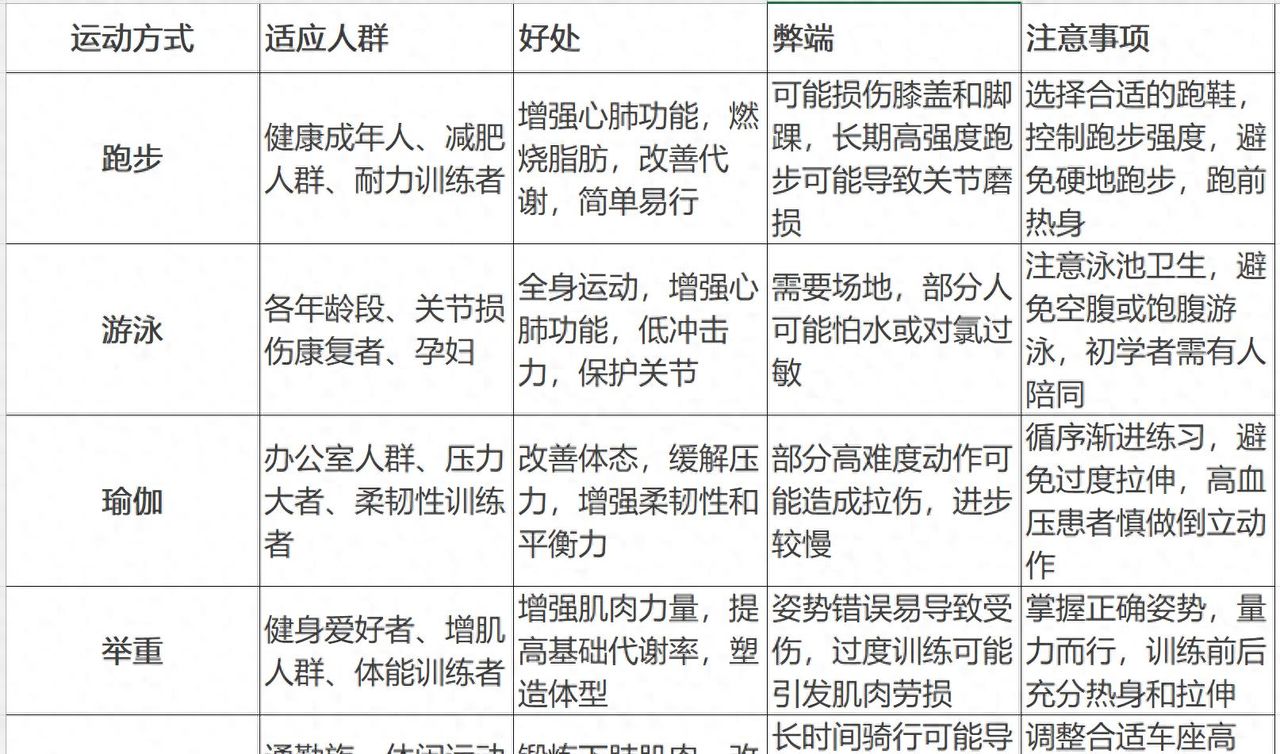
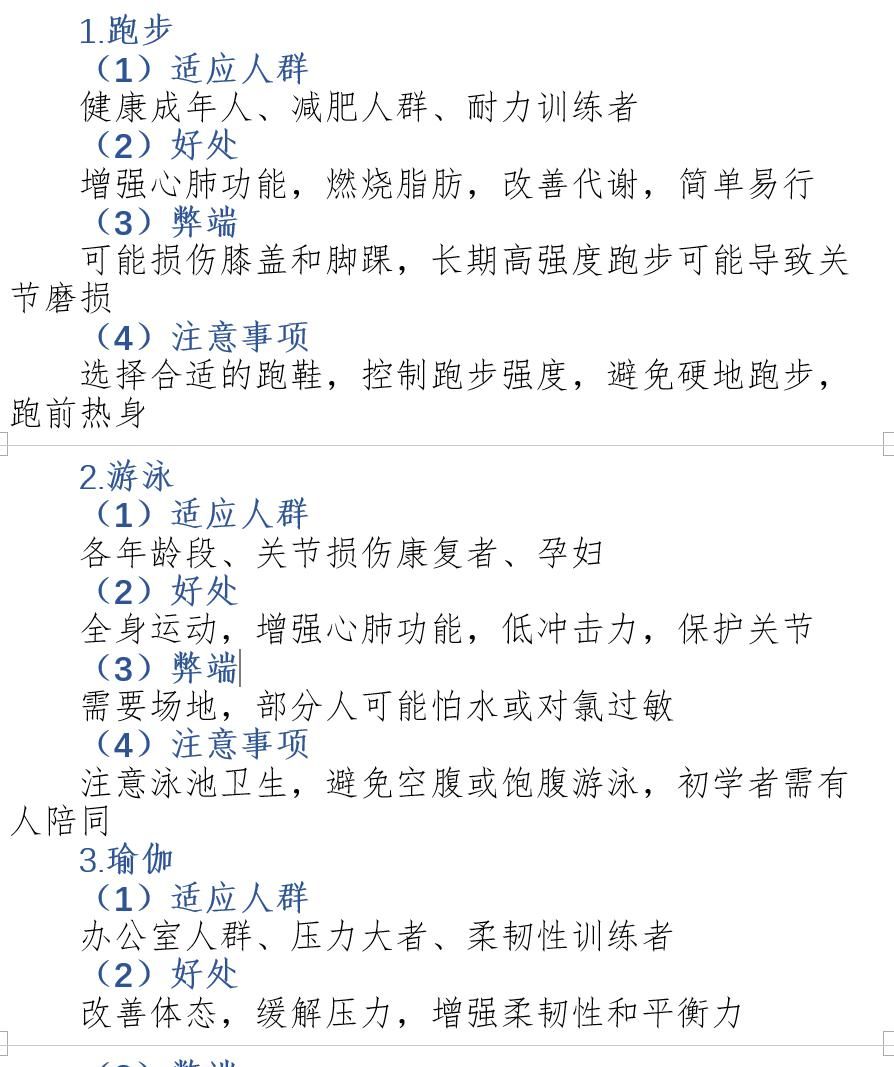
结果:
自动格式化的文档。如下:
主要代码:
Sub 将筛选后的单元格清单导出到Word()


    Dim cell As Range
    On Error Resume Next
    For Each cell In ActiveSheet.UsedRange
        If cell.MergeCells Then
            MsgBox "发现合并单元格!请撤销单元格合并后,继续操作!位置:" & cell.Address, vbInformation
            Exit Sub
        End If
    Next cell
    On Error GoTo 0


    If MsgBox("是否确认将当前工作表的可见单元格区域中的:数据清单,导出到Word格式的文档。", vbYesNo + vbInformation, _
              "提示") = vbNo Then
        Exit Sub
    End If


    If MsgBox("是否确认将当前工作表的可见单元格区域中的:数据清单,导出到Word格式的文档。", vbYesNo + vbInformation, _
              "提示") = vbNo Then
        Exit Sub
    End If


    If MsgBox("第一列单元格,是否是标题列?如果是,则继续。", vbYesNo + vbInformation, _
              "提示") = vbNo Then
        Exit Sub
    End If


    Dim ws As Worksheet
    Dim wordApp As Word.Application
    Dim wordDoc As Word.document


    Dim rng As Range

    Dim lastRow As Long
    Dim i As Long
    Dim j As Long
    Dim allText As String
    Dim line As String

    ' 设置工作表
    Set ws = ActiveWorkbook.ActiveSheet

    If ws Is Nothing Then
        MsgBox "请选择单元格区域。", vbInformation, "提示"
        Exit Sub
    End If


    ' 获取最后一行
    lastRow = ws.Cells(ws.Rows.count, 1).End(xlUp).row


    ' 创建Word
    Set wordApp = CreateObject("Word.Application")
    wordApp.Visible = True
    Set wordDoc = wordApp.Documents.Add

    wordDoc.Range.Font.Name = "宋体"
    wordDoc.Range.Font.Size = 14


    ' 初始化
    allText = ws.Parent.Name & "_" & ws.Name & vbCrLf & String(36, "-")

    allText = ""

    ' 循环

    Dim cellComment As String

    Dim strN0 As Integer
    strN0 = 0


    Dim strColumn As Integer
    strColumn = 0


    Dim blnAddNo As Boolean
    blnAddNo = True


    Dim blnAddMemo As Boolean
    blnAddMemo = True


    If MsgBox("每一行,是否增加:第n条 ?", vbYesNo + vbInformation, _
              "提示") = vbNo Then

        blnAddNo = False

    End If


    If MsgBox("是否包括单元格的批注内容 ?", vbYesNo + vbInformation, _
              "提示") = vbNo Then

        blnAddMemo = False

    End If


    ' 循环行

    For i = 2 To lastRow

        ' 判断该行是否可见

        strColumn = 0

        If Not ws.Cells(i, 1).EntireRow.Hidden Then

            strN0 = strN0 + 1

            If blnAddNo Then
                line = vbCrLf & "第" & Format(strN0, "000") & "条"
            Else
                line = ""
            End If


            ' 循环列
            For j = 1 To ws.Cells(1, ws.columns.count).End(xlToLeft).Column

                ' 判断该列是否可见
                If Not ws.Cells(1, j).EntireColumn.Hidden Then


                    If strColumn = 0 Then

                        line = line & vbCrLf & Format(strN0, "0") & "." & ws.Cells(i, j).value
                    Else
                        line = line & vbCrLf & "(" & Format(strColumn, "0") & ")" & ws.Cells(1, j).value & vbCrLf & ws.Cells(i, j).value
                    End If


                    If blnAddMemo Then
                        If Not ws.Cells(i, j).comment Is Nothing Then
                            cellComment = ws.Cells(i, j).comment.text
                            line = line & vbCrLf & "(批注:" & cellComment & ")"
                        End If
                    End If


                    strColumn = strColumn + 1

                End If ' 列结束

            Next j

            allText = allText & line

        End If ' 行结束
    Next i


    ' 写入
    wordDoc.Content.InsertAfter text:=allText


    Call 设置标题段落格式(wordDoc)

    wordDoc.Application.Activate

    ' 释放
    Set wordDoc = Nothing
    Set wordApp = Nothing
    Set ws = Nothing


End Sub
© 版权声明
文章版权归作者所有,未经允许请勿转载。如内容涉嫌侵权,请在本页底部进入<联系我们>进行举报投诉!
THE END

















暂无评论内容