

在当今数字化时代,天气数据已成为众多行业的核心基础资源。从智能农业的灌溉决策到物流行业的路径规划,从能源调度到智慧城市建设,精准及时的天气数据都扮演着至关重要的角色。然而,如何从第三方数据源高效、可靠地同步天气数据到本地系统,却是许多开发者面临的棘手问题。
本文将带您深入探讨一个基于 XXL-Job 定时任务框架的天气数据同步解决方案,从架构设计到代码实现,从异常处理到性能优化,全方位解析构建高可用数据同步系统的关键技术点。无论您是需要快速搭建数据同步通道的开发工程师,还是希望优化现有同步系统的技术负责人,都能从中获得实用的技术参考和实战经验。
一、方案整体设计与技术选型
1.1 业务需求分析
在开始技术方案设计之前,我们首先需要明确业务需求的核心要点:
数据来源:第三方天气 API 服务(如高德地图开放平台、和风天气等)同步频率:根据业务需求,可能需要每 10 分钟、30 分钟或 1 小时同步一次数据范围:全国主要城市的实时天气、未来天气预报、空气质量等信息数据可靠性:确保数据不丢失、不重复,同步失败时有重试机制系统可扩展性:支持未来增加更多数据源或扩展更多数据类型监控告警:同步异常时能及时发现并通知相关人员
1.2 整体架构设计
基于上述需求,我们设计了如下的天气数据同步系统架构:

架构说明:
API 调用层:负责与第三方天气 API 进行通信,处理认证、限流等问题数据转换层:将第三方 API 返回的原始数据转换为本地系统的数据模型数据存储层:负责将转换后的数据持久化到本地数据库XXL-Job 调度中心:负责定时任务的配置、调度和监控XXL-Job 执行器:部署在应用中,负责实际执行数据同步任务监控告警系统:监控任务执行状态和数据同步情况,异常时发出告警
1.3 技术栈选型
为了构建一个高效、可靠且易于维护的系统,我们选择了以下技术栈:
开发语言:Java 17(提供更好的性能和新特性支持)构建工具:Maven 3.9.6(项目依赖管理)框架:Spring Boot 3.2.5(快速开发 Spring 应用)持久层:MyBatis-Plus 3.5.5(简化数据库操作)定时任务:XXL-Job 2.4.0(分布式任务调度)数据库:MySQL 8.0.36(关系型数据存储)JSON 处理:FastJSON2 2.0.47(高效 JSON 解析)接口文档:SpringDoc-OpenAPI 2.3.0(Swagger3)日志框架:Logback(日志记录)监控:Spring Boot Actuator + Prometheus + Grafana(系统监控)
二、环境准备与项目初始化
2.1 开发环境配置
在开始编码前,需要准备以下开发环境:
JDK 17(推荐 AdoptOpenJDK 17.0.10+7)MySQL 8.0.36Maven 3.9.6IDE(IntelliJ IDEA 2023.3 + 或 Eclipse 2023-12+)Git(版本控制)
2.2 项目初始化
使用 Spring Initializr 创建一个新的 Spring Boot 项目,项目基本信息如下:
Group: com.weatherArtifact: weather-syncVersion: 1.0.0Name: Weather Sync ServiceDescription: A service to sync weather data from third-party APIsPackage name: com.weather.syncJava: 17Spring Boot: 3.2.5
添加以下依赖:
Spring WebSpring Data JDBCMyBatis-PlusMySQL DriverLombokSpring Boot ActuatorSpringDoc OpenAPI Starter WebMvc UI
2.3 核心依赖配置
项目创建完成后,
pom.xml
<?xml version="1.0" encoding="UTF-8"?>
<project xmlns="http://maven.apache.org/POM/4.0.0" xmlns:xsi="http://www.w3.org/2001/XMLSchema-instance"
         xsi:schemaLocation="http://maven.apache.org/POM/4.0.0 https://maven.apache.org/xsd/maven-4.0.0.xsd">
    <modelVersion>4.0.0</modelVersion>
    <parent>
        <groupId>org.springframework.boot</groupId>
        <artifactId>spring-boot-starter-parent</artifactId>
        <version>3.2.5</version>
        <relativePath/>
    </parent>
    <groupId>com.weather</groupId>
    <artifactId>weather-sync</artifactId>
    <version>1.0.0</version>
    <name>weather-sync</name>
    <description>A service to sync weather data from third-party APIs</description>
    <properties>
        <java.version>17</java.version>
        <mybatis-plus.version>3.5.5</mybatis-plus.version>
        <xxl-job.version>2.4.0</xxl-job.version>
        <fastjson2.version>2.0.47</fastjson2.version>
        <springdoc.version>2.3.0</springdoc.version>
    </properties>
    <dependencies>
        <!-- Spring Boot Core -->
        <dependency>
            <groupId>org.springframework.boot</groupId>
            <artifactId>spring-boot-starter-web</artifactId>
        </dependency>
        <dependency>
            <groupId>org.springframework.boot</groupId>
            <artifactId>spring-boot-starter-actuator</artifactId>
        </dependency>

        <!-- Database -->
        <dependency>
            <groupId>org.springframework.boot</groupId>
            <artifactId>spring-boot-starter-jdbc</artifactId>
        </dependency>
        <dependency>
            <groupId>com.baomidou</groupId>
            <artifactId>mybatis-plus-boot-starter</artifactId>
            <version>${mybatis-plus.version}</version>
        </dependency>
        <dependency>
            <groupId>com.mysql</groupId>
            <artifactId>mysql-connector-j</artifactId>
            <scope>runtime</scope>
        </dependency>

        <!-- XXL-Job -->
        <dependency>
            <groupId>com.xuxueli</groupId>
            <artifactId>xxl-job-core</artifactId>
            <version>${xxl-job.version}</version>
        </dependency>

        <!-- JSON Processing -->
        <dependency>
            <groupId>com.alibaba.fastjson2</groupId>
            <artifactId>fastjson2</artifactId>
            <version>${fastjson2.version}</version>
        </dependency>

        <!-- Documentation -->
        <dependency>
            <groupId>org.springdoc</groupId>
            <artifactId>springdoc-openapi-starter-webmvc-ui</artifactId>
            <version>${springdoc.version}</version>
        </dependency>

        <!-- Utils -->
        <dependency>
            <groupId>org.projectlombok</groupId>
            <artifactId>lombok</artifactId>
            <optional>true</optional>
        </dependency>
        <dependency>
            <groupId>com.google.guava</groupId>
            <artifactId>guava</artifactId>
            <version>33.0.0-jre</version>
        </dependency>

        <!-- Testing -->
        <dependency>
            <groupId>org.springframework.boot</groupId>
            <artifactId>spring-boot-starter-test</artifactId>
            <scope>test</scope>
        </dependency>
    </dependencies>

    <build>
        <plugins>
            <plugin>
                <groupId>org.springframework.boot</groupId>
                <artifactId>spring-boot-maven-plugin</artifactId>
                <configuration>
                    <excludes>
                        <exclude>
                            <groupId>org.projectlombok</groupId>
                            <artifactId>lombok</artifactId>
                        </exclude>
                    </excludes>
                </configuration>
            </plugin>
        </plugins>
    </build>
</project>
2.4 配置文件设置
创建
application.yml
server:
  port: 8080
  servlet:
    context-path: /weather-sync

spring:
  application:
    name: weather-sync-service
  datasource:
    driver-class-name: com.mysql.cj.jdbc.Driver
    url: jdbc:mysql://localhost:3306/weather_db?useUnicode=true&characterEncoding=utf8&useSSL=false&serverTimezone=Asia/Shanghai&allowPublicKeyRetrieval=true
    username: root
    password: root
    hikari:
      maximum-pool-size: 10
      minimum-idle: 5
      idle-timeout: 300000
      connection-timeout: 20000

mybatis-plus:
  mapper-locations: classpath*:mapper/**/*.xml
  type-aliases-package: com.weather.sync.entity
  configuration:
    map-underscore-to-camel-case: true
    log-impl: org.apache.ibatis.logging.stdout.StdOutImpl
  global-config:
    db-config:
      id-type: auto
      logic-delete-field: deleted
      logic-delete-value: 1
      logic-not-delete-value: 0

# XXL-Job配置
xxl:
  job:
    admin:
      addresses: http://localhost:8081/xxl-job-admin
    executor:
      appname: weather-sync-executor
      address:
      ip:
      port: 9999
      logpath: /data/applogs/xxl-job/jobhandler
      logretentiondays: 30
    accessToken:

# 第三方天气API配置
weather:
  api:
    key: your_api_key
    host: https://restapi.amap.com
    path: /v3/weather/weatherInfo
    timeout: 5000
    retry:
      max-attempts: 3
      backoff:
        initial-interval: 1000
        multiplier: 2.0
        max-interval: 5000

# 日志配置
logging:
  level:
    root: INFO
    com.weather.sync: DEBUG
  file:
    name: /data/logs/weather-sync/weather-sync.log
  pattern:
    console: "%d{yyyy-MM-dd HH:mm:ss.SSS} [%thread] %-5level %logger{50} - %msg%n"
    file: "%d{yyyy-MM-dd HH:mm:ss.SSS} [%thread] %-5level %logger{50} - %msg%n"

# SpringDoc OpenAPI配置
springdoc:
  api-docs:
    path: /api-docs
  swagger-ui:
    path: /swagger-ui.html
    operationsSorter: method
  packages-to-scan: com.weather.sync.controller

# Actuator配置
management:
  endpoints:
    web:
      exposure:
        include: health,info,metrics,prometheus
  metrics:
    export:
      prometheus:
        enabled: true
  endpoint:
    health:
      show-details: always
三、数据库设计
3.1 数据库表结构设计
为了存储同步的天气数据,我们需要设计以下几张核心表:
city
weather_realtime
weather_forecast
sync_record
下面是各表的 SQL 创建语句:
-- 创建数据库
CREATE DATABASE IF NOT EXISTS weather_db CHARACTER SET utf8mb4 COLLATE utf8mb4_unicode_ci;
USE weather_db;

-- 城市表
CREATE TABLE `city` (
  `id` bigint NOT NULL AUTO_INCREMENT COMMENT '主键ID',
  `city_id` varchar(20) NOT NULL COMMENT '城市编码',
  `city_name` varchar(50) NOT NULL COMMENT '城市名称',
  `province` varchar(50) NOT NULL COMMENT '省份',
  `longitude` decimal(10,6) DEFAULT NULL COMMENT '经度',
  `latitude` decimal(10,6) DEFAULT NULL COMMENT '纬度',
  `level` tinyint DEFAULT NULL COMMENT '城市级别:1-省/直辖市,2-地级市,3-县级市',
  `status` tinyint NOT NULL DEFAULT 1 COMMENT '状态:0-禁用,1-启用',
  `create_time` datetime NOT NULL DEFAULT CURRENT_TIMESTAMP COMMENT '创建时间',
  `update_time` datetime NOT NULL DEFAULT CURRENT_TIMESTAMP ON UPDATE CURRENT_TIMESTAMP COMMENT '更新时间',
  PRIMARY KEY (`id`),
  UNIQUE KEY `uk_city_id` (`city_id`),
  KEY `idx_province` (`province`),
  KEY `idx_status` (`status`)
) ENGINE=InnoDB DEFAULT CHARSET=utf8mb4 COLLATE=utf8mb4_unicode_ci COMMENT='城市信息表';

-- 实时天气表
CREATE TABLE `weather_realtime` (
  `id` bigint NOT NULL AUTO_INCREMENT COMMENT '主键ID',
  `city_id` varchar(20) NOT NULL COMMENT '城市编码',
  `city_name` varchar(50) NOT NULL COMMENT '城市名称',
  `temperature` varchar(10) DEFAULT NULL COMMENT '温度,单位:摄氏度',
  `weather` varchar(50) DEFAULT NULL COMMENT '天气现象',
  `wind_direction` varchar(20) DEFAULT NULL COMMENT '风向',
  `wind_power` varchar(20) DEFAULT NULL COMMENT '风力',
  `humidity` varchar(10) DEFAULT NULL COMMENT '湿度,单位:%',
  `report_time` datetime DEFAULT NULL COMMENT '数据发布时间',
  `create_time` datetime NOT NULL DEFAULT CURRENT_TIMESTAMP COMMENT '创建时间',
  `update_time` datetime NOT NULL DEFAULT CURRENT_TIMESTAMP ON UPDATE CURRENT_TIMESTAMP COMMENT '更新时间',
  PRIMARY KEY (`id`),
  KEY `idx_city_id` (`city_id`),
  KEY `idx_report_time` (`report_time`)
) ENGINE=InnoDB DEFAULT CHARSET=utf8mb4 COLLATE=utf8mb4_unicode_ci COMMENT='实时天气数据表';

-- 天气预报表
CREATE TABLE `weather_forecast` (
  `id` bigint NOT NULL AUTO_INCREMENT COMMENT '主键ID',
  `city_id` varchar(20) NOT NULL COMMENT '城市编码',
  `city_name` varchar(50) NOT NULL COMMENT '城市名称',
  `date` date NOT NULL COMMENT '预报日期',
  `week` varchar(10) DEFAULT NULL COMMENT '星期',
  `day_weather` varchar(50) DEFAULT NULL COMMENT '白天天气现象',
  `night_weather` varchar(50) DEFAULT NULL COMMENT '夜间天气现象',
  `day_temp` varchar(10) DEFAULT NULL COMMENT '白天温度,单位:摄氏度',
  `night_temp` varchar(10) DEFAULT NULL COMMENT '夜间温度,单位:摄氏度',
  `day_wind_direction` varchar(20) DEFAULT NULL COMMENT '白天风向',
  `night_wind_direction` varchar(20) DEFAULT NULL COMMENT '夜间风向',
  `day_wind_power` varchar(20) DEFAULT NULL COMMENT '白天风力',
  `night_wind_power` varchar(20) DEFAULT NULL COMMENT '夜间风力',
  `report_time` datetime DEFAULT NULL COMMENT '数据发布时间',
  `create_time` datetime NOT NULL DEFAULT CURRENT_TIMESTAMP COMMENT '创建时间',
  `update_time` datetime NOT NULL DEFAULT CURRENT_TIMESTAMP ON UPDATE CURRENT_TIMESTAMP COMMENT '更新时间',
  PRIMARY KEY (`id`),
  UNIQUE KEY `uk_city_date` (`city_id`,`date`),
  KEY `idx_report_time` (`report_time`)
) ENGINE=InnoDB DEFAULT CHARSET=utf8mb4 COLLATE=utf8mb4_unicode_ci COMMENT='天气预报数据表';

-- 同步记录表
CREATE TABLE `sync_record` (
  `id` bigint NOT NULL AUTO_INCREMENT COMMENT '主键ID',
  `sync_type` tinyint NOT NULL COMMENT '同步类型:1-实时天气,2-天气预报',
  `city_id` varchar(20) NOT NULL COMMENT '城市编码',
  `status` tinyint NOT NULL COMMENT '状态:0-失败,1-成功',
  `message` varchar(500) DEFAULT NULL COMMENT '同步信息/错误消息',
  `sync_start_time` datetime NOT NULL COMMENT '同步开始时间',
  `sync_end_time` datetime DEFAULT NULL COMMENT '同步结束时间',
  `cost_time` int DEFAULT NULL COMMENT '耗时,单位:毫秒',
  `create_time` datetime NOT NULL DEFAULT CURRENT_TIMESTAMP COMMENT '创建时间',
  PRIMARY KEY (`id`),
  KEY `idx_city_type` (`city_id`,`sync_type`),
  KEY `idx_status` (`status`),
  KEY `idx_sync_start_time` (`sync_start_time`)
) ENGINE=InnoDB DEFAULT CHARSET=utf8mb4 COLLATE=utf8mb4_unicode_ci COMMENT='数据同步记录表';
3.2 数据库索引设计说明
在上述表结构中,我们设计了合理的索引以提高查询性能:
city
对
city_id
province
status
weather_realtime
对
city_id
report_time
weather_forecast
对
city_id
date
report_time
sync_record
对
city_id
sync_type
status
sync_start_time
这些索引设计能够有效提升查询效率,特别是在数据量较大的情况下。
四、数据模型与基础组件
4.1 实体类设计
根据数据库表结构,我们设计对应的实体类:
4.1.1 城市实体类
package com.weather.sync.entity;

import com.baomidou.mybatisplus.annotation.IdType;
import com.baomidou.mybatisplus.annotation.TableId;
import com.baomidou.mybatisplus.annotation.TableName;
import io.swagger.v3.oas.annotations.media.Schema;
import lombok.Data;

import java.math.BigDecimal;
import java.time.LocalDateTime;

/**
 * 城市信息实体类
 *
 * @author ken
 */
@Data
@TableName("city")
@Schema(description = "城市信息实体")
public class City {
    @TableId(type = IdType.AUTO)
    @Schema(description = "主键ID")
    private Long id;

    @Schema(description = "城市编码")
    private String cityId;

    @Schema(description = "城市名称")
    private String cityName;

    @Schema(description = "省份")
    private String province;

    @Schema(description = "经度")
    private BigDecimal longitude;

    @Schema(description = "纬度")
    private BigDecimal latitude;

    @Schema(description = "城市级别:1-省/直辖市,2-地级市,3-县级市")
    private Integer level;

    @Schema(description = "状态:0-禁用,1-启用")
    private Integer status;

    @Schema(description = "创建时间")
    private LocalDateTime createTime;

    @Schema(description = "更新时间")
    private LocalDateTime updateTime;
}
4.1.2 实时天气实体类
package com.weather.sync.entity;

import com.baomidou.mybatisplus.annotation.IdType;
import com.baomidou.mybatisplus.annotation.TableId;
import com.baomidou.mybatisplus.annotation.TableName;
import io.swagger.v3.oas.annotations.media.Schema;
import lombok.Data;

import java.time.LocalDateTime;

/**
 * 实时天气实体类
 *
 * @author ken
 */
@Data
@TableName("weather_realtime")
@Schema(description = "实时天气实体")
public class WeatherRealtime {
    @TableId(type = IdType.AUTO)
    @Schema(description = "主键ID")
    private Long id;

    @Schema(description = "城市编码")
    private String cityId;

    @Schema(description = "城市名称")
    private String cityName;

    @Schema(description = "温度,单位:摄氏度")
    private String temperature;

    @Schema(description = "天气现象")
    private String weather;

    @Schema(description = "风向")
    private String windDirection;

    @Schema(description = "风力")
    private String windPower;

    @Schema(description = "湿度,单位:%")
    private String humidity;

    @Schema(description = "数据发布时间")
    private LocalDateTime reportTime;

    @Schema(description = "创建时间")
    private LocalDateTime createTime;

    @Schema(description = "更新时间")
    private LocalDateTime updateTime;
}
4.1.3 天气预报实体类
package com.weather.sync.entity;

import com.baomidou.mybatisplus.annotation.IdType;
import com.baomidou.mybatisplus.annotation.TableId;
import com.baomidou.mybatisplus.annotation.TableName;
import io.swagger.v3.oas.annotations.media.Schema;
import lombok.Data;

import java.time.LocalDate;
import java.time.LocalDateTime;

/**
 * 天气预报实体类
 *
 * @author ken
 */
@Data
@TableName("weather_forecast")
@Schema(description = "天气预报实体")
public class WeatherForecast {
    @TableId(type = IdType.AUTO)
    @Schema(description = "主键ID")
    private Long id;

    @Schema(description = "城市编码")
    private String cityId;

    @Schema(description = "城市名称")
    private String cityName;

    @Schema(description = "预报日期")
    private LocalDate date;

    @Schema(description = "星期")
    private String week;

    @Schema(description = "白天天气现象")
    private String dayWeather;

    @Schema(description = "夜间天气现象")
    private String nightWeather;

    @Schema(description = "白天温度,单位:摄氏度")
    private String dayTemp;

    @Schema(description = "夜间温度,单位:摄氏度")
    private String nightTemp;

    @Schema(description = "白天风向")
    private String dayWindDirection;

    @Schema(description = "夜间风向")
    private String nightWindDirection;

    @Schema(description = "白天风力")
    private String dayWindPower;

    @Schema(description = "夜间风力")
    private String nightWindPower;

    @Schema(description = "数据发布时间")
    private LocalDateTime reportTime;

    @Schema(description = "创建时间")
    private LocalDateTime createTime;

    @Schema(description = "更新时间")
    private LocalDateTime updateTime;
}
4.1.4 同步记录实体类
package com.weather.sync.entity;

import com.baomidou.mybatisplus.annotation.IdType;
import com.baomidou.mybatisplus.annotation.TableId;
import com.baomidou.mybatisplus.annotation.TableName;
import io.swagger.v3.oas.annotations.media.Schema;
import lombok.Data;

import java.time.LocalDateTime;

/**
 * 数据同步记录实体类
 *
 * @author ken
 */
@Data
@TableName("sync_record")
@Schema(description = "数据同步记录实体")
public class SyncRecord {
    @TableId(type = IdType.AUTO)
    @Schema(description = "主键ID")
    private Long id;

    @Schema(description = "同步类型:1-实时天气,2-天气预报")
    private Integer syncType;

    @Schema(description = "城市编码")
    private String cityId;

    @Schema(description = "状态:0-失败,1-成功")
    private Integer status;

    @Schema(description = "同步信息/错误消息")
    private String message;

    @Schema(description = "同步开始时间")
    private LocalDateTime syncStartTime;

    @Schema(description = "同步结束时间")
    private LocalDateTime syncEndTime;

    @Schema(description = "耗时,单位:毫秒")
    private Integer costTime;

    @Schema(description = "创建时间")
    private LocalDateTime createTime;
}
4.2 Mapper 接口定义
使用 MyBatis-Plus 的 BaseMapper 来简化数据库操作:
4.2.1 城市 Mapper
package com.weather.sync.mapper;

import com.baomidou.mybatisplus.core.mapper.BaseMapper;
import com.weather.sync.entity.City;
import org.apache.ibatis.annotations.Param;

import java.util.List;

/**
 * 城市Mapper接口
 *
 * @author ken
 */
public interface CityMapper extends BaseMapper<City> {
    /**
     * 查询启用状态的城市列表
     *
     * @return 城市列表
     */
    List<City> selectEnabledCities();

    /**
     * 批量插入城市数据
     *
     * @param cities 城市列表
     * @return 插入数量
     */
    int batchInsert(@Param("list") List<City> cities);
}
4.2.2 实时天气 Mapper
package com.weather.sync.mapper;

import com.baomidou.mybatisplus.core.mapper.BaseMapper;
import com.weather.sync.entity.WeatherRealtime;

/**
 * 实时天气Mapper接口
 *
 * @author ken
 */
public interface WeatherRealtimeMapper extends BaseMapper<WeatherRealtime> {
}
4.2.3 天气预报 Mapper
package com.weather.sync.mapper;

import com.baomidou.mybatisplus.core.mapper.BaseMapper;
import com.weather.sync.entity.WeatherForecast;
import org.apache.ibatis.annotations.Param;

import java.time.LocalDate;
import java.util.List;

/**
 * 天气预报Mapper接口
 *
 * @author ken
 */
public interface WeatherForecastMapper extends BaseMapper<WeatherForecast> {
    /**
     * 根据城市ID和日期范围删除预报数据
     *
     * @param cityId 城市ID
     * @param startDate 开始日期
     * @param endDate 结束日期
     * @return 删除数量
     */
    int deleteByCityIdAndDateRange(
            @Param("cityId") String cityId,
            @Param("startDate") LocalDate startDate,
            @Param("endDate") LocalDate endDate);

    /**
     * 批量插入天气预报数据
     *
     * @param forecasts 天气预报列表
     * @return 插入数量
     */
    int batchInsert(@Param("list") List<WeatherForecast> forecasts);
}
4.2.4 同步记录 Mapper
package com.weather.sync.mapper;

import com.baomidou.mybatisplus.core.mapper.BaseMapper;
import com.weather.sync.entity.SyncRecord;
import org.apache.ibatis.annotations.Param;

import java.time.LocalDateTime;
import java.util.List;

/**
 * 同步记录Mapper接口
 *
 * @author ken
 */
public interface SyncRecordMapper extends BaseMapper<SyncRecord> {
    /**
     * 查询指定时间范围内失败的同步记录
     *
     * @param syncType 同步类型
     * @param startTime 开始时间
     * @param endTime 结束时间
     * @return 同步记录列表
     */
    List<SyncRecord> selectFailedRecords(
            @Param("syncType") Integer syncType,
            @Param("startTime") LocalDateTime startTime,
            @Param("endTime") LocalDateTime endTime);
}
4.3 Service 层接口与实现
设计 Service 层接口,封装业务逻辑:
4.3.1 城市服务
package com.weather.sync.service;

import com.baomidou.mybatisplus.extension.service.IService;
import com.weather.sync.entity.City;

import java.util.List;

/**
 * 城市服务接口
 *
 * @author ken
 */
public interface CityService extends IService<City> {
    /**
     * 获取所有启用的城市列表
     *
     * @return 城市列表
     */
    List<City> getEnabledCities();

    /**
     * 批量保存城市数据
     *
     * @param cities 城市列表
     * @return 保存成功的数量
     */
    int batchSaveCities(List<City> cities);
}
package com.weather.sync.service.impl;

import com.baomidou.mybatisplus.extension.service.impl.ServiceImpl;
import com.google.common.collect.Lists;
import com.weather.sync.entity.City;
import com.weather.sync.mapper.CityMapper;
import com.weather.sync.service.CityService;
import lombok.RequiredArgsConstructor;
import lombok.extern.slf4j.Slf4j;
import org.springframework.stereotype.Service;
import org.springframework.transaction.annotation.Transactional;
import org.springframework.util.CollectionUtils;

import java.util.List;

/**
 * 城市服务实现类
 *
 * @author ken
 */
@Slf4j
@Service
@RequiredArgsConstructor
public class CityServiceImpl extends ServiceImpl<CityMapper, City> implements CityService {
    private final CityMapper cityMapper;

    @Override
    public List<City> getEnabledCities() {
        log.info("查询所有启用的城市");
        return cityMapper.selectEnabledCities();
    }

    @Override
    @Transactional(rollbackFor = Exception.class)
    public int batchSaveCities(List<City> cities) {
        if (CollectionUtils.isEmpty(cities)) {
            log.warn("城市列表为空,无需保存");
            return 0;
        }

        log.info("批量保存城市,数量:{}", cities.size());

        // 分批插入,每批500条
        final int batchSize = 500;
        List<List<City>> batches = Lists.partition(cities, batchSize);

        int total = 0;
        for (List<City> batch : batches) {
            int count = cityMapper.batchInsert(batch);
            total += count;
            log.debug("批量插入城市,批次大小:{},插入数量:{}", batch.size(), count);
        }

        log.info("批量保存城市完成,总插入数量:{}", total);
        return total;
    }
}
4.3.2 天气数据服务
package com.weather.sync.service;

import com.baomidou.mybatisplus.extension.service.IService;
import com.weather.sync.entity.WeatherForecast;
import com.weather.sync.entity.WeatherRealtime;

import java.util.List;

/**
 * 实时天气服务接口
 *
 * @author ken
 */
public interface WeatherRealtimeService extends IService<WeatherRealtime> {
    /**
     * 保存实时天气数据
     *
     * @param realtime 实时天气数据
     * @return 是否保存成功
     */
    boolean saveWeatherRealtime(WeatherRealtime realtime);

    /**
     * 批量保存实时天气数据
     *
     * @param realtimes 实时天气数据列表
     * @return 保存成功的数量
     */
    int batchSaveWeatherRealtimes(List<WeatherRealtime> realtimes);
}
package com.weather.sync.service.impl;

import com.baomidou.mybatisplus.extension.service.impl.ServiceImpl;
import com.google.common.collect.Lists;
import com.weather.sync.entity.WeatherRealtime;
import com.weather.sync.mapper.WeatherRealtimeMapper;
import com.weather.sync.service.WeatherRealtimeService;
import lombok.RequiredArgsConstructor;
import lombok.extern.slf4j.Slf4j;
import org.springframework.stereotype.Service;
import org.springframework.transaction.annotation.Transactional;
import org.springframework.util.CollectionUtils;

import java.time.LocalDateTime;
import java.util.List;

/**
 * 实时天气服务实现类
 *
 * @author ken
 */
@Slf4j
@Service
@RequiredArgsConstructor
public class WeatherRealtimeServiceImpl extends ServiceImpl<WeatherRealtimeMapper, WeatherRealtime> implements WeatherRealtimeService {
    private final WeatherRealtimeMapper weatherRealtimeMapper;

    @Override
    @Transactional(rollbackFor = Exception.class)
    public boolean saveWeatherRealtime(WeatherRealtime realtime) {
        if (ObjectUtils.isEmpty(realtime)) {
            log.warn("实时天气数据为空,无法保存");
            return false;
        }

        log.debug("保存实时天气数据,城市ID:{}", realtime.getCityId());

        // 设置创建时间和更新时间
        LocalDateTime now = LocalDateTime.now();
        realtime.setCreateTime(now);
        realtime.setUpdateTime(now);

        return save(realtime);
    }

    @Override
    @Transactional(rollbackFor = Exception.class)
    public int batchSaveWeatherRealtimes(List<WeatherRealtime> realtimes) {
        if (CollectionUtils.isEmpty(realtimes)) {
            log.warn("实时天气数据列表为空,无需保存");
            return 0;
        }

        log.info("批量保存实时天气数据,数量:{}", realtimes.size());

        // 设置创建时间和更新时间
        LocalDateTime now = LocalDateTime.now();
        for (WeatherRealtime realtime : realtimes) {
            realtime.setCreateTime(now);
            realtime.setUpdateTime(now);
        }

        // 分批插入,每批500条
        final int batchSize = 500;
        List<List<WeatherRealtime>> batches = Lists.partition(realtimes, batchSize);

        int total = 0;
        for (List<WeatherRealtime> batch : batches) {
            boolean success = saveBatch(batch);
            if (success) {
                total += batch.size();
                log.debug("批量插入实时天气数据,批次大小:{}", batch.size());
            } else {
                log.error("批量插入实时天气数据失败,批次大小:{}", batch.size());
            }
        }

        log.info("批量保存实时天气数据完成,总插入数量:{}", total);
        return total;
    }
}
类似地,我们实现天气预报服务:
package com.weather.sync.service;

import com.baomidou.mybatisplus.extension.service.IService;
import com.weather.sync.entity.WeatherForecast;

import java.time.LocalDate;
import java.util.List;

/**
 * 天气预报服务接口
 *
 * @author ken
 */
public interface WeatherForecastService extends IService<WeatherForecast> {
    /**
     * 保存天气预报数据
     *
     * @param forecast 天气预报数据
     * @return 是否保存成功
     */
    boolean saveWeatherForecast(WeatherForecast forecast);

    /**
     * 批量保存天气预报数据
     *
     * @param forecasts 天气预报数据列表
     * @return 保存成功的数量
     */
    int batchSaveWeatherForecasts(List<WeatherForecast> forecasts);

    /**
     * 根据城市ID和日期范围删除预报数据
     *
     * @param cityId 城市ID
     * @param startDate 开始日期
     * @param endDate 结束日期
     * @return 删除数量
     */
    int deleteByCityIdAndDateRange(String cityId, LocalDate startDate, LocalDate endDate);
}
package com.weather.sync.service.impl;

import com.baomidou.mybatisplus.extension.service.impl.ServiceImpl;
import com.google.common.collect.Lists;
import com.weather.sync.entity.WeatherForecast;
import com.weather.sync.mapper.WeatherForecastMapper;
import com.weather.sync.service.WeatherForecastService;
import lombok.RequiredArgsConstructor;
import lombok.extern.slf4j.Slf4j;
import org.springframework.stereotype.Service;
import org.springframework.transaction.annotation.Transactional;
import org.springframework.util.CollectionUtils;
import org.springframework.util.ObjectUtils;

import java.time.LocalDate;
import java.time.LocalDateTime;
import java.util.List;

/**
 * 天气预报服务实现类
 *
 * @author ken
 */
@Slf4j
@Service
@RequiredArgsConstructor
public class WeatherForecastServiceImpl extends ServiceImpl<WeatherForecastMapper, WeatherForecast> implements WeatherForecastService {
    private final WeatherForecastMapper weatherForecastMapper;

    @Override
    @Transactional(rollbackFor = Exception.class)
    public boolean saveWeatherForecast(WeatherForecast forecast) {
        if (ObjectUtils.isEmpty(forecast)) {
            log.warn("天气预报数据为空,无法保存");
            return false;
        }

        log.debug("保存天气预报数据,城市ID:{},日期:{}", forecast.getCityId(), forecast.getDate());

        // 设置创建时间和更新时间
        LocalDateTime now = LocalDateTime.now();
        forecast.setCreateTime(now);
        forecast.setUpdateTime(now);

        return save(forecast);
    }

    @Override
    @Transactional(rollbackFor = Exception.class)
    public int batchSaveWeatherForecasts(List<WeatherForecast> forecasts) {
        if (CollectionUtils.isEmpty(forecasts)) {
            log.warn("天气预报数据列表为空,无需保存");
            return 0;
        }

        log.info("批量保存天气预报数据,数量:{}", forecasts.size());

        // 设置创建时间和更新时间
        LocalDateTime now = LocalDateTime.now();
        for (WeatherForecast forecast : forecasts) {
            forecast.setCreateTime(now);
            forecast.setUpdateTime(now);
        }

        // 分批插入,每批500条
        final int batchSize = 500;
        List<List<WeatherForecast>> batches = Lists.partition(forecasts, batchSize);

        int total = 0;
        for (List<WeatherForecast> batch : batches) {
            int count = weatherForecastMapper.batchInsert(batch);
            total += count;
            log.debug("批量插入天气预报数据,批次大小:{},插入数量:{}", batch.size(), count);
        }

        log.info("批量保存天气预报数据完成,总插入数量:{}", total);
        return total;
    }

    @Override
    @Transactional(rollbackFor = Exception.class)
    public int deleteByCityIdAndDateRange(String cityId, LocalDate startDate, LocalDate endDate) {
        if (StringUtils.isEmpty(cityId)) {
            log.warn("城市ID为空,无法删除天气预报数据");
            return 0;
        }

        if (ObjectUtils.isEmpty(startDate) || ObjectUtils.isEmpty(endDate)) {
            log.warn("日期范围为空,无法删除天气预报数据,城市ID:{}", cityId);
            return 0;
        }

        log.debug("删除天气预报数据,城市ID:{},日期范围:{}至{}", cityId, startDate, endDate);

        int count = weatherForecastMapper.deleteByCityIdAndDateRange(cityId, startDate, endDate);
        log.debug("删除天气预报数据完成,城市ID:{},删除数量:{}", cityId, count);

        return count;
    }
}
4.3.3 同步记录服务
package com.weather.sync.service;

import com.baomidou.mybatisplus.extension.service.IService;
import com.weather.sync.entity.SyncRecord;

import java.time.LocalDateTime;
import java.util.List;

/**
 * 同步记录服务接口
 *
 * @author ken
 */
public interface SyncRecordService extends IService<SyncRecord> {
    /**
     * 记录同步结果
     *
     * @param syncType 同步类型:1-实时天气,2-天气预报
     * @param cityId 城市编码
     * @param status 状态:0-失败,1-成功
     * @param message 同步信息/错误消息
     * @param syncStartTime 同步开始时间
     * @param syncEndTime 同步结束时间
     * @return 是否记录成功
     */
    boolean recordSyncResult(
            Integer syncType,
            String cityId,
            Integer status,
            String message,
            LocalDateTime syncStartTime,
            LocalDateTime syncEndTime);

    /**
     * 查询指定时间范围内失败的同步记录
     *
     * @param syncType 同步类型
     * @param startTime 开始时间
     * @param endTime 结束时间
     * @return 同步记录列表
     */
    List<SyncRecord> getFailedRecords(Integer syncType, LocalDateTime startTime, LocalDateTime endTime);
}
package com.weather.sync.service.impl;

import com.baomidou.mybatisplus.extension.service.impl.ServiceImpl;
import com.weather.sync.entity.SyncRecord;
import com.weather.sync.mapper.SyncRecordMapper;
import com.weather.sync.service.SyncRecordService;
import lombok.RequiredArgsConstructor;
import lombok.extern.slf4j.Slf4j;
import org.springframework.stereotype.Service;
import org.springframework.transaction.annotation.Transactional;
import org.springframework.util.StringUtils;

import java.time.Duration;
import java.time.LocalDateTime;
import java.util.List;

/**
 * 同步记录服务实现类
 *
 * @author ken
 */
@Slf4j
@Service
@RequiredArgsConstructor
public class SyncRecordServiceImpl extends ServiceImpl<SyncRecordMapper, SyncRecord> implements SyncRecordService {
    private final SyncRecordMapper syncRecordMapper;

    @Override
    @Transactional(rollbackFor = Exception.class)
    public boolean recordSyncResult(
            Integer syncType,
            String cityId,
            Integer status,
            String message,
            LocalDateTime syncStartTime,
            LocalDateTime syncEndTime) {
        if (ObjectUtils.isEmpty(syncType) || StringUtils.isEmpty(cityId) ||
            ObjectUtils.isEmpty(status) || ObjectUtils.isEmpty(syncStartTime)) {
            log.warn("同步记录参数不完整,无法记录");
            return false;
        }

        SyncRecord record = new SyncRecord();
        record.setSyncType(syncType);
        record.setCityId(cityId);
        record.setStatus(status);
        record.setMessage(message);
        record.setSyncStartTime(syncStartTime);
        record.setSyncEndTime(syncEndTime);

        // 计算耗时
        if (syncEndTime != null) {
            long costTime = Duration.between(syncStartTime, syncEndTime).toMillis();
            record.setCostTime((int) costTime);
        }

        log.debug("记录同步结果,城市ID:{},类型:{},状态:{}", cityId, syncType, status);

        return save(record);
    }

    @Override
    public List<SyncRecord> getFailedRecords(Integer syncType, LocalDateTime startTime, LocalDateTime endTime) {
        if (ObjectUtils.isEmpty(syncType) || ObjectUtils.isEmpty(startTime) || ObjectUtils.isEmpty(endTime)) {
            log.warn("查询失败同步记录的参数不完整");
            return Lists.newArrayList();
        }

        log.info("查询失败的同步记录,类型:{},时间范围:{}至{}", syncType, startTime, endTime);

        return syncRecordMapper.selectFailedRecords(syncType, startTime, endTime);
    }
}
五、第三方天气 API 对接
5.1 API 接口分析
以高德地图开放平台的天气查询 API 为例,分析其接口规范:
接口地址:
https://restapi.amap.com/v3/weather/weatherInfo
key
city
extensions
output
返回结果示例(实况天气):
{
  "status": "1",
  "count": "1",
  "info": "OK",
  "infocode": "10000",
  "lives": [
    {
      "province": "北京",
      "city": "北京市",
      "adcode": "110000",
      "weather": "晴",
      "temperature": "25",
      "winddirection": "东北",
      "windpower": "≤3",
      "humidity": "30",
      "reporttime": "2023-06-15 14:00:00"
    }
  ]
}
返回结果示例(预报天气):
{
  "status": "1",
  "count": "1",
  "info": "OK",
  "infocode": "10000",
  "forecasts": [
    {
      "city": "北京市",
      "adcode": "110000",
      "province": "北京",
      "reporttime": "2023-06-15 11:00:00",
      "casts": [
        {
          "date": "2023-06-15",
          "week": "4",
          "dayweather": "晴",
          "nightweather": "晴",
          "daytemp": "30",
          "nighttemp": "18",
          "daywind": "东北",
          "nightwind": "东北",
          "daypower": "≤3",
          "nightpower": "≤3"
        },
        {
          "date": "2023-06-16",
          "week": "5",
          "dayweather": "多云",
          "nightweather": "晴",
          "daytemp": "32",
          "nighttemp": "19",
          "daywind": "西南",
          "nightwind": "西北",
          "daypower": "3-4",
          "nightpower": "≤3"
        }
      ]
    }
  ]
}
5.2 API 响应模型设计
根据 API 返回结果,设计对应的响应模型:
5.2.1 基础响应模型
package com.weather.sync.thirdparty.model;

import lombok.Data;

/**
 * 高德天气API基础响应模型
 *
 * @author ken
 */
@Data
public class AmapWeatherResponse {
    /**
     * 状态码:1表示成功,0表示失败
     */
    private String status;

    /**
     * 返回结果的数量
     */
    private String count;

    /**
     * 状态说明:OK表示成功
     */
    private String info;

    /**
     * 状态码说明
     */
    private String infocode;
}
5.2.2 实时天气响应模型
package com.weather.sync.thirdparty.model;

import com.alibaba.fastjson2.annotation.JSONField;
import lombok.Data;
import lombok.EqualsAndHashCode;

import java.util.List;

/**
 * 高德实时天气API响应模型
 *
 * @author ken
 */
@Data
@EqualsAndHashCode(callSuper = true)
public class AmapRealtimeWeatherResponse extends AmapWeatherResponse {
    /**
     * 实时天气数据列表
     */
    @JSONField(name = "lives")
    private List<AmapRealtimeWeather> realtimeWeathers;

    /**
     * 实时天气数据模型
     */
    @Data
    public static class AmapRealtimeWeather {
        /**
         * 省份名称
         */
        private String province;

        /**
         * 城市名称
         */
        private String city;

        /**
         * 城市编码
         */
        private String adcode;

        /**
         * 天气现象
         */
        private String weather;

        /**
         * 温度,单位:摄氏度
         */
        private String temperature;

        /**
         * 风向
         */
        private String winddirection;

        /**
         * 风力
         */
        private String windpower;

        /**
         * 湿度,单位:%
         */
        private String humidity;

        /**
         * 数据发布时间
         */
        private String reporttime;
    }
}
5.2.3 天气预报响应模型
package com.weather.sync.thirdparty.model;

import com.alibaba.fastjson2.annotation.JSONField;
import lombok.Data;
import lombok.EqualsAndHashCode;

import java.util.List;

/**
 * 高德天气预报API响应模型
 *
 * @author ken
 */
@Data
@EqualsAndHashCode(callSuper = true)
public class AmapForecastWeatherResponse extends AmapWeatherResponse {
    /**
     * 天气预报数据列表
     */
    @JSONField(name = "forecasts")
    private List<AmapForecastWeather> forecastWeathers;

    /**
     * 天气预报数据模型
     */
    @Data
    public static class AmapForecastWeather {
        /**
         * 城市名称
         */
        private String city;

        /**
         * 城市编码
         */
        private String adcode;

        /**
         * 省份名称
         */
        private String province;

        /**
         * 数据发布时间
         */
        private String reporttime;

        /**
         * 预报数据列表
         */
        private List<AmapForecast> casts;

        /**
         * 单日预报模型
         */
        @Data
        public static class AmapForecast {
            /**
             * 日期
             */
            private String date;

            /**
             * 星期
             */
            private String week;

            /**
             * 白天天气现象
             */
            private String dayweather;

            /**
             * 夜间天气现象
             */
            private String nightweather;

            /**
             * 白天温度,单位:摄氏度
             */
            private String daytemp;

            /**
             * 夜间温度,单位:摄氏度
             */
            private String nighttemp;

            /**
             * 白天风向
             */
            private String daywind;

            /**
             * 夜间风向
             */
            private String nightwind;

            /**
             * 白天风力
             */
            private String daypower;

            /**
             * 夜间风力
             */
            private String nightpower;
        }
    }
}
5.3 API 调用工具类
封装 HTTP 请求工具类,用于调用第三方 API:
package com.weather.sync.thirdparty.client;

import com.alibaba.fastjson2.JSON;
import com.weather.sync.thirdparty.model.AmapForecastWeatherResponse;
import com.weather.sync.thirdparty.model.AmapRealtimeWeatherResponse;
import lombok.RequiredArgsConstructor;
import lombok.extern.slf4j.Slf4j;
import org.springframework.http.HttpEntity;
import org.springframework.http.HttpHeaders;
import org.springframework.http.HttpMethod;
import org.springframework.http.ResponseEntity;
import org.springframework.retry.annotation.Backoff;
import org.springframework.retry.annotation.Retryable;
import org.springframework.stereotype.Component;
import org.springframework.util.MultiValueMap;
import org.springframework.web.client.RestTemplate;
import org.springframework.web.util.UriComponentsBuilder;

import java.net.URI;

/**
 * 高德天气API客户端
 *
 * @author ken
 */
@Slf4j
@Component
@RequiredArgsConstructor
public class AmapWeatherClient {
    private final RestTemplate restTemplate;
    private final AmapWeatherProperties properties;

    /**
     * 查询实时天气
     *
     * @param cityId 城市编码
     * @return 实时天气响应
     */
    @Retryable(
            value = {Exception.class},
            maxAttemptsExpression = "${weather.api.retry.max-attempts}",
            backoff = @Backoff(
                    delayExpression = "${weather.api.retry.backoff.initial-interval}",
                    multiplierExpression = "${weather.api.retry.backoff.multiplier}",
                    maxDelayExpression = "${weather.api.retry.backoff.max-interval}"
            )
    )
    public AmapRealtimeWeatherResponse getRealtimeWeather(String cityId) {
        log.info("查询实时天气,城市ID:{}", cityId);

        // 构建请求参数
        MultiValueMap<String, String> params = org.springframework.util.LinkedMultiValueMap.forLinkedMultiValueMap();
        params.add("key", properties.getKey());
        params.add("city", cityId);
        params.add("extensions", "base");

        // 构建请求URL
        URI uri = UriComponentsBuilder.fromHttpUrl(properties.getHost() + properties.getPath())
                .queryParams(params)
                .build()
                .toUri();

        // 设置请求头
        HttpHeaders headers = new HttpHeaders();
        headers.add("Accept", "application/json");
        HttpEntity<?> requestEntity = new HttpEntity<>(headers);

        // 发送请求
        long startTime = System.currentTimeMillis();
        ResponseEntity<String> responseEntity = restTemplate.exchange(
                uri,
                HttpMethod.GET,
                requestEntity,
                String.class
        );
        long endTime = System.currentTimeMillis();

        log.debug("查询实时天气API耗时:{}ms,城市ID:{},响应状态码:{}",
                (endTime - startTime), cityId, responseEntity.getStatusCodeValue());

        // 解析响应
        AmapRealtimeWeatherResponse response = JSON.parseObject(
                responseEntity.getBody(), AmapRealtimeWeatherResponse.class);

        // 验证响应状态
        if (!"1".equals(response.getStatus())) {
            log.error("查询实时天气失败,城市ID:{},错误信息:{},错误代码:{}",
                    cityId, response.getInfo(), response.getInfocode());
            throw new RuntimeException(
                    String.format("查询实时天气失败:%s(%s)", response.getInfo(), response.getInfocode()));
        }

        return response;
    }

    /**
     * 查询天气预报
     *
     * @param cityId 城市编码
     * @return 天气预报响应
     */
    @Retryable(
            value = {Exception.class},
            maxAttemptsExpression = "${weather.api.retry.max-attempts}",
            backoff = @Backoff(
                    delayExpression = "${weather.api.retry.backoff.initial-interval}",
                    multiplierExpression = "${weather.api.retry.backoff.multiplier}",
                    maxDelayExpression = "${weather.api.retry.backoff.max-interval}"
            )
    )
    public AmapForecastWeatherResponse getForecastWeather(String cityId) {
        log.info("查询天气预报,城市ID:{}", cityId);

        // 构建请求参数
        MultiValueMap<String, String> params = org.springframework.util.LinkedMultiValueMap.forLinkedMultiValueMap();
        params.add("key", properties.getKey());
        params.add("city", cityId);
        params.add("extensions", "all");

        // 构建请求URL
        URI uri = UriComponentsBuilder.fromHttpUrl(properties.getHost() + properties.getPath())
                .queryParams(params)
                .build()
                .toUri();

        // 设置请求头
        HttpHeaders headers = new HttpHeaders();
        headers.add("Accept", "application/json");
        HttpEntity<?> requestEntity = new HttpEntity<>(headers);

        // 发送请求
        long startTime = System.currentTimeMillis();
        ResponseEntity<String> responseEntity = restTemplate.exchange(
                uri,
                HttpMethod.GET,
                requestEntity,
                String.class
        );
        long endTime = System.currentTimeMillis();

        log.debug("查询天气预报API耗时:{}ms,城市ID:{},响应状态码:{}",
                (endTime - startTime), cityId, responseEntity.getStatusCodeValue());

        // 解析响应
        AmapForecastWeatherResponse response = JSON.parseObject(
                responseEntity.getBody(), AmapForecastWeatherResponse.class);

        // 验证响应状态
        if (!"1".equals(response.getStatus())) {
            log.error("查询天气预报失败,城市ID:{},错误信息:{},错误代码:{}",
                    cityId, response.getInfo(), response.getInfocode());
            throw new RuntimeException(
                    String.format("查询天气预报失败:%s(%s)", response.getInfo(), response.getInfocode()));
        }

        return response;
    }
}
5.4 API 配置类
创建配置类,注入 API 相关配置和 RestTemplate:
package com.weather.sync.thirdparty.client;

import lombok.Data;
import org.springframework.boot.context.properties.ConfigurationProperties;
import org.springframework.context.annotation.Bean;
import org.springframework.context.annotation.Configuration;
import org.springframework.http.client.ClientHttpRequestFactory;
import org.springframework.http.client.SimpleClientHttpRequestFactory;
import org.springframework.web.client.RestTemplate;

/**
 * 高德天气API配置
 *
 * @author ken
 */
@Configuration
@ConfigurationProperties(prefix = "weather.api")
@Data
public class AmapWeatherProperties {
    /**
     * API访问密钥
     */
    private String key;

    /**
     * API主机地址
     */
    private String host;

    /**
     * API路径
     */
    private String path;

    /**
     * 超时时间,单位:毫秒
     */
    private int timeout;

    /**
     * 创建RestTemplate实例
     *
     * @return RestTemplate实例
     */
    @Bean
    public RestTemplate restTemplate() {
        SimpleClientHttpRequestFactory requestFactory = new SimpleClientHttpRequestFactory();
        requestFactory.setConnectTimeout(timeout);
        requestFactory.setReadTimeout(timeout);

        return new RestTemplate(requestFactory);
    }
}
六、数据转换与同步逻辑
6.1 数据转换工具类
将第三方 API 返回的数据转换为本地系统实体类:
package com.weather.sync.service.converter;

import com.weather.sync.entity.WeatherForecast;
import com.weather.sync.entity.WeatherRealtime;
import com.weather.sync.thirdparty.model.AmapForecastWeatherResponse;
import com.weather.sync.thirdparty.model.AmapRealtimeWeatherResponse;
import org.springframework.stereotype.Component;
import org.springframework.util.ObjectUtils;

import java.time.LocalDate;
import java.time.LocalDateTime;
import java.time.format.DateTimeFormatter;
import java.util.ArrayList;
import java.util.List;

/**
 * 天气数据转换器
 *
 * @author ken
 */
@Component
public class WeatherDataConverter {
    private static final DateTimeFormatter DATE_TIME_FORMATTER = DateTimeFormatter.ofPattern("yyyy-MM-dd HH:mm:ss");
    private static final DateTimeFormatter DATE_FORMATTER = DateTimeFormatter.ofPattern("yyyy-MM-dd");

    /**
     * 将高德实时天气响应转换为本地实时天气实体
     *
     * @param response 高德实时天气响应
     * @return 本地实时天气实体
     */
    public WeatherRealtime convertRealtimeWeather(AmapRealtimeWeatherResponse response) {
        if (ObjectUtils.isEmpty(response) ||
            ObjectUtils.isEmpty(response.getRealtimeWeathers()) ||
            response.getRealtimeWeathers().isEmpty()) {
            return null;
        }

        AmapRealtimeWeatherResponse.AmapRealtimeWeather amapWeather = response.getRealtimeWeathers().get(0);

        WeatherRealtime realtime = new WeatherRealtime();
        realtime.setCityId(amapWeather.getAdcode());
        realtime.setCityName(amapWeather.getCity());
        realtime.setTemperature(amapWeather.getTemperature());
        realtime.setWeather(amapWeather.getWeather());
        realtime.setWindDirection(amapWeather.getWinddirection());
        realtime.setWindPower(amapWeather.getWindpower());
        realtime.setHumidity(amapWeather.getHumidity());

        // 转换发布时间
        if (!ObjectUtils.isEmpty(amapWeather.getReporttime())) {
            try {
                realtime.setReportTime(LocalDateTime.parse(amapWeather.getReporttime(), DATE_TIME_FORMATTER));
            } catch (Exception e) {
                // 如果时间格式解析失败,不设置发布时间
            }
        }

        return realtime;
    }

    /**
     * 将高德天气预报响应转换为本地天气预报实体列表
     *
     * @param response 高德天气预报响应
     * @return 本地天气预报实体列表
     */
    public List<WeatherForecast> convertForecastWeather(AmapForecastWeatherResponse response) {
        List<WeatherForecast> forecasts = new ArrayList<>();

        if (ObjectUtils.isEmpty(response) ||
            ObjectUtils.isEmpty(response.getForecastWeathers()) ||
            response.getForecastWeathers().isEmpty()) {
            return forecasts;
        }

        AmapForecastWeatherResponse.AmapForecastWeather amapForecast = response.getForecastWeathers().get(0);
        String cityId = amapForecast.getAdcode();
        String cityName = amapForecast.getCity();
        LocalDateTime reportTime = null;

        // 转换发布时间
        if (!ObjectUtils.isEmpty(amapForecast.getReporttime())) {
            try {
                reportTime = LocalDateTime.parse(amapForecast.getReporttime(), DATE_TIME_FORMATTER);
            } catch (Exception e) {
                // 如果时间格式解析失败,不设置发布时间
            }
        }

        // 转换每日预报
        if (!ObjectUtils.isEmpty(amapForecast.getCasts())) {
            for (AmapForecastWeatherResponse.AmapForecastWeather.AmapForecast amapDaily : amapForecast.getCasts()) {
                WeatherForecast forecast = new WeatherForecast();
                forecast.setCityId(cityId);
                forecast.setCityName(cityName);

                // 转换日期
                if (!ObjectUtils.isEmpty(amapDaily.getDate())) {
                    try {
                        forecast.setDate(LocalDate.parse(amapDaily.getDate(), DATE_FORMATTER));
                    } catch (Exception e) {
                        // 如果日期格式解析失败,跳过该条数据
                        continue;
                    }
                }

                forecast.setWeek(amapDaily.getWeek());
                forecast.setDayWeather(amapDaily.getDayweather());
                forecast.setNightWeather(amapDaily.getNightweather());
                forecast.setDayTemp(amapDaily.getDaytemp());
                forecast.setNightTemp(amapDaily.getNighttemp());
                forecast.setDayWindDirection(amapDaily.getDaywind());
                forecast.setNightWindDirection(amapDaily.getNightwind());
                forecast.setDayWindPower(amapDaily.getDaypower());
                forecast.setNightWindPower(amapDaily.getNightpower());
                forecast.setReportTime(reportTime);

                forecasts.add(forecast);
            }
        }

        return forecasts;
    }
}
6.2 同步服务实现
实现核心的数据同步逻辑:
package com.weather.sync.service;

import com.weather.sync.entity.SyncRecord;
import com.weather.sync.entity.WeatherForecast;
import com.weather.sync.entity.WeatherRealtime;
import com.weather.sync.service.converter.WeatherDataConverter;
import com.weather.sync.thirdparty.client.AmapWeatherClient;
import com.weather.sync.thirdparty.model.AmapForecastWeatherResponse;
import com.weather.sync.thirdparty.model.AmapRealtimeWeatherResponse;
import lombok.RequiredArgsConstructor;
import lombok.extern.slf4j.Slf4j;
import org.springframework.stereotype.Service;
import org.springframework.transaction.annotation.Transactional;
import org.springframework.util.ObjectUtils;
import org.springframework.util.StringUtils;

import java.time.LocalDate;
import java.time.LocalDateTime;
import java.util.List;

/**
 * 天气数据同步服务
 *
 * @author ken
 */
@Slf4j
@Service
@RequiredArgsConstructor
public class WeatherSyncService {
    /**
     * 同步类型:实时天气
     */
    public static final int SYNC_TYPE_REALTIME = 1;

    /**
     * 同步类型:天气预报
     */
    public static final int SYNC_TYPE_FORECAST = 2;

    /**
     * 同步状态:失败
     */
    public static final int SYNC_STATUS_FAILED = 0;

    /**
     * 同步状态:成功
     */
    public static final int SYNC_STATUS_SUCCESS = 1;

    private final AmapWeatherClient amapWeatherClient;
    private final WeatherDataConverter weatherDataConverter;
    private final WeatherRealtimeService weatherRealtimeService;
    private final WeatherForecastService weatherForecastService;
    private final SyncRecordService syncRecordService;

    /**
     * 同步指定城市的实时天气
     *
     * @param cityId 城市编码
     * @return 同步是否成功
     */
    @Transactional(rollbackFor = Exception.class)
    public boolean syncRealtimeWeather(String cityId) {
        if (StringUtils.isEmpty(cityId)) {
            log.warn("城市ID为空,无法同步实时天气");
            return false;
        }

        log.info("开始同步实时天气,城市ID:{}", cityId);
        LocalDateTime startTime = LocalDateTime.now();
        String message = null;
        boolean success = false;

        try {
            // 调用API获取实时天气
            AmapRealtimeWeatherResponse response = amapWeatherClient.getRealtimeWeather(cityId);

            // 转换数据
            WeatherRealtime realtime = weatherDataConverter.convertRealtimeWeather(response);
            if (ObjectUtils.isEmpty(realtime)) {
                message = "转换实时天气数据失败,结果为空";
                log.error(message + ",城市ID:{}", cityId);
                return false;
            }

            // 保存数据
            success = weatherRealtimeService.saveWeatherRealtime(realtime);
            if (success) {
                message = "同步实时天气成功";
                log.info(message + ",城市ID:{}", cityId);
            } else {
                message = "保存实时天气数据失败";
                log.error(message + ",城市ID:{}", cityId);
            }
        } catch (Exception e) {
            message = "同步实时天气发生异常:" + e.getMessage();
            log.error(message + ",城市ID:{}", cityId, e);
        } finally {
            // 记录同步结果
            LocalDateTime endTime = LocalDateTime.now();
            syncRecordService.recordSyncResult(
                    SYNC_TYPE_REALTIME,
                    cityId,
                    success ? SYNC_STATUS_SUCCESS : SYNC_STATUS_FAILED,
                    message,
                    startTime,
                    endTime
            );
        }

        return success;
    }

    /**
     * 同步指定城市的天气预报
     *
     * @param cityId 城市编码
     * @return 同步是否成功
     */
    @Transactional(rollbackFor = Exception.class)
    public boolean syncForecastWeather(String cityId) {
        if (StringUtils.isEmpty(cityId)) {
            log.warn("城市ID为空,无法同步天气预报");
            return false;
        }

        log.info("开始同步天气预报,城市ID:{}", cityId);
        LocalDateTime startTime = LocalDateTime.now();
        String message = null;
        boolean success = false;

        try {
            // 调用API获取天气预报
            AmapForecastWeatherResponse response = amapWeatherClient.getForecastWeather(cityId);

            // 转换数据
            List<WeatherForecast> forecasts = weatherDataConverter.convertForecastWeather(response);
            if (ObjectUtils.isEmpty(forecasts) || forecasts.isEmpty()) {
                message = "转换天气预报数据失败,结果为空";
                log.error(message + ",城市ID:{}", cityId);
                return false;
            }

            // 确定日期范围,删除旧数据
            LocalDate startDate = forecasts.get(0).getDate();
            LocalDate endDate = forecasts.get(forecasts.size() - 1).getDate();
            int deleteCount = weatherForecastService.deleteByCityIdAndDateRange(cityId, startDate, endDate);
            log.debug("删除旧的天气预报数据,城市ID:{},日期范围:{}至{},删除数量:{}",
                    cityId, startDate, endDate, deleteCount);

            // 保存新数据
            int saveCount = weatherForecastService.batchSaveWeatherForecasts(forecasts);
            if (saveCount == forecasts.size()) {
                success = true;
                message = String.format("同步天气预报成功,共%d条数据", saveCount);
                log.info(message + ",城市ID:{}", cityId);
            } else {
                message = String.format("保存天气预报数据不完整,期望保存%d条,实际保存%d条",
                        forecasts.size(), saveCount);
                log.error(message + ",城市ID:{}", cityId);
            }
        } catch (Exception e) {
            message = "同步天气预报发生异常:" + e.getMessage();
            log.error(message + ",城市ID:{}", cityId, e);
        } finally {
            // 记录同步结果
            LocalDateTime endTime = LocalDateTime.now();
            syncRecordService.recordSyncResult(
                    SYNC_TYPE_FORECAST,
                    cityId,
                    success ? SYNC_STATUS_SUCCESS : SYNC_STATUS_FAILED,
                    message,
                    startTime,
                    endTime
            );
        }

        return success;
    }

    /**
     * 同步所有启用城市的实时天气
     *
     * @return 成功同步的城市数量
     */
    public int syncAllRealtimeWeather(List<String> cityIds) {
        if (ObjectUtils.isEmpty(cityIds) || cityIds.isEmpty()) {
            log.warn("城市ID列表为空,无法同步实时天气");
            return 0;
        }

        log.info("开始同步所有启用城市的实时天气,城市数量:{}", cityIds.size());

        int successCount = 0;
        for (String cityId : cityIds) {
            try {
                boolean success = syncRealtimeWeather(cityId);
                if (success) {
                    successCount++;
                }
            } catch (Exception e) {
                log.error("同步实时天气失败,城市ID:{}", cityId, e);
            }
        }

        log.info("所有启用城市的实时天气同步完成,总城市数:{},成功数:{},失败数:{}",
                cityIds.size(), successCount, cityIds.size() - successCount);

        return successCount;
    }

    /**
     * 同步所有启用城市的天气预报
     *
     * @return 成功同步的城市数量
     */
    public int syncAllForecastWeather(List<String> cityIds) {
        if (ObjectUtils.isEmpty(cityIds) || cityIds.isEmpty()) {
            log.warn("城市ID列表为空,无法同步天气预报");
            return 0;
        }

        log.info("开始同步所有启用城市的天气预报,城市数量:{}", cityIds.size());

        int successCount = 0;
        for (String cityId : cityIds) {
            try {
                boolean success = syncForecastWeather(cityId);
                if (success) {
                    successCount++;
                }
            } catch (Exception e) {
                log.error("同步天气预报失败,城市ID:{}", cityId, e);
            }
        }

        log.info("所有启用城市的天气预报同步完成,总城市数:{},成功数:{},失败数:{}",
                cityIds.size(), successCount, cityIds.size() - successCount);

        return successCount;
    }

    /**
     * 重试失败的同步任务
     *
     * @param syncType 同步类型:1-实时天气,2-天气预报
     * @param hours 重试多少小时内的失败任务
     * @return 重试成功的数量
     */
    public int retryFailedSyncTasks(Integer syncType, int hours) {
        if (ObjectUtils.isEmpty(syncType) || hours <= 0) {
            log.warn("重试参数不合法,同步类型:{},小时数:{}", syncType, hours);
            return 0;
        }

        log.info("开始重试失败的同步任务,类型:{},时间范围:最近{}小时", syncType, hours);

        // 查询指定时间范围内的失败记录
        LocalDateTime endTime = LocalDateTime.now();
        LocalDateTime startTime = endTime.minusHours(hours);
        List<SyncRecord> failedRecords = syncRecordService.getFailedRecords(syncType, startTime, endTime);

        if (ObjectUtils.isEmpty(failedRecords) || failedRecords.isEmpty()) {
            log.info("没有需要重试的失败同步任务,类型:{},时间范围:最近{}小时", syncType, hours);
            return 0;
        }

        log.info("发现需要重试的失败同步任务数量:{},类型:{}", failedRecords.size(), syncType);

        int successCount = 0;
        for (SyncRecord record : failedRecords) {
            try {
                boolean success;
                if (SYNC_TYPE_REALTIME == syncType) {
                    success = syncRealtimeWeather(record.getCityId());
                } else if (SYNC_TYPE_FORECAST == syncType) {
                    success = syncForecastWeather(record.getCityId());
                } else {
                    log.warn("未知的同步类型,无法重试,类型:{},城市ID:{}", syncType, record.getCityId());
                    continue;
                }

                if (success) {
                    successCount++;
                }
            } catch (Exception e) {
                log.error("重试同步任务失败,类型:{},城市ID:{}", syncType, record.getCityId(), e);
            }
        }

        log.info("重试失败同步任务完成,总任务数:{},成功数:{},失败数:{},类型:{}",
                failedRecords.size(), successCount, failedRecords.size() - successCount, syncType);

        return successCount;
    }
}
七、XXL-Job 定时任务集成
7.1 XXL-Job 简介
XXL-Job 是一个分布式任务调度平台,其核心设计目标是开发迅速、学习简单、轻量级、易扩展。现已开放源代码并接入多家公司线上产品线,开箱即用。
主要特点:
简单:支持通过 Web 页面对任务进行 CRUD 操作,操作简单,一分钟上手动态:支持动态修改任务状态、启动 / 停止任务,以及终止运行中任务调度中心 HA:调度采用中心式设计,”调度中心” 自研调度组件并支持集群部署,可保证调度中心 HA执行器 HA:任务分布式执行,任务 “执行器” 支持集群部署,可保证任务执行 HA注册中心:执行器会周期性自动注册任务,调度中心将会自动发现注册的任务并触发执行弹性扩容缩容:一旦有新执行器机器上线或者下线,下次调度时将会重新分配任务
7.2 XXL-Job 环境搭建
下载 XXL-Job 源码:
git clone https://github.com/xuxueli/xxl-job.git
初始化数据库:执行
xxl-job/doc/db/tables_xxl_job.sql
配置调度中心:修改
xxl-job/xxl-job-admin/src/main/resources/application.properties
启动调度中心:运行
xxl-job/xxl-job-admin/src/main/java/com/xxl/job/admin/XxlJobAdminApplication.java
访问调度中心:打开浏览器访问
http://localhost:8081/xxl-job-admin
7.3 项目集成 XXL-Job
7.3.1 XXL-Job 配置类
package com.weather.sync.config;

import com.xxl.job.core.executor.impl.XxlJobSpringExecutor;
import lombok.Data;
import org.springframework.boot.context.properties.ConfigurationProperties;
import org.springframework.context.annotation.Bean;
import org.springframework.context.annotation.Configuration;

/**
 * XXL-Job配置类
 *
 * @author ken
 */
@Configuration
@ConfigurationProperties(prefix = "xxl.job")
@Data
public class XxlJobConfig {
    private XxlJobAdminProperties admin;
    private XxlJobExecutorProperties executor;
    private String accessToken;

    @Data
    public static class XxlJobAdminProperties {
        private String addresses;
    }

    @Data
    public static class XxlJobExecutorProperties {
        private String appname;
        private String address;
        private String ip;
        private int port;
        private String logpath;
        private int logretentiondays;
    }

    /**
     * 初始化XXL-Job执行器
     *
     * @return XXL-Job执行器
     */
    @Bean
    public XxlJobSpringExecutor xxlJobExecutor() {
        System.out.println(">>>>>>>>>>> xxl-job config init.");
        XxlJobSpringExecutor xxlJobSpringExecutor = new XxlJobSpringExecutor();
        xxlJobSpringExecutor.setAdminAddresses(admin.getAddresses());
        xxlJobSpringExecutor.setAppname(executor.getAppname());
        xxlJobSpringExecutor.setAddress(executor.getAddress());
        xxlJobSpringExecutor.setIp(executor.getIp());
        xxlJobSpringExecutor.setPort(executor.getPort());
        xxlJobSpringExecutor.setAccessToken(accessToken);
        xxlJobSpringExecutor.setLogPath(executor.getLogpath());
        xxlJobSpringExecutor.setLogRetentionDays(executor.getLogretentiondays());

        return xxlJobSpringExecutor;
    }
}
7.3.2 定时任务实现
package com.weather.sync.job;

import com.xxl.job.core.context.XxlJobHelper;
import com.xxl.job.core.handler.annotation.XxlJob;
import com.weather.sync.entity.City;
import com.weather.sync.service.CityService;
import com.weather.sync.service.WeatherSyncService;
import lombok.RequiredArgsConstructor;
import lombok.extern.slf4j.Slf4j;
import org.springframework.stereotype.Component;
import org.springframework.util.CollectionUtils;

import java.time.LocalDateTime;
import java.util.List;
import java.util.stream.Collectors;

/**
 * 天气数据同步定时任务
 *
 * @author ken
 */
@Slf4j
@Component
@RequiredArgsConstructor
public class WeatherSyncJob {
    private final CityService cityService;
    private final WeatherSyncService weatherSyncService;

    /**
     * 同步所有启用城市的实时天气
     */
    @XxlJob("syncAllRealtimeWeatherJob")
    public void syncAllRealtimeWeatherJob() {
        log.info("===== 开始执行同步所有启用城市的实时天气任务 =====");
        XxlJobHelper.log("开始执行同步所有启用城市的实时天气任务,时间:{}", LocalDateTime.now());

        try {
            // 获取所有启用的城市
            List<City> enabledCities = cityService.getEnabledCities();
            if (CollectionUtils.isEmpty(enabledCities)) {
                String message = "没有启用的城市,无需同步实时天气";
                log.info(message);
                XxlJobHelper.log(message);
                XxlJobHelper.handleSuccess(message);
                return;
            }

            XxlJobHelper.log("获取到启用的城市数量:{}", enabledCities.size());

            // 提取城市ID列表
            List<String> cityIds = enabledCities.stream()
                    .map(City::getCityId)
                    .collect(Collectors.toList());

            // 同步实时天气
            int successCount = weatherSyncService.syncAllRealtimeWeather(cityIds);

            String message = String.format("同步所有启用城市的实时天气任务完成,总城市数:%d,成功数:%d,失败数:%d",
                    enabledCities.size(), successCount, enabledCities.size() - successCount);
            log.info(message);
            XxlJobHelper.log(message);
            XxlJobHelper.handleSuccess(message);
        } catch (Exception e) {
            String errorMsg = "同步所有启用城市的实时天气任务发生异常:" + e.getMessage();
            log.error(errorMsg, e);
            XxlJobHelper.log(errorMsg);
            XxlJobHelper.handleFail(errorMsg);
        } finally {
            log.info("===== 同步所有启用城市的实时天气任务执行结束 =====");
        }
    }

    /**
     * 同步所有启用城市的天气预报
     */
    @XxlJob("syncAllForecastWeatherJob")
    public void syncAllForecastWeatherJob() {
        log.info("===== 开始执行同步所有启用城市的天气预报任务 =====");
        XxlJobHelper.log("开始执行同步所有启用城市的天气预报任务,时间:{}", LocalDateTime.now());

        try {
            // 获取所有启用的城市
            List<City> enabledCities = cityService.getEnabledCities();
            if (CollectionUtils.isEmpty(enabledCities)) {
                String message = "没有启用的城市,无需同步天气预报";
                log.info(message);
                XxlJobHelper.log(message);
                XxlJobHelper.handleSuccess(message);
                return;
            }

            XxlJobHelper.log("获取到启用的城市数量:{}", enabledCities.size());

            // 提取城市ID列表
            List<String> cityIds = enabledCities.stream()
                    .map(City::getCityId)
                    .collect(Collectors.toList());

            // 同步天气预报
            int successCount = weatherSyncService.syncAllForecastWeather(cityIds);

            String message = String.format("同步所有启用城市的天气预报任务完成,总城市数:%d,成功数:%d,失败数:%d",
                    enabledCities.size(), successCount, enabledCities.size() - successCount);
            log.info(message);
            XxlJobHelper.log(message);
            XxlJobHelper.handleSuccess(message);
        } catch (Exception e) {
            String errorMsg = "同步所有启用城市的天气预报任务发生异常:" + e.getMessage();
            log.error(errorMsg, e);
            XxlJobHelper.log(errorMsg);
            XxlJobHelper.handleFail(errorMsg);
        } finally {
            log.info("===== 同步所有启用城市的天气预报任务执行结束 =====");
        }
    }

    /**
     * 重试失败的实时天气同步任务
     */
    @XxlJob("retryFailedRealtimeWeatherJob")
    public void retryFailedRealtimeWeatherJob() {
        log.info("===== 开始执行重试失败的实时天气同步任务 =====");
        XxlJobHelper.log("开始执行重试失败的实时天气同步任务,时间:{}", LocalDateTime.now());

        try {
            // 重试最近24小时内失败的实时天气同步任务
            int hours = 24;
            int successCount = weatherSyncService.retryFailedSyncTasks(
                    WeatherSyncService.SYNC_TYPE_REALTIME, hours);

            String message = String.format("重试失败的实时天气同步任务完成,重试时间范围:最近%d小时,成功数:%d",
                    hours, successCount);
            log.info(message);
            XxlJobHelper.log(message);
            XxlJobHelper.handleSuccess(message);
        } catch (Exception e) {
            String errorMsg = "重试失败的实时天气同步任务发生异常:" + e.getMessage();
            log.error(errorMsg, e);
            XxlJobHelper.log(errorMsg);
            XxlJobHelper.handleFail(errorMsg);
        } finally {
            log.info("===== 重试失败的实时天气同步任务执行结束 =====");
        }
    }

    /**
     * 重试失败的天气预报同步任务
     */
    @XxlJob("retryFailedForecastWeatherJob")
    public void retryFailedForecastWeatherJob() {
        log.info("===== 开始执行重试失败的天气预报同步任务 =====");
        XxlJobHelper.log("开始执行重试失败的天气预报同步任务,时间:{}", LocalDateTime.now());

        try {
            // 重试最近24小时内失败的天气预报同步任务
            int hours = 24;
            int successCount = weatherSyncService.retryFailedSyncTasks(
                    WeatherSyncService.SYNC_TYPE_FORECAST, hours);

            String message = String.format("重试失败的天气预报同步任务完成,重试时间范围:最近%d小时,成功数:%d",
                    hours, successCount);
            log.info(message);
            XxlJobHelper.log(message);
            XxlJobHelper.handleSuccess(message);
        } catch (Exception e) {
            String errorMsg = "重试失败的天气预报同步任务发生异常:" + e.getMessage();
            log.error(errorMsg, e);
            XxlJobHelper.log(errorMsg);
            XxlJobHelper.handleFail(errorMsg);
        } finally {
            log.info("===== 重试失败的天气预报同步任务执行结束 =====");
        }
    }
}
7.4 XXL-Job 任务配置
在 XXL-Job 调度中心配置任务:
新增执行器:
执行器 AppName:weather-sync-executor(与配置文件中一致)执行器名称:天气数据同步执行器注册方式:自动注册
新增任务:
任务名称:同步所有城市实时天气执行器:选择上面创建的执行器调度类型:CRONCRON 表达式:0 0/30 * * * ? (每 30 分钟执行一次)运行模式:BEANJobHandler:syncAllRealtimeWeatherJob(与 @XxlJob 注解的值一致)路由策略:轮询阻塞处理策略:单机串行任务超时时间:0(不超时)失败重试次数:0(由业务代码处理重试)
以同样的方式配置其他三个任务:
同步所有城市天气预报:CRON 表达式 0 0 0/1 * * ?(每小时执行一次),JobHandler 为 syncAllForecastWeatherJob重试失败的实时天气同步:CRON 表达式 0 0/10 * * * ?(每 10 分钟执行一次),JobHandler 为 retryFailedRealtimeWeatherJob重试失败的天气预报同步:CRON 表达式 0 5/10 * * * ?(每 10 分钟执行一次,偏移 5 分钟),JobHandler 为 retryFailedForecastWeatherJob
7.5 任务执行流程
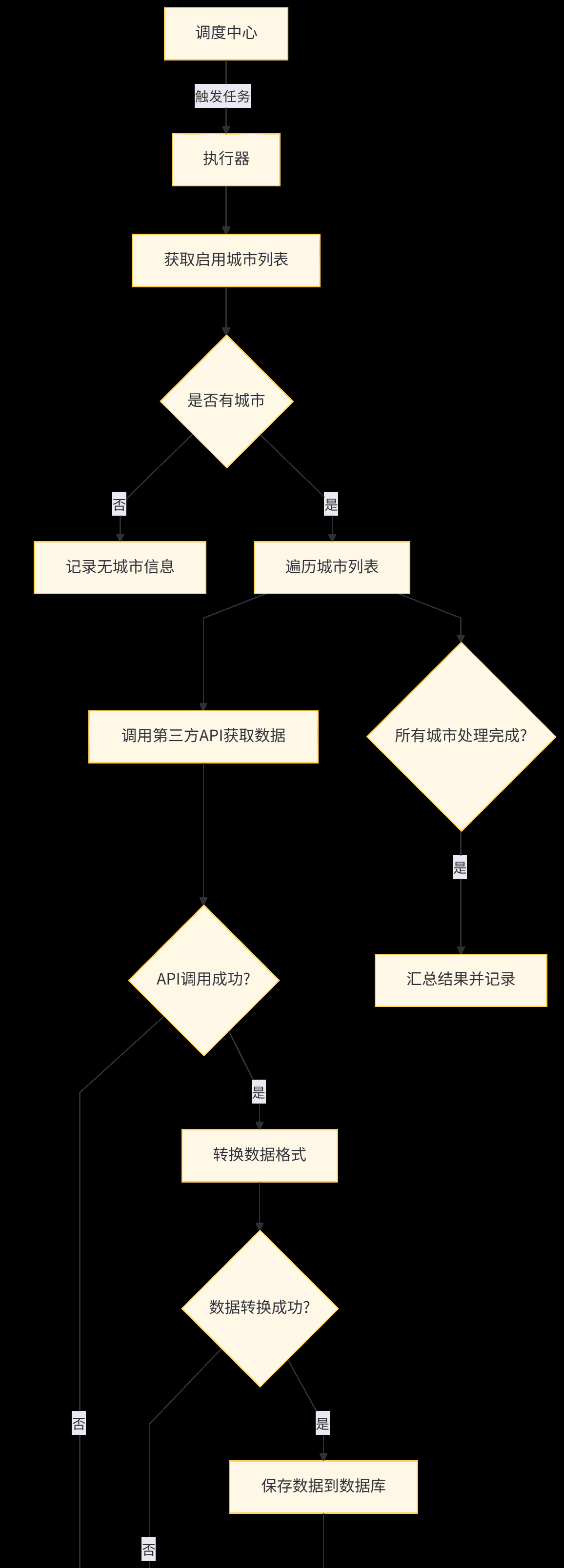
八、异常处理与重试机制
8.1 异常处理策略
在数据同步过程中,可能会遇到各种异常情况,如网络超时、API 返回错误、数据格式错误等。我们需要设计完善的异常处理策略:
网络异常:第三方 API 调用超时或连接失败,采用重试机制API 返回错误:API 返回错误码,根据错误码类型决定是否重试数据格式错误:API 返回数据格式不符合预期,记录错误并跳过数据库异常:数据库连接失败或操作错误,记录错误并尝试重试业务异常:如城市 ID 不存在等,记录错误并跳过
8.2 重试机制实现
我们使用 Spring Retry 实现方法级别的重试机制:
首先在 pom.xml 中添加 Spring Retry 依赖:
<dependency>
    <groupId>org.springframework.retry</groupId>
    <artifactId>spring-retry</artifactId>
    <version>2.0.5</version>
</dependency>
<dependency>
    <groupId>org.aspectj</groupId>
    <artifactId>aspectjweaver</artifactId>
    <version>1.9.20.1</version>
</dependency>
在启动类上添加 @EnableRetry 注解:
package com.weather.sync;

import org.mybatis.spring.annotation.MapperScan;
import org.springframework.boot.SpringApplication;
import org.springframework.boot.autoconfigure.SpringBootApplication;
import org.springframework.retry.annotation.EnableRetry;

/**
 * 天气数据同步服务启动类
 *
 * @author ken
 */
@SpringBootApplication
@MapperScan("com.weather.sync.mapper")
@EnableRetry
public class WeatherSyncApplication {
    public static void main(String[] args) {
        SpringApplication.run(WeatherSyncApplication.class, args);
    }
}
在 API 调用方法上添加 @Retryable 注解(已在 5.3 节中实现)
重试机制说明:
当方法抛出 Exception 时触发重试最大重试次数:3 次(可通过配置修改)重试间隔:首次 1 秒,之后按 2 倍递增,最大 5 秒(可通过配置修改)
8.3 失败任务重试策略
除了方法级别的重试,我们还实现了失败任务的整体重试机制:
在 sync_record 表中记录每次同步的结果专门的定时任务定期查询失败的同步记录对失败的记录进行重试,并更新同步结果对于多次重试仍失败的任务,触发告警机制
8.4 熔断机制
为了防止因第三方 API 故障导致系统资源耗尽,我们实现了简单的熔断机制:
package com.weather.sync.service;

import com.google.common.cache.CacheBuilder;
import com.google.common.cache.CacheLoader;
import com.google.common.cache.LoadingCache;
import lombok.extern.slf4j.Slf4j;
import org.springframework.stereotype.Component;

import java.util.concurrent.ExecutionException;
import java.util.concurrent.TimeUnit;

/**
 * API调用熔断管理器
 *
 * @author ken
 */
@Slf4j
@Component
public class ApiCircuitBreaker {
    /**
     * 失败计数缓存,key为城市ID,value为失败次数
     */
    private final LoadingCache<String, Integer> failureCountCache;

    /**
     * 熔断状态缓存,key为城市ID,value为是否熔断
     */
    private final LoadingCache<String, Boolean> circuitStatusCache;

    /**
     * 最大失败次数,超过该次数则熔断
     */
    private static final int MAX_FAILURE_COUNT = 5;

    /**
     * 熔断时间,单位:分钟
     */
    private static final int CIRCUIT_BREAKER_MINUTES = 10;

    public ApiCircuitBreaker() {
        // 初始化失败计数缓存,10分钟过期
        this.failureCountCache = CacheBuilder.newBuilder()
                .expireAfterWrite(CIRCUIT_BREAKER_MINUTES, TimeUnit.MINUTES)
                .build(new CacheLoader<>() {
                    @Override
                    public Integer load(String cityId) {
                        return 0;
                    }
                });

        // 初始化熔断状态缓存,10分钟过期
        this.circuitStatusCache = CacheBuilder.newBuilder()
                .expireAfterWrite(CIRCUIT_BREAKER_MINUTES, TimeUnit.MINUTES)
                .build(new CacheLoader<>() {
                    @Override
                    public Boolean load(String cityId) {
                        return false;
                    }
                });
    }

    /**
     * 检查是否可以调用API
     *
     * @param cityId 城市ID
     * @return 是否可以调用
     */
    public boolean canCallApi(String cityId) {
        try {
            // 检查是否处于熔断状态
            boolean isCircuitOpen = circuitStatusCache.get(cityId);
            if (isCircuitOpen) {
                log.warn("API调用已熔断,城市ID:{},将在{}分钟后尝试恢复", cityId, CIRCUIT_BREAKER_MINUTES);
                return false;
            }
            return true;
        } catch (ExecutionException e) {
            log.error("检查API调用熔断状态失败,城市ID:{}", cityId, e);
            return true;
        }
    }

    /**
     * 记录API调用失败
     *
     * @param cityId 城市ID
     */
    public void recordFailure(String cityId) {
        try {
            // 增加失败计数
            int failureCount = failureCountCache.get(cityId) + 1;
            failureCountCache.put(cityId, failureCount);

            log.debug("记录API调用失败,城市ID:{},失败次数:{}", cityId, failureCount);

            // 如果失败次数达到阈值,触发熔断
            if (failureCount >= MAX_FAILURE_COUNT) {
                circuitStatusCache.put(cityId, true);
                log.warn("API调用触发熔断,城市ID:{},失败次数:{}", cityId, failureCount);
            }
        } catch (ExecutionException e) {
            log.error("记录API调用失败次数失败,城市ID:{}", cityId, e);
        }
    }

    /**
     * 记录API调用成功
     *
     * @param cityId 城市ID
     */
    public void recordSuccess(String cityId) {
        try {
            // 重置失败计数和熔断状态
            failureCountCache.put(cityId, 0);
            circuitStatusCache.put(cityId, false);

            log.debug("记录API调用成功,城市ID:{}", cityId);
        } catch (Exception e) {
            log.error("记录API调用成功状态失败,城市ID:{}", cityId, e);
        }
    }
}
在 WeatherSyncService 中使用熔断机制:
// 在syncRealtimeWeather方法中添加
if (!apiCircuitBreaker.canCallApi(cityId)) {
    message = "API调用已熔断,暂时无法同步";
    log.warn(message + ",城市ID:{}", cityId);
    return false;
}

// API调用成功后
apiCircuitBreaker.recordSuccess(cityId);

// API调用失败后
apiCircuitBreaker.recordFailure(cityId);
九、监控与告警
9.1 系统监控设计
为了确保数据同步系统的稳定运行,我们需要对系统进行全面监控:
任务执行监控:监控定时任务的执行状态、执行时间、成功率等API 调用监控:监控第三方 API 的调用频率、响应时间、错误率等数据同步监控:监控数据同步的数量、成功率、数据完整性等系统指标监控:监控 JVM 状态、内存使用、CPU 使用率等系统指标
9.2 Spring Boot Actuator 配置
使用 Spring Boot Actuator 暴露监控端点:
management:
  endpoints:
    web:
      exposure:
        include: health,info,metrics,prometheus,httptrace,loggers
  metrics:
    export:
      prometheus:
        enabled: true
  endpoint:
    health:
      show-details: always
      probes:
        enabled: true
      group:
        readiness:
          include: db,redis
  metrics:
    tags:
      application: ${spring.application.name}
    enable:
      http: true
      jvm: true
      logback: true
      process: true
      system: true
9.3 自定义监控指标
创建自定义监控指标,跟踪数据同步相关指标:
package com.weather.sync.monitor;

import io.micrometer.core.instrument.Counter;
import io.micrometer.core.instrument.Gauge;
import io.micrometer.core.instrument.MeterRegistry;
import io.micrometer.core.instrument.Timer;
import org.springframework.stereotype.Component;

import java.util.concurrent.atomic.AtomicInteger;

/**
 * 天气同步监控指标
 *
 * @author ken
 */
@Component
public class WeatherSyncMetrics {
    /**
     * 实时天气同步成功计数器
     */
    private final Counter realtimeSyncSuccessCounter;

    /**
     * 实时天气同步失败计数器
     */
    private final Counter realtimeSyncFailureCounter;

    /**
     * 天气预报同步成功计数器
     */
    private final Counter forecastSyncSuccessCounter;

    /**
     * 天气预报同步失败计数器
     */
    private final Counter forecastSyncFailureCounter;

    /**
     * 实时天气同步计时器
     */
    private final Timer realtimeSyncTimer;

    /**
     * 天气预报同步计时器
     */
    private final Timer forecastSyncTimer;

    /**
     * 当前同步中的城市数量
     */
    private final AtomicInteger syncingCityCount;

    public WeatherSyncMetrics(MeterRegistry registry) {
        // 初始化计数器
        this.realtimeSyncSuccessCounter = registry.counter("weather.sync.realtime.success");
        this.realtimeSyncFailureCounter = registry.counter("weather.sync.realtime.failure");
        this.forecastSyncSuccessCounter = registry.counter("weather.sync.forecast.success");
        this.forecastSyncFailureCounter = registry.counter("weather.sync.forecast.failure");

        // 初始化计时器
        this.realtimeSyncTimer = Timer.builder("weather.sync.realtime.duration")
                .description("Time taken to sync realtime weather data")
                .register(registry);
        this.forecastSyncTimer = Timer.builder("weather.sync.forecast.duration")
                .description("Time taken to sync forecast weather data")
                .register(registry);

        // 初始化 gauge
        this.syncingCityCount = new AtomicInteger(0);
        Gauge.builder("weather.sync.city.count", syncingCityCount, AtomicInteger::get)
                .description("Number of cities currently being synced")
                .register(registry);
    }

    /**
     * 记录实时天气同步成功
     */
    public void incrementRealtimeSyncSuccess() {
        realtimeSyncSuccessCounter.increment();
    }

    /**
     * 记录实时天气同步失败
     */
    public void incrementRealtimeSyncFailure() {
        realtimeSyncFailureCounter.increment();
    }

    /**
     * 记录天气预报同步成功
     */
    public void incrementForecastSyncSuccess() {
        forecastSyncSuccessCounter.increment();
    }

    /**
     * 记录天气预报同步失败
     */
    public void incrementForecastSyncFailure() {
        forecastSyncFailureCounter.increment();
    }

    /**
     * 开始实时天气同步计时
     *
     * @return 计时器上下文
     */
    public Timer.Sample startRealtimeSyncTimer() {
        return Timer.start();
    }

    /**
     * 结束实时天气同步计时
     *
     * @param sample 计时器上下文
     */
    public void stopRealtimeSyncTimer(Timer.Sample sample) {
        sample.stop(realtimeSyncTimer);
    }

    /**
     * 开始天气预报同步计时
     *
     * @return 计时器上下文
     */
    public Timer.Sample startForecastSyncTimer() {
        return Timer.start();
    }

    /**
     * 结束天气预报同步计时
     *
     * @param sample 计时器上下文
     */
    public void stopForecastSyncTimer(Timer.Sample sample) {
        sample.stop(forecastSyncTimer);
    }

    /**
     * 增加同步中城市数量
     */
    public void incrementSyncingCityCount() {
        syncingCityCount.incrementAndGet();
    }

    /**
     * 减少同步中城市数量
     */
    public void decrementSyncingCityCount() {
        syncingCityCount.decrementAndGet();
    }
}
在 WeatherSyncService 中使用这些指标:
// 在syncRealtimeWeather方法中
metrics.incrementSyncingCityCount();
Timer.Sample sample = metrics.startRealtimeSyncTimer();
try {
    // 同步逻辑...
    if (success) {
        metrics.incrementRealtimeSyncSuccess();
    } else {
        metrics.incrementRealtimeSyncFailure();
    }
} finally {
    metrics.stopRealtimeSyncTimer(sample);
    metrics.decrementSyncingCityCount();
}

// 类似地在syncForecastWeather方法中使用对应的指标
9.4 告警机制实现
当系统出现异常时,需要及时通知相关人员:
package com.weather.sync.alert;

import lombok.RequiredArgsConstructor;
import lombok.extern.slf4j.Slf4j;
import org.springframework.mail.SimpleMailMessage;
import org.springframework.mail.javamail.JavaMailSender;
import org.springframework.scheduling.annotation.Async;
import org.springframework.stereotype.Component;
import org.springframework.util.StringUtils;

/**
 * 告警通知服务
 *
 * @author ken
 */
@Slf4j
@Component
@RequiredArgsConstructor
public class AlertService {
    private final JavaMailSender mailSender;
    private final AlertProperties alertProperties;

    /**
     * 发送邮件告警
     *
     * @param subject 邮件主题
     * @param content 邮件内容
     */
    @Async
    public void sendMailAlert(String subject, String content) {
        if (!alertProperties.isEnabled()) {
            log.debug("告警功能已禁用,不发送邮件告警");
            return;
        }

        if (StringUtils.isEmpty(subject) || StringUtils.isEmpty(content)) {
            log.warn("邮件告警主题或内容为空,无法发送");
            return;
        }

        if (ObjectUtils.isEmpty(alertProperties.getRecipients()) || alertProperties.getRecipients().length == 0) {
            log.warn("邮件告警接收人为空,无法发送");
            return;
        }

        try {
            SimpleMailMessage message = new SimpleMailMessage();
            message.setFrom(alertProperties.getSender());
            message.setTo(alertProperties.getRecipients());
            message.setSubject(subject);
            message.setText(content);

            log.info("开始发送邮件告警,主题:{},接收人:{}", subject, String.join(",", alertProperties.getRecipients()));
            mailSender.send(message);
            log.info("邮件告警发送成功,主题:{}", subject);
        } catch (Exception e) {
            log.error("发送邮件告警失败,主题:{}", subject, e);
        }
    }

    /**
     * 发送数据同步失败告警
     *
     * @param syncType 同步类型
     * @param cityId 城市ID
     * @param errorMsg 错误信息
     */
    public void sendSyncFailureAlert(Integer syncType, String cityId, String errorMsg) {
        String syncTypeName = syncType == 1 ? "实时天气" : "天气预报";
        String subject = String.format("[天气同步告警] %s同步失败 - 城市ID:%s", syncTypeName, cityId);
        String content = String.format(
                "告警类型:%s同步失败
" +
                "城市ID:%s
" +
                "错误信息:%s
" +
                "告警时间:%s",
                syncTypeName,
                cityId,
                errorMsg,
                LocalDateTime.now().format(DateTimeFormatter.ofPattern("yyyy-MM-dd HH:mm:ss"))
        );

        sendMailAlert(subject, content);
    }

    /**
     * 发送任务执行异常告警
     *
     * @param jobName 任务名称
     * @param errorMsg 错误信息
     */
    public void sendJobExceptionAlert(String jobName, String errorMsg) {
        String subject = String.format("[天气同步告警] 定时任务执行异常 - 任务名称:%s", jobName);
        String content = String.format(
                "告警类型:定时任务执行异常
" +
                "任务名称:%s
" +
                "错误信息:%s
" +
                "告警时间:%s",
                jobName,
                errorMsg,
                LocalDateTime.now().format(DateTimeFormatter.ofPattern("yyyy-MM-dd HH:mm:ss"))
        );

        sendMailAlert(subject, content);
    }

    /**
     * 发送API调用熔断告警
     *
     * @param cityId 城市ID
     */
    public void sendCircuitBreakerAlert(String cityId) {
        String subject = String.format("[天气同步告警] API调用熔断 - 城市ID:%s", cityId);
        String content = String.format(
                "告警类型:API调用熔断
" +
                "城市ID:%s
" +
                "告警说明:该城市API调用失败次数过多,已触发熔断保护
" +
                "恢复时间:约10分钟后自动尝试恢复
" +
                "告警时间:%s",
                cityId,
                LocalDateTime.now().format(DateTimeFormatter.ofPattern("yyyy-MM-dd HH:mm:ss"))
        );

        sendMailAlert(subject, content);
    }
}
9.4.1 告警配置类
package com.weather.sync.alert;

import lombok.Data;
import org.springframework.boot.context.properties.ConfigurationProperties;
import org.springframework.context.annotation.Configuration;

/**
 * 告警配置
 *
 * @author ken
 */
@Configuration
@ConfigurationProperties(prefix = "alert")
@Data
public class AlertProperties {
    /**
     * 是否启用告警功能
     */
    private boolean enabled = true;

    /**
     * 邮件发送者
     */
    private String sender;

    /**
     * 邮件接收人(多个用逗号分隔)
     */
    private String[] recipients;

    /**
     * 邮件服务器主机
     */
    private String host;

    /**
     * 邮件服务器端口
     */
    private int port;

    /**
     * 邮件服务器用户名
     */
    private String username;

    /**
     * 邮件服务器密码
     */
    private String password;

    /**
     * 是否启用SSL
     */
    private boolean ssl = true;
}
9.4.2 邮件发送配置
在
application.yml
# 告警配置
alert:
  enabled: true
  sender: alert@example.com
  recipients:
    - developer1@example.com
    - developer2@example.com
  host: smtp.example.com
  port: 465
  username: alert@example.com
  password: your_email_password
  ssl: true

# Spring Mail配置
spring:
  mail:
    host: ${alert.host}
    port: ${alert.port}
    username: ${alert.username}
    password: ${alert.password}
    properties:
      mail:
        smtp:
          auth: true
          starttls:
            enable: ${alert.ssl}
            required: ${alert.ssl}
          ssl:
            enable: ${alert.ssl}
        debug: false
9.4.3 告警触发场景
在关键位置添加告警触发逻辑:
任务执行异常时(修改 WeatherSyncJob):
@XxlJob("syncAllRealtimeWeatherJob")
public void syncAllRealtimeWeatherJob() {
    log.info("===== 开始执行同步所有启用城市的实时天气任务 =====");
    XxlJobHelper.log("开始执行同步所有启用城市的实时天气任务,时间:{}", LocalDateTime.now());

    try {
        // 原有逻辑...
    } catch (Exception e) {
        String errorMsg = "同步所有启用城市的实时天气任务发生异常:" + e.getMessage();
        log.error(errorMsg, e);
        XxlJobHelper.log(errorMsg);
        XxlJobHelper.handleFail(errorMsg);

        // 发送任务执行异常告警
        alertService.sendJobExceptionAlert("syncAllRealtimeWeatherJob", errorMsg);
    } finally {
        log.info("===== 同步所有启用城市的实时天气任务执行结束 =====");
    }
}
单个城市同步多次失败时(修改 WeatherSyncService):
// 在syncRealtimeWeather方法的catch块中
catch (Exception e) {
    message = "同步实时天气发生异常:" + e.getMessage();
    log.error(message + ",城市ID:{}", cityId, e);

    // 记录失败次数,达到阈值发送告警
    int failCount = recordFailureCount(cityId, SYNC_TYPE_REALTIME);
    if (failCount >= 3) { // 连续失败3次发送告警
        alertService.sendSyncFailureAlert(SYNC_TYPE_REALTIME, cityId, message);
    }
}
API 调用熔断时(修改 ApiCircuitBreaker):
// 在recordFailure方法中,触发熔断后
if (failureCount >= MAX_FAILURE_COUNT) {
    circuitStatusCache.put(cityId, true);
    log.warn("API调用触发熔断,城市ID:{},失败次数:{}", cityId, failureCount);

    // 发送熔断告警
    alertService.sendCircuitBreakerAlert(cityId);
}
9.5 监控面板集成
9.5.1 Prometheus 配置
添加 Prometheus 依赖(已在 pom.xml 中包含),并配置
prometheus.yml
global:
  scrape_interval: 15s
  evaluation_interval: 15s

scrape_configs:
  - job_name: 'weather-sync-service'
    metrics_path: '/weather-sync/actuator/prometheus'
    static_configs:
      - targets: ['localhost:8080']
9.5.2 Grafana Dashboard 配置
导入 JVM 监控面板(ID:4701)导入 Spring Boot 应用监控面板(ID:12900)创建自定义天气同步监控面板,添加以下指标:
weather_sync_realtime_success_total
weather_sync_realtime_failure_total
weather_sync_forecast_success_total
weather_sync_forecast_failure_total
weather_sync_realtime_duration_seconds_sum
weather_sync_forecast_duration_seconds_sum
weather_sync_city_count
十、性能优化与最佳实践
10.1 并发控制优化
10.1.1 多线程同步实现
package com.weather.sync.service;

import com.google.common.util.concurrent.ThreadFactoryBuilder;
import lombok.RequiredArgsConstructor;
import lombok.extern.slf4j.Slf4j;
import org.springframework.stereotype.Component;
import org.springframework.util.CollectionUtils;

import java.util.List;
import java.util.concurrent.*;

/**
 * 并发同步工具类
 *
 * @author ken
 */
@Slf4j
@Component
@RequiredArgsConstructor
public class ConcurrentSyncUtil {
    /**
     * 核心线程数
     */
    private static final int CORE_POOL_SIZE = Runtime.getRuntime().availableProcessors() * 2;

    /**
     * 最大线程数
     */
    private static final int MAX_POOL_SIZE = 20;

    /**
     * 队列容量
     */
    private static final int QUEUE_CAPACITY = 100;

    /**
     * 空闲线程存活时间
     */
    private static final long KEEP_ALIVE_TIME = 60L;

    /**
     * 线程池
     */
    private final ExecutorService executorService = new ThreadPoolExecutor(
            CORE_POOL_SIZE,
            MAX_POOL_SIZE,
            KEEP_ALIVE_TIME,
            TimeUnit.SECONDS,
            new ArrayBlockingQueue<>(QUEUE_CAPACITY),
            new ThreadFactoryBuilder().setNameFormat("weather-sync-thread-%d").build(),
            new ThreadPoolExecutor.CallerRunsPolicy() // 队列满时使用调用线程执行
    );

    /**
     * 并发同步实时天气
     *
     * @param cityIds 城市ID列表
     * @return 成功同步的城市数量
     */
    public int concurrentSyncRealtimeWeather(List<String> cityIds, WeatherSyncService syncService) {
        if (CollectionUtils.isEmpty(cityIds)) {
            log.warn("城市ID列表为空,无需同步实时天气");
            return 0;
        }

        log.info("开始并发同步实时天气,城市数量:{},线程池核心线程数:{}", cityIds.size(), CORE_POOL_SIZE);

        List<CompletableFuture<Boolean>> futures = Lists.newArrayList();
        for (String cityId : cityIds) {
            CompletableFuture<Boolean> future = CompletableFuture.supplyAsync(() -> {
                try {
                    return syncService.syncRealtimeWeather(cityId);
                } catch (Exception e) {
                    log.error("并发同步实时天气失败,城市ID:{}", cityId, e);
                    return false;
                }
            }, executorService);
            futures.add(future);
        }

        // 等待所有任务完成
        CompletableFuture<Void> allOf = CompletableFuture.allOf(futures.toArray(new CompletableFuture[0]));
        try {
            allOf.get(); // 等待所有任务完成
        } catch (InterruptedException | ExecutionException e) {
            log.error("并发同步实时天气等待任务完成时发生异常", e);
            Thread.currentThread().interrupt();
        }

        // 统计成功数量
        int successCount = 0;
        for (CompletableFuture<Boolean> future : futures) {
            try {
                Boolean success = future.get();
                if (Boolean.TRUE.equals(success)) {
                    successCount++;
                }
            } catch (InterruptedException | ExecutionException e) {
                log.error("获取并发同步结果失败", e);
                Thread.currentThread().interrupt();
            }
        }

        log.info("并发同步实时天气完成,总城市数:{},成功数:{},失败数:{}",
                cityIds.size(), successCount, cityIds.size() - successCount);

        return successCount;
    }

    /**
     * 并发同步天气预报
     *
     * @param cityIds 城市ID列表
     * @return 成功同步的城市数量
     */
    public int concurrentSyncForecastWeather(List<String> cityIds, WeatherSyncService syncService) {
        if (CollectionUtils.isEmpty(cityIds)) {
            log.warn("城市ID列表为空,无需同步天气预报");
            return 0;
        }

        log.info("开始并发同步天气预报,城市数量:{},线程池核心线程数:{}", cityIds.size(), CORE_POOL_SIZE);

        List<CompletableFuture<Boolean>> futures = Lists.newArrayList();
        for (String cityId : cityIds) {
            CompletableFuture<Boolean> future = CompletableFuture.supplyAsync(() -> {
                try {
                    return syncService.syncForecastWeather(cityId);
                } catch (Exception e) {
                    log.error("并发同步天气预报失败,城市ID:{}", cityId, e);
                    return false;
                }
            }, executorService);
            futures.add(future);
        }

        // 等待所有任务完成
        CompletableFuture<Void> allOf = CompletableFuture.allOf(futures.toArray(new CompletableFuture[0]));
        try {
            allOf.get(); // 等待所有任务完成
        } catch (InterruptedException | ExecutionException e) {
            log.error("并发同步天气预报等待任务完成时发生异常", e);
            Thread.currentThread().interrupt();
        }

        // 统计成功数量
        int successCount = 0;
        for (CompletableFuture<Boolean> future : futures) {
            try {
                Boolean success = future.get();
                if (Boolean.TRUE.equals(success)) {
                    successCount++;
                }
            } catch (InterruptedException | ExecutionException e) {
                log.error("获取并发同步结果失败", e);
                Thread.currentThread().interrupt();
            }
        }

        log.info("并发同步天气预报完成,总城市数:{},成功数:{},失败数:{}",
                cityIds.size(), successCount, cityIds.size() - successCount);

        return successCount;
    }

    /**
     * 关闭线程池
     */
    public void shutdown() {
        log.info("关闭天气同步线程池");
        executorService.shutdown();
        try {
            if (!executorService.awaitTermination(60, TimeUnit.SECONDS)) {
                executorService.shutdownNow();
                if (!executorService.awaitTermination(60, TimeUnit.SECONDS)) {
                    log.error("天气同步线程池未正常关闭");
                }
            }
        } catch (InterruptedException e) {
            executorService.shutdownNow();
            Thread.currentThread().interrupt();
        }
    }
}
10.1.2 修改同步任务使用并发同步
// 在WeatherSyncService中添加
private final ConcurrentSyncUtil concurrentSyncUtil;

/**
 * 并发同步所有启用城市的实时天气
 *
 * @return 成功同步的城市数量
 */
public int concurrentSyncAllRealtimeWeather(List<String> cityIds) {
    return concurrentSyncUtil.concurrentSyncRealtimeWeather(cityIds, this);
}

/**
 * 并发同步所有启用城市的天气预报
 *
 * @return 成功同步的城市数量
 */
public int concurrentSyncAllForecastWeather(List<String> cityIds) {
    return concurrentSyncUtil.concurrentSyncForecastWeather(cityIds, this);
}

// 在WeatherSyncJob中修改任务实现
@XxlJob("syncAllRealtimeWeatherJob")
public void syncAllRealtimeWeatherJob() {
    log.info("===== 开始执行同步所有启用城市的实时天气任务 =====");
    XxlJobHelper.log("开始执行同步所有启用城市的实时天气任务,时间:{}", LocalDateTime.now());

    try {
        // 获取所有启用的城市
        List<City> enabledCities = cityService.getEnabledCities();
        if (CollectionUtils.isEmpty(enabledCities)) {
            String message = "没有启用的城市,无需同步实时天气";
            log.info(message);
            XxlJobHelper.log(message);
            XxlJobHelper.handleSuccess(message);
            return;
        }

        XxlJobHelper.log("获取到启用的城市数量:{}", enabledCities.size());

        // 提取城市ID列表
        List<String> cityIds = enabledCities.stream()
                .map(City::getCityId)
                .collect(Collectors.toList());

        // 并发同步实时天气(替换原有同步方式)
        int successCount = weatherSyncService.concurrentSyncAllRealtimeWeather(cityIds);

        String message = String.format("同步所有启用城市的实时天气任务完成,总城市数:%d,成功数:%d,失败数:%d",
                enabledCities.size(), successCount, enabledCities.size() - successCount);
        log.info(message);
        XxlJobHelper.log(message);
        XxlJobHelper.handleSuccess(message);
    } catch (Exception e) {
        // 原有异常处理逻辑...
    } finally {
        log.info("===== 同步所有启用城市的实时天气任务执行结束 =====");
    }
}

// 天气预报任务同理修改
10.2 缓存策略优化
10.2.1 城市数据缓存
package com.weather.sync.cache;

import com.google.common.cache.Cache;
import com.google.common.cache.CacheBuilder;
import com.weather.sync.entity.City;
import com.weather.sync.service.CityService;
import lombok.RequiredArgsConstructor;
import lombok.extern.slf4j.Slf4j;
import org.springframework.stereotype.Component;
import org.springframework.util.CollectionUtils;

import javax.annotation.PostConstruct;
import java.util.List;
import java.util.Map;
import java.util.concurrent.TimeUnit;
import java.util.stream.Collectors;

/**
 * 城市数据缓存
 *
 * @author ken
 */
@Slf4j
@Component
@RequiredArgsConstructor
public class CityCache {
    private final CityService cityService;

    /**
     * 城市缓存,key为城市ID,value为城市信息
     */
    private Cache<String, City> cityCache;

    /**
     * 启用城市ID列表缓存
     */
    private Cache<String, List<String>> enabledCityIdsCache;

    @PostConstruct
    public void init() {
        // 初始化城市缓存,1小时过期
        cityCache = CacheBuilder.newBuilder()
                .expireAfterWrite(1, TimeUnit.HOURS)
                .maximumSize(10000)
                .build();

        // 初始化启用城市ID列表缓存,30分钟过期
        enabledCityIdsCache = CacheBuilder.newBuilder()
                .expireAfterWrite(30, TimeUnit.MINUTES)
                .maximumSize(1)
                .build();

        // 预热缓存
        loadCityCache();
        log.info("城市缓存初始化完成");
    }

    /**
     * 加载城市缓存
     */
    public void loadCityCache() {
        try {
            List<City> allCities = cityService.list();
            if (!CollectionUtils.isEmpty(allCities)) {
                Map<String, City> cityMap = allCities.stream()
                        .collect(Collectors.toMap(City::getCityId, city -> city));
                cityCache.putAll(cityMap);
                log.info("加载城市缓存完成,缓存城市数量:{}", allCities.size());
            } else {
                log.warn("没有查询到城市数据,缓存加载失败");
            }
        } catch (Exception e) {
            log.error("加载城市缓存发生异常", e);
        }
    }

    /**
     * 获取启用的城市ID列表
     *
     * @return 城市ID列表
     */
    public List<String> getEnabledCityIds() {
        try {
            return enabledCityIdsCache.get("ENABLED_CITY_IDS", () -> {
                List<City> enabledCities = cityService.getEnabledCities();
                if (CollectionUtils.isEmpty(enabledCities)) {
                    return Lists.newArrayList();
                }
                return enabledCities.stream()
                        .map(City::getCityId)
                        .collect(Collectors.toList());
            });
        } catch (Exception e) {
            log.error("获取启用城市ID列表缓存失败", e);
            // 缓存获取失败时,直接查询数据库
            List<City> enabledCities = cityService.getEnabledCities();
            return enabledCities.stream()
                    .map(City::getCityId)
                    .collect(Collectors.toList());
        }
    }

    /**
     * 根据城市ID获取城市信息
     *
     * @param cityId 城市ID
     * @return 城市信息
     */
    public City getCityById(String cityId) {
        if (StringUtils.isEmpty(cityId)) {
            return null;
        }

        try {
            return cityCache.get(cityId, () -> {
                City city = cityService.getOne(new LambdaQueryChainWrapper<>(cityService.getBaseMapper())
                        .eq(City::getCityId, cityId));
                if (city == null) {
                    log.warn("城市ID:{} 不存在", cityId);
                }
                return city;
            });
        } catch (Exception e) {
            log.error("获取城市缓存失败,城市ID:{}", cityId, e);
            // 缓存获取失败时,直接查询数据库
            return cityService.getOne(new LambdaQueryChainWrapper<>(cityService.getBaseMapper())
                    .eq(City::getCityId, cityId));
        }
    }

    /**
     * 刷新城市缓存
     */
    public void refreshCityCache() {
        log.info("开始刷新城市缓存");
        cityCache.invalidateAll();
        enabledCityIdsCache.invalidateAll();
        loadCityCache();
        log.info("城市缓存刷新完成");
    }
}
10.2.2 API 响应缓存(可选)
对于变更不频繁的天气预报数据,可以添加短期缓存:
package com.weather.sync.cache;

import com.google.common.cache.Cache;
import com.google.common.cache.CacheBuilder;
import com.weather.sync.entity.WeatherForecast;
import lombok.extern.slf4j.Slf4j;
import org.springframework.stereotype.Component;
import org.springframework.util.CollectionUtils;

import java.util.List;
import java.util.concurrent.TimeUnit;

/**
 * 天气预报缓存
 *
 * @author ken
 */
@Slf4j
@Component
public class WeatherForecastCache {
    /**
     * 天气预报缓存,key为城市ID,value为天气预报列表
     */
    private final Cache<String, List<WeatherForecast>> forecastCache;

    public WeatherForecastCache() {
        // 初始化天气预报缓存,15分钟过期
        this.forecastCache = CacheBuilder.newBuilder()
                .expireAfterWrite(15, TimeUnit.MINUTES)
                .maximumSize(1000)
                .build();
    }

    /**
     * 缓存天气预报数据
     *
     * @param cityId 城市ID
     * @param forecasts 天气预报列表
     */
    public void cacheForecast(String cityId, List<WeatherForecast> forecasts) {
        if (StringUtils.isEmpty(cityId) || CollectionUtils.isEmpty(forecasts)) {
            return;
        }

        forecastCache.put(cityId, forecasts);
        log.debug("缓存天气预报数据,城市ID:{},缓存条数:{}", cityId, forecasts.size());
    }

    /**
     * 获取缓存的天气预报数据
     *
     * @param cityId 城市ID
     * @return 天气预报列表
     */
    public List<WeatherForecast> getForecastFromCache(String cityId) {
        if (StringUtils.isEmpty(cityId)) {
            return Lists.newArrayList();
        }

        try {
            return forecastCache.getIfPresent(cityId);
        } catch (Exception e) {
            log.error("获取天气预报缓存失败,城市ID:{}", cityId, e);
            return Lists.newArrayList();
        }
    }

    /**
     * 清除指定城市的天气预报缓存
     *
     * @param cityId 城市ID
     */
    public void clearForecastCache(String cityId) {
        if (StringUtils.isEmpty(cityId)) {
            return;
        }

        forecastCache.invalidate(cityId);
        log.debug("清除天气预报缓存,城市ID:{}", cityId);
    }

    /**
     * 清除所有天气预报缓存
     */
    public void clearAllForecastCache() {
        forecastCache.invalidateAll();
        log.info("清除所有天气预报缓存");
    }
}
10.3 数据库优化
10.3.1 批量操作优化
在之前的 Service 实现中已经使用了批量插入,这里补充批量更新的实现:
// 在WeatherRealtimeMapper中添加
/**
 * 批量更新实时天气数据
 *
 * @param list 实时天气列表
 * @return 更新数量
 */
int batchUpdate(@Param("list") List<WeatherRealtime> list);
对应的 Mapper XML 文件:
<update id="batchUpdate" parameterType="java.util.List">
    <foreach collection="list" item="item" index="index" separator=";">
        UPDATE weather_realtime
        <set>
            city_name = #{item.cityName},
            temperature = #{item.temperature},
            weather = #{item.weather},
            wind_direction = #{item.windDirection},
            wind_power = #{item.windPower},
            humidity = #{item.humidity},
            report_time = #{item.reportTime},
            update_time = #{item.updateTime}
        </set>
        WHERE city_id = #{item.cityId}
    </foreach>
</update>
10.3.2 索引优化
除了表结构中定义的索引,根据查询场景添加以下索引:
-- 实时天气表添加联合索引
ALTER TABLE weather_realtime ADD INDEX idx_city_report_time (city_id, report_time DESC);

-- 同步记录表添加联合索引,优化失败重试查询
ALTER TABLE sync_record ADD INDEX idx_sync_type_status_time (sync_type, status, sync_start_time DESC);

-- 优化按时间范围查询
ALTER TABLE weather_forecast ADD INDEX idx_report_time_date (report_time DESC, date);
10.3.3 分表策略(适用于大数据量场景)
当数据量达到百万级以上时,可以考虑分表:
按时间分表(以天气预报为例):
-- 创建分表存储过程
DELIMITER //
CREATE PROCEDURE create_weather_forecast_table(IN table_suffix VARCHAR(20))
BEGIN
    SET @table_name = CONCAT('weather_forecast_', table_suffix);
    SET @sql = CONCAT('
        CREATE TABLE IF NOT EXISTS ', @table_name, ' (
          `id` bigint NOT NULL AUTO_INCREMENT COMMENT "主键ID",
          `city_id` varchar(20) NOT NULL COMMENT "城市编码",
          `city_name` varchar(50) NOT NULL COMMENT "城市名称",
          `date` date NOT NULL COMMENT "预报日期",
          `week` varchar(10) DEFAULT NULL COMMENT "星期",
          `day_weather` varchar(50) DEFAULT NULL COMMENT "白天天气现象",
          `night_weather` varchar(50) DEFAULT NULL COMMENT "夜间天气现象",
          `day_temp` varchar(10) DEFAULT NULL COMMENT "白天温度,单位:摄氏度",
          `night_temp` varchar(10) DEFAULT NULL COMMENT "夜间温度,单位:摄氏度",
          `day_wind_direction` varchar(20) DEFAULT NULL COMMENT "白天风向",
          `night_wind_direction` varchar(20) DEFAULT NULL COMMENT "夜间风向",
          `day_wind_power` varchar(20) DEFAULT NULL COMMENT "白天风力",
          `night_wind_power` varchar(20) DEFAULT NULL COMMENT "夜间风力",
          `report_time` datetime DEFAULT NULL COMMENT "数据发布时间",
          `create_time` datetime NOT NULL DEFAULT CURRENT_TIMESTAMP COMMENT "创建时间",
          `update_time` datetime NOT NULL DEFAULT CURRENT_TIMESTAMP ON UPDATE CURRENT_TIMESTAMP COMMENT "更新时间",
          PRIMARY KEY (`id`),
          UNIQUE KEY `uk_city_date` (`city_id`,`date`),
          KEY `idx_report_time` (`report_time`),
          KEY `idx_date` (`date`)
        ) ENGINE=InnoDB DEFAULT CHARSET=utf8mb4 COLLATE=utf8mb4_unicode_ci COMMENT="天气预报数据表_', table_suffix, '";
    ');
    PREPARE stmt FROM @sql;
    EXECUTE stmt;
    DEALLOCATE PREPARE stmt;
END //
DELIMITER ;

-- 调用存储过程创建按月分表(示例:2024年5月)
CALL create_weather_forecast_table('202405');
使用 Sharding-JDBC 实现分表路由:
<!-- 添加Sharding-JDBC依赖 -->
<dependency>
    <groupId>org.apache.shardingsphere</groupId>
    <artifactId>shardingsphere-jdbc-core-spring-boot-starter</artifactId>
    <version>5.4.1</version>
</dependency>
# Sharding-JDBC配置
spring:
  shardingsphere:
    datasource:
      names: weather_db
      weather_db:
        type: com.zaxxer.hikari.HikariDataSource
        driver-class-name: com.mysql.cj.jdbc.Driver
        url: jdbc:mysql://localhost:3306/weather_db?useUnicode=true&characterEncoding=utf8&useSSL=false&serverTimezone=Asia/Shanghai
        username: root
        password: root
    rules:
      sharding:
        tables:
          weather_forecast:
            actual-data-nodes: weather_db.weather_forecast_${202401..202412}
            table-strategy:
              standard:
                sharding-column: date
                sharding-algorithm-name: weather_forecast_table_strategy
        sharding-algorithms:
          weather_forecast_table_strategy:
            type: CLASS_BASED
            props:
              strategy: STANDARD
              algorithm-class-name: com.weather.sync.sharding.WeatherForecastShardingAlgorithm
    props:
      sql-show: true
10.4 最佳实践总结
API 调用最佳实践
始终设置超时时间,避免无限等待使用重试机制处理临时网络问题实现熔断机制,防止第三方 API 故障影响系统对 API 响应进行严格校验,避免脏数据
数据同步最佳实践
记录详细的同步日志,便于问题排查实现失败重试机制,确保数据完整性使用事务保证数据一致性对敏感操作进行幂等设计,避免重复数据
性能优化最佳实践
合理使用缓存,减少数据库和 API 调用压力大数据量操作使用批量处理多线程并发同步,提高处理效率数据库索引优化,提升查询性能
可靠性最佳实践
完善的异常处理机制全面的监控告警,及时发现问题关键配置可动态调整,无需重启服务定期备份数据,防止数据丢失
十一、系统测试与验证
11.1 单元测试
11.1.1 数据转换测试
package com.weather.sync.service.converter;

import com.weather.sync.entity.WeatherForecast;
import com.weather.sync.entity.WeatherRealtime;
import com.weather.sync.thirdparty.model.AmapForecastWeatherResponse;
import com.weather.sync.thirdparty.model.AmapRealtimeWeatherResponse;
import org.junit.jupiter.api.Test;
import org.springframework.beans.factory.annotation.Autowired;
import org.springframework.boot.test.context.SpringBootTest;

import java.util.List;

import static org.junit.jupiter.api.Assertions.*;

/**
 * 天气数据转换器测试
 *
 * @author ken
 */
@SpringBootTest
public class WeatherDataConverterTest {
    @Autowired
    private WeatherDataConverter weatherDataConverter;

    @Test
    public void testConvertRealtimeWeather() {
        // 构建测试数据
        AmapRealtimeWeatherResponse response = new AmapRealtimeWeatherResponse();
        AmapRealtimeWeatherResponse.AmapRealtimeWeather amapWeather = new AmapRealtimeWeatherResponse.AmapRealtimeWeather();
        amapWeather.setAdcode("110000");
        amapWeather.setCity("北京市");
        amapWeather.setProvince("北京");
        amapWeather.setWeather("晴");
        amapWeather.setTemperature("25");
        amapWeather.setWinddirection("东北");
        amapWeather.setWindpower("≤3");
        amapWeather.setHumidity("30");
        amapWeather.setReporttime("2024-05-20 14:00:00");

        response.setRealtimeWeathers(Lists.newArrayList(amapWeather));

        // 执行转换
        WeatherRealtime realtime = weatherDataConverter.convertRealtimeWeather(response);

        // 验证结果
        assertNotNull(realtime);
        assertEquals("110000", realtime.getCityId());
        assertEquals("北京市", realtime.getCityName());
        assertEquals("晴", realtime.getWeather());
        assertEquals("25", realtime.getTemperature());
        assertEquals("东北", realtime.getWindDirection());
        assertEquals("≤3", realtime.getWindPower());
        assertEquals("30", realtime.getHumidity());
        assertNotNull(realtime.getReportTime());
        assertEquals("2024-05-20T14:00", realtime.getReportTime().toString());
    }

    @Test
    public void testConvertForecastWeather() {
        // 构建测试数据
        AmapForecastWeatherResponse response = new AmapForecastWeatherResponse();
        AmapForecastWeatherResponse.AmapForecastWeather amapForecast = new AmapForecastWeatherResponse.AmapForecastWeather();
        amapForecast.setAdcode("110000");
        amapForecast.setCity("北京市");
        amapForecast.setProvince("北京");
        amapForecast.setReporttime("2024-05-20 11:00:00");

        AmapForecastWeatherResponse.AmapForecastWeather.AmapForecast amapDaily1 = new AmapForecastWeatherResponse.AmapForecastWeather.AmapForecast();
        amapDaily1.setDate("2024-05-20");
        amapDaily1.setWeek("1");
        amapDaily1.setDayweather("晴");
        amapDaily1.setNightweather("晴");
        amapDaily1.setDaytemp("30");
        amapDaily1.setNighttemp("18");
        amapDaily1.setDaywind("东北");
        amapDaily1.setNightwind("东北");
        amapDaily1.setDaypower("≤3");
        amapDaily1.setNightpower("≤3");

        AmapForecastWeatherResponse.AmapForecastWeather.AmapForecast amapDaily2 = new AmapForecastWeatherResponse.AmapForecastWeather.AmapForecast();
        amapDaily2.setDate("2024-05-21");
        amapDaily2.setWeek("2");
        amapDaily2.setDayweather("多云");
        amapDaily2.setNightweather("晴");
        amapDaily2.setDaytemp("32");
        amapDaily2.setNighttemp("19");
        amapDaily2.setDaywind("西南");
        amapDaily2.setNightwind("西北");
        amapDaily2.setDaypower("3-4");
        amapDaily2.setNightpower("≤3");

        amapForecast.setCasts(Lists.newArrayList(amapDaily1, amapDaily2));
        response.setForecastWeathers(Lists.newArrayList(amapForecast));

        // 执行转换
        List<WeatherForecast> forecasts = weatherDataConverter.convertForecastWeather(response);

        // 验证结果
        assertNotNull(forecasts);
        assertEquals(2, forecasts.size());

        WeatherForecast forecast1 = forecasts.get(0);
        assertEquals("110000", forecast1.getCityId());
        assertEquals("北京市", forecast1.getCityName());
        assertEquals("2024-05-20", forecast1.getDate().toString());
        assertEquals("1", forecast1.getWeek());
        assertEquals("晴", forecast1.getDayWeather());
        assertEquals("晴", forecast1.getNightWeather());
        assertEquals("30", forecast1.getDayTemp());
        assertEquals("18", forecast1.getNightTemp());

        WeatherForecast forecast2 = forecasts.get(1);
        assertEquals("2024-05-21", forecast2.getDate().toString());
        assertEquals("2", forecast2.getWeek());
        assertEquals("多云", forecast2.getDayWeather());
        assertEquals("晴", forecast2.getNightWeather());
    }
}
11.1.2 同步服务测试
package com.weather.sync.service;

import com.weather.sync.entity.City;
import com.weather.sync.entity.SyncRecord;
import com.weather.sync.entity.WeatherRealtime;
import com.weather.sync.thirdparty.client.AmapWeatherClient;
import com.weather.sync.thirdparty.model.AmapRealtimeWeatherResponse;
import org.junit.jupiter.api.Test;
import org.mockito.InjectMocks;
import org.mockito.Mock;
import org.mockito.Mockito;
import org.springframework.boot.test.context.SpringBootTest;

import static org.junit.jupiter.api.Assertions.*;
import static org.mockito.ArgumentMatchers.anyString;
import static org.mockito.Mockito.when;

/**
 * 天气数据同步服务测试
 *
 * @author ken
 */
@SpringBootTest
public class WeatherSyncServiceTest {
    @Mock
    private AmapWeatherClient amapWeatherClient;

    @Mock
    private WeatherDataConverter weatherDataConverter;

    @Mock
    private WeatherRealtimeService weatherRealtimeService;

    @Mock
    private SyncRecordService syncRecordService;

    @Mock
    private ApiCircuitBreaker apiCircuitBreaker;

    @InjectMocks
    private WeatherSyncService weatherSyncService;

    @Test
    public void testSyncRealtimeWeather_Success() {
        // 准备测试数据
        String cityId = "110000";

        AmapRealtimeWeatherResponse apiResponse = new AmapRealtimeWeatherResponse();
        apiResponse.setStatus("1");

        WeatherRealtime realtimeWeather = new WeatherRealtime();
        realtimeWeather.setCityId(cityId);
        realtimeWeather.setCityName("北京市");

        // Mock依赖方法
        when(apiCircuitBreaker.canCallApi(anyString())).thenReturn(true);
        when(amapWeatherClient.getRealtimeWeather(cityId)).thenReturn(apiResponse);
        when(weatherDataConverter.convertRealtimeWeather(apiResponse)).thenReturn(realtimeWeather);
        when(weatherRealtimeService.saveWeatherRealtime(realtimeWeather)).thenReturn(true);
        when(syncRecordService.recordSyncResult(Mockito.anyInt(), Mockito.anyString(),
                Mockito.anyInt(), Mockito.anyString(), Mockito.any(), Mockito.any())).thenReturn(true);

        // 执行测试
        boolean result = weatherSyncService.syncRealtimeWeather(cityId);

        // 验证结果
        assertTrue(result);
        Mockito.verify(apiCircuitBreaker).canCallApi(cityId);
        Mockito.verify(amapWeatherClient).getRealtimeWeather(cityId);
        Mockito.verify(weatherDataConverter).convertRealtimeWeather(apiResponse);
        Mockito.verify(weatherRealtimeService).saveWeatherRealtime(realtimeWeather);
        Mockito.verify(syncRecordService).recordSyncResult(
                WeatherSyncService.SYNC_TYPE_REALTIME,
                cityId,
                WeatherSyncService.SYNC_STATUS_SUCCESS,
                Mockito.anyString(),
                Mockito.any(),
                Mockito.any()
        );
    }

    @Test
    public void testSyncRealtimeWeather_Failure_APIError() {
        // 准备测试数据
        String cityId = "110000";

        AmapRealtimeWeatherResponse apiResponse = new AmapRealtimeWeatherResponse();
        apiResponse.setStatus("0");
        apiResponse.setInfo("API调用失败");
        apiResponse.setInfocode("10001");

        // Mock依赖方法
        when(apiCircuitBreaker.canCallApi(anyString())).thenReturn(true);
        when(amapWeatherClient.getRealtimeWeather(cityId)).thenReturn(apiResponse);
        when(syncRecordService.recordSyncResult(Mockito.anyInt(), Mockito.anyString(),
                Mockito.anyInt(), Mockito.anyString(), Mockito.any(), Mockito.any())).thenReturn(true);

        // 执行测试
        boolean result = weatherSyncService.syncRealtimeWeather(cityId);

        // 验证结果
        assertFalse(result);
        Mockito.verify(apiCircuitBreaker).canCallApi(cityId);
        Mockito.verify(amapWeatherClient).getRealtimeWeather(cityId);
        Mockito.verify(weatherDataConverter, Mockito.never()).convertRealtimeWeather(Mockito.any());
        Mockito.verify(weatherRealtimeService, Mockito.never()).saveWeatherRealtime(Mockito.any());
        Mockito.verify(syncRecordService).recordSyncResult(
                WeatherSyncService.SYNC_TYPE_REALTIME,
                cityId,
                WeatherSyncService.SYNC_STATUS_FAILED,
                Mockito.contains("API调用失败"),
                Mockito.any(),
                Mockito.any()
        );
    }
}
11.2 集成测试
11.2.1 数据库操作测试
package com.weather.sync.mapper;

import com.baomidou.mybatisplus.core.conditions.query.LambdaQueryChainWrapper;
import com.weather.sync.entity.City;
import com.weather.sync.service.CityService;
import org.junit.jupiter.api.Test;
import org.springframework.beans.factory.annotation.Autowired;
import org.springframework.boot.test.context.SpringBootTest;
import org.springframework.transaction.annotation.Transactional;

import java.math.BigDecimal;
import java.util.List;

import static org.junit.jupiter.api.Assertions.*;

/**
 * 城市Mapper集成测试
 *
 * @author ken
 */
@SpringBootTest
@Transactional
public class CityMapperIntegrationTest {
    @Autowired
    private CityMapper cityMapper;

    @Autowired
    private CityService cityService;

    @Test
    public void testSelectEnabledCities() {
        // 插入测试数据
        City city1 = new City();
        city1.setCityId("110000");
        city1.setCityName("北京市");
        city1.setProvince("北京");
        city1.setLongitude(new BigDecimal("116.4074"));
        city1.setLatitude(new BigDecimal("39.9042"));
        city1.setLevel(1);
        city1.setStatus(1); // 启用
        cityMapper.insert(city1);

        City city2 = new City();
        city2.setCityId("310000");
        city2.setCityName("上海市");
        city2.setProvince("上海");
        city2.setLongitude(new BigDecimal("121.4737"));
        city2.setLatitude(new BigDecimal("31.2304"));
        city2.setLevel(1);
        city2.setStatus(0); // 禁用
        cityMapper.insert(city2);

        // 执行查询
        List<City> enabledCities = cityMapper.selectEnabledCities();

        // 验证结果
        assertNotNull(enabledCities);
        assertEquals(1, enabledCities.size());
        assertEquals("110000", enabledCities.get(0).getCityId());
        assertEquals("北京市", enabledCities.get(0).getCityName());
    }

    @Test
    public void testBatchInsert() {
        // 准备测试数据
        City city1 = new City();
        city1.setCityId("110000");
        city1.setCityName("北京市");
        city1.setProvince("北京");
        city1.setLongitude(new BigDecimal("116.4074"));
        city1.setLatitude(new BigDecimal("39.9042"));
        city1.setLevel(1);
        city1.setStatus(1);

        City city2 = new City();
        city2.setCityId("310000");
        city2.setCityName("上海市");
        city2.setProvince("上海");
        city2.setLongitude(new BigDecimal("121.4737"));
        city2.setLatitude(new BigDecimal("31.2304"));
        city2.setLevel(1);
        city2.setStatus(1);

        List<City> cities = Lists.newArrayList(city1, city2);

        // 执行批量插入
        int count = cityMapper.batchInsert(cities);

        // 验证结果
        assertEquals(2, count);

        // 验证数据已插入
        City savedCity1 = new LambdaQueryChainWrapper<>(cityMapper)
                .eq(City::getCityId, "110000")
                .one();
        assertNotNull(savedCity1);
        assertEquals("北京市", savedCity1.getCityName());

        City savedCity2 = new LambdaQueryChainWrapper<>(cityMapper)
                .eq(City::getCityId, "310000")
                .one();
        assertNotNull(savedCity2);
        assertEquals("上海市", savedCity2.getCityName());
    }
}
11.2.2 XXL-Job 任务测试
package com.weather.sync.job;

import com.xxl.job.core.context.XxlJobHelper;
import com.weather.sync.entity.City;
import com.weather.sync.service.CityService;
import com.weather.sync.service.WeatherSyncService;
import org.junit.jupiter.api.Test;
import org.mockito.InjectMocks;
import org.mockito.Mock;
import org.mockito.Mockito;
import org.springframework.boot.test.context.SpringBootTest;

import java.util.List;

import static org.mockito.ArgumentMatchers.anyList;
import static org.mockito.Mockito.*;

/**
 * 天气同步任务测试
 *
 * @author ken
 */
@SpringBootTest
public class WeatherSyncJobTest {
    @Mock
    private CityService cityService;

    @Mock
    private WeatherSyncService weatherSyncService;

    @InjectMocks
    private WeatherSyncJob weatherSyncJob;

    @Test
    public void testSyncAllRealtimeWeatherJob_WithCities() {
        // 准备测试数据
        City city1 = new City();
        city1.setCityId("110000");
        city1.setCityName("北京市");

        City city2 = new City();
        city2.setCityId("310000");
        city2.setCityName("上海市");

        List<City> enabledCities = Lists.newArrayList(city1, city2);

        // Mock依赖方法
        when(cityService.getEnabledCities()).thenReturn(enabledCities);
        when(weatherSyncService.concurrentSyncAllRealtimeWeather(anyList())).thenReturn(2);

        // Mock XxlJobHelper
        XxlJobHelper.log = Mockito.mockStatic(XxlJobHelper.class);

        // 执行测试
        weatherSyncJob.syncAllRealtimeWeatherJob();

        // 验证结果
        verify(cityService).getEnabledCities();
        verify(weatherSyncService).concurrentSyncAllRealtimeWeather(anyList());
        XxlJobHelper.log.verify(() -> XxlJobHelper.log(contains("获取到启用的城市数量:2")), times(1));
        XxlJobHelper.log.verify(() -> XxlJobHelper.log(contains("同步所有启用城市的实时天气任务完成")), times(1));
        XxlJobHelper.log.verify(() -> XxlJobHelper.handleSuccess(anyString()), times(1));

        // 关闭mock静态方法
        XxlJobHelper.log.close();
    }

    @Test
    public void testSyncAllRealtimeWeatherJob_NoCities() {
        // Mock依赖方法
        when(cityService.getEnabledCities()).thenReturn(Lists.newArrayList());

        // Mock XxlJobHelper
        XxlJobHelper.log = Mockito.mockStatic(XxlJobHelper.class);

        // 执行测试
        weatherSyncJob.syncAllRealtimeWeatherJob();

        // 验证结果
        verify(cityService).getEnabledCities();
        verify(weatherSyncService, never()).concurrentSyncAllRealtimeWeather(anyList());
        XxlJobHelper.log.verify(() -> XxlJobHelper.log(contains("没有启用的城市,无需同步实时天气")), times(1));
        XxlJobHelper.log.verify(() -> XxlJobHelper.handleSuccess(anyString()), times(1));

        // 关闭mock静态方法
        XxlJobHelper.log.close();
    }
}
11.3 压力测试
使用 JMeter 进行压力测试,模拟大量城市同步场景:
测试计划:
线程组:10 个线程,循环 5 次采样器:HTTP 请求,调用同步接口断言:响应状态码为 200监听器:查看结果树、聚合报告、响应时间曲线
测试接口:
package com.weather.sync.controller;

import com.weather.sync.entity.City;
import com.weather.sync.service.CityService;
import com.weather.sync.service.WeatherSyncService;
import io.swagger.v3.oas.annotations.Operation;
import io.swagger.v3.oas.annotations.Parameter;
import io.swagger.v3.oas.annotations.tags.Tag;
import lombok.RequiredArgsConstructor;
import lombok.extern.slf4j.Slf4j;
import org.springframework.http.ResponseEntity;
import org.springframework.web.bind.annotation.GetMapping;
import org.springframework.web.bind.annotation.RequestMapping;
import org.springframework.web.bind.annotation.RequestParam;
import org.springframework.web.bind.annotation.RestController;

import java.util.List;
import java.util.stream.Collectors;

/**
 * 压力测试控制器
 *
 * @author ken
 */
@Slf4j
@RestController
@RequestMapping("/test")
@RequiredArgsConstructor
@Tag(name = "压力测试接口", description = "用于系统压力测试的接口")
public class StressTestController {
    private final CityService cityService;
    private final WeatherSyncService weatherSyncService;

    @Operation(summary = "同步指定数量的城市实时天气", description = "用于压力测试,随机选择指定数量的城市进行同步")
    @GetMapping("/sync/realtime")
    public ResponseEntity<?> syncRealtimeWeather(
            @Parameter(description = "同步城市数量", required = true)
            @RequestParam int count) {

        log.info("开始压力测试:同步{}个城市的实时天气", count);

        // 获取所有启用的城市
        List<City> enabledCities = cityService.getEnabledCities();
        if (enabledCities.size() < count) {
            return ResponseEntity.badRequest().body("可用城市数量不足,当前可用:" + enabledCities.size());
        }

        // 随机选择指定数量的城市
        List<String> cityIds = enabledCities.stream()
                .limit(count)
                .map(City::getCityId)
                .collect(Collectors.toList());

        // 并发同步
        long startTime = System.currentTimeMillis();
        int successCount = weatherSyncService.concurrentSyncAllRealtimeWeather(cityIds);
        long endTime = System.currentTimeMillis();
        long costTime = endTime - startTime;

        log.info("压力测试完成:同步{}个城市的实时天气,成功{}个,耗时{}ms",
                count, successCount, costTime);

        return ResponseEntity.ok().body(Map.of(
                "total", count,
                "success", successCount,
                "failure", count - successCount,
                "costTime", costTime,
                "averageTime", costTime / count
        ));
    }
}测试结果分析:
响应时间:平均响应时间应小于 1 秒成功率:同步成功率应达到 99.9% 以上系统资源:CPU 使用率应低于 80%,内存无泄漏
十二、部署与上线
12.1 Docker 部署
12.1.1 Dockerfile
# 基础镜像
FROM eclipse-temurin:17-jre-alpine

# 维护者信息
LABEL maintainer="ken"

# 设置工作目录
WORKDIR /app

# 复制jar包
COPY target/weather-sync-1.0.0.jar app.jar

# 设置环境变量
ENV JAVA_OPTS="-Xms512m -Xmx1024m -XX:+UseContainerSupport -XX:MaxRAMPercentage=75.0"

# 暴露端口
EXPOSE 8080 9999

# 启动命令
ENTRYPOINT ["sh", "-c", "java $JAVA_OPTS -jar app.jar"]
12.1.2 Docker Compose 配置
version: '3.8'

services:
  # MySQL数据库
  mysql:
    image: mysql:8.0.36
    container_name: weather-mysql
    restart: always
    environment:
      MYSQL_ROOT_PASSWORD: root
      MYSQL_DATABASE: weather_db
      MYSQL_USER: weather
      MYSQL_PASSWORD: weather123
    ports:
      - "3306:3306"
    volumes:
      - mysql-data:/var/lib/mysql
      - ./sql:/docker-entrypoint-initdb.d
    networks:
      - weather-network
    healthcheck:
      test: ["CMD", "mysqladmin", "ping", "-h", "localhost", "-uroot", "-proot"]
      interval: 10s
      timeout: 5s
      retries: 3

  # XXL-Job调度中心
  xxl-job-admin:
    image: xuxueli/xxl-job-admin:2.4.0
    container_name: xxl-job-admin
    restart: always
    environment:
      PARAMS: "--spring.datasource.url=jdbc:mysql://mysql:3306/xxl_job?useUnicode=true&characterEncoding=UTF-8&autoReconnect=true&serverTimezone=Asia/Shanghai --spring.datasource.username=root --spring.datasource.password=root"
    ports:
      - "8081:8080"
    depends_on:
      mysql:
        condition: service_healthy
    networks:
      - weather-network

  # 天气同步服务
  weather-sync:
    build: .
    container_name: weather-sync
    restart: always
    environment:
      SPRING_DATASOURCE_URL: jdbc:mysql://mysql:3306/weather_db?useUnicode=true&characterEncoding=utf8&useSSL=false&serverTimezone=Asia/Shanghai&allowPublicKeyRetrieval=true
      SPRING_DATASOURCE_USERNAME: root
      SPRING_DATASOURCE_PASSWORD: root
      XXL_JOB_ADMIN_ADDRESSES: http://xxl-job-admin:8080/xxl-job-admin
      WEATHER_API_KEY: your_api_key
    ports:
      - "8080:8080"
      - "9999:9999"
    depends_on:
      mysql:
        condition: service_healthy
      xxl-job-admin:
        condition: service_started
    networks:
      - weather-network
    volumes:
      - ./logs:/data/logs/weather-sync
      - ./joblogs:/data/applogs/xxl-job/jobhandler

  # Prometheus监控
  prometheus:
    image: prom/prometheus:v2.45.0
    container_name: weather-prometheus
    restart: always
    ports:
      - "9090:9090"
    volumes:
      - ./prometheus.yml:/etc/prometheus/prometheus.yml
      - prometheus-data:/prometheus
    networks:
      - weather-network
    depends_on:
      - weather-sync

  # Grafana可视化
  grafana:
    image: grafana/grafana:10.1.1
    container_name: weather-grafana
    restart: always
    ports:
      - "3000:3000"
    volumes:
      - grafana-data:/var/lib/grafana
    networks:
      - weather-network
    depends_on:
      - prometheus

networks:
  weather-network:
    driver: bridge

volumes:
  mysql-data:
  prometheus-data:
  grafana-data:
12.2 CI/CD 流程配置(GitLab CI)
# .gitlab-ci.yml
stages:
  - build
  - test
  - package
  - deploy

variables:
  MAVEN_OPTS: "-Dmaven.repo.local=.m2/repository"
  DOCKER_REGISTRY: your-registry.example.com
  IMAGE_NAME: weather-sync
  IMAGE_TAG: $CI_COMMIT_SHA

# 构建阶段
build:
  stage: build
  image: maven:3.9.6-eclipse-temurin-17
  script:
    - mvn clean package -DskipTests
  artifacts:
    paths:
      - target/*.jar
    expire_in: 1 hour
  cache:
    paths:
      - .m2/repository/

# 测试阶段
test:
  stage: test
  image: maven:3.9.6-eclipse-temurin-17
  script:
    - mvn test
  cache:
    paths:
      - .m2/repository/

# 打包镜像阶段
package:
  stage: package
  image: docker:24.0.2
  services:
    - docker:24.0.2-dind
  script:
    - docker login -u $CI_REGISTRY_USER -p $CI_REGISTRY_PASSWORD $DOCKER_REGISTRY
    - docker build -t $DOCKER_REGISTRY/$IMAGE_NAME:$IMAGE_TAG .
    - docker tag $DOCKER_REGISTRY/$IMAGE_NAME:$IMAGE_TAG $DOCKER_REGISTRY/$IMAGE_NAME:latest
    - docker push $DOCKER_REGISTRY/$IMAGE_NAME:$IMAGE_TAG
    - docker push $DOCKER_REGISTRY/$IMAGE_NAME:latest
  only:
    - main

# 部署阶段
deploy:
  stage: deploy
  image: alpine:3.18
  script:
    - apk add --no-cache openssh-client
    - eval $(ssh-agent -s)
    - echo "$SSH_PRIVATE_KEY" | tr -d '
' | ssh-add -
    - mkdir -p ~/.ssh
    - chmod 700 ~/.ssh
    - ssh-keyscan -H $DEPLOY_SERVER >> ~/.ssh/known_hosts
    - chmod 644 ~/.ssh/known_hosts
    - ssh $DEPLOY_USER@$DEPLOY_SERVER "cd /opt/weather-sync && docker-compose pull && docker-compose up -d"
  only:
    - main
  when: manual
12.3 集群部署方案
为了提高系统可用性和处理能力,可以采用集群部署:
执行器集群:
部署多个 weather-sync 实例,作为 XXL-Job 执行器配置相同的 executor.appname,实现自动负载均衡每个实例独立运行,通过数据库共享状态
数据库集群:
MySQL 主从复制,提高读性能主库负责写入,从库负责查询配置读写分离,优化数据库访问
调度中心高可用:
XXL-Job Admin 部署多个实例使用 Nginx 作为负载均衡共享数据库,确保状态一致性
12.4 上线前检查清单
功能检查
实时天气同步功能正常 天气预报同步功能正常 失败重试机制正常 告警功能正常 监控指标正常输出
性能检查
单实例支持并发同步 100 + 城市 平均响应时间 < 1 秒 数据库查询响应时间 < 100ms 内存使用稳定,无泄漏
可靠性检查
网络异常时自动重试 API 调用失败时触发熔断 数据库连接异常时自动重连 任务执行异常时记录日志并告警
安全检查
敏感配置使用环境变量 API 密钥加密存储 数据库访问权限最小化 接口访问控制
十三、总结与扩展
13.1 方案总结
本文详细介绍了基于 XXL-Job 的第三方天气数据同步方案,从架构设计到代码实现,涵盖了数据同步的全流程。该方案具有以下特点:
高可靠性:通过重试机制、熔断机制、失败告警等确保数据同步的可靠性高性能:采用并发同步、批量处理、缓存优化等手段提升系统性能易维护:清晰的代码结构、完善的日志记录、全面的监控告警,便于维护可扩展:模块化设计,支持多数据源、多同步类型的扩展易用性:通过 XXL-Job 提供可视化的任务管理和监控
该方案不仅适用于天气数据同步,也可作为通用的第三方数据同步解决方案,应用于其他类似场景。
13.2 扩展方向
多数据源支持
支持多个第三方天气 API 服务实现数据源故障自动切换支持数据融合,提高数据准确性
数据加工与分析
历史数据统计分析天气趋势预测异常天气检测与预警
分布式锁优化
使用 Redis 实现分布式锁防止并发同步导致的数据冲突优化任务调度效率
配置中心集成
集成 Nacos 或 Apollo 配置中心支持配置动态调整,无需重启服务配置变更审计与回滚
数据脱敏与安全
敏感信息加密存储数据访问权限控制操作日志审计
多租户支持
实现多租户隔离租户专属配置与数据租户用量统计与限流
13.3 常见问题与解决方案
| 问题场景 | 解决方案 |
|---|---|
| API 调用频率限制 | 1. 合理设置同步频率;2. 实现请求限流;3. 缓存 API 响应 |
| 数据同步延迟 | 1. 优化同步策略;2. 增加并发线程数;3. 分批同步 |
| 数据库性能瓶颈 | 1. 索引优化;2. 分表分库;3. 读写分离;4. 缓存热点数据 |
| 同步数据不一致 | 1. 实现幂等性设计;2. 定期数据校验;3. 全量同步兜底 |
| 系统可用性低 | 1. 集群部署;2. 故障自动切换;3. 完善的监控告警 |



















暂无评论内容