

文章内容为《Python网络爬虫实战》配套源代码。
4. 3分钟搞定Python爬虫!+ 5. 3个简单方法,轻松提取爬虫数据
main.py
import requests
from file_util import FileUtil
url="https://www.tiobe.com/tiobe-index/"
headers ={"User-Agent":
"Mozilla/5.0 (Windows NT 10.0; Win64; x64) AppleWebKit/537.36 (KHTML, like Gecko) Chrome/141.0.0.0 Safari/537.36"}
response=requests.get(url,headers=headers)
if response.ok:
    FileUtil.re_parse_html(response.text)
else:
    print("爬取数据错误...")
file_util.py
import re


class FileUtil:
    @staticmethod
    def re_parse_html(html: str):
        thead_match = re.search(r"<thead>.*?</thead>", html, re.S)
        if thead_match:
            thead = thead_match.group(0)
            th_list = re.findall(r"<th.*?>.*?</th>", thead, re.S)
            for th in th_list:
                text = re.sub(r"<.*?>", "", th).strip()
                print(text, end="	")
            print("")

        tbody_match = re.search(r"<tbody>.*?</tbody>", html, re.S)
        if thead_match:
            tbody = tbody_match.group(0)
            tr_list = re.findall(r"<tr>.*?</tr>", tbody, re.S)
            for tr in tr_list:
                td_list = re.findall(r"<td.*?>.*?</td>", tr, re.S)
                for td in td_list:
                    text = re.sub(r"<.*?>", "", td).strip()
                    print(text, end="	")
                print("")
6. 保姆级!3 分钟学会多页爬取!
main.py
import time
import requests

base_url = "https://movie.douban.com/top250"
headers = {"User-Agent":
               "Mozilla/5.0 (Windows NT 10.0; Win64; x64) AppleWebKit/537.36 (KHTML, like Gecko) Chrome/141.0.0.0 Safari/537.36"}
for start in range(0,250,25):
    url =f"{base_url}?start={start}"
    try:
        response = requests.get(url, headers=headers,timeout=10)
        if response.ok:
            print(response.text)
            print(f"爬取start={start}的HTML")
        else:
            print(f"爬取start={start}失败,状态码:{response.status_code}")
        time.sleep(2)
    except Exception as e:
        print(f"爬取start={start}出错:{str(e)}")
        continue
file_util.py
import re


class FileUtil:
    @staticmethod
    def re_parse_html(html: str):
        thead_match = re.search(r"<thead>.*?</thead>", html, re.S)
        if thead_match:
            thead = thead_match.group(0)
            th_list = re.findall(r"<th.*?>.*?</th>", thead, re.S)
            for th in th_list:
                text = re.sub(r"<.*?>", "", th).strip()
                print(text, end="	")
            print("")

        tbody_match = re.search(r"<tbody>.*?</tbody>", html, re.S)
        if thead_match:
            tbody = tbody_match.group(0)
            tr_list = re.findall(r"<tr>.*?</tr>", tbody, re.S)
            for tr in tr_list:
                td_list = re.findall(r"<td.*?>.*?</td>", tr, re.S)
                for td in td_list:
                    text = re.sub(r"<.*?>", "", td).strip()
                    print(text, end="	")
                print("")
7.【保姆级】12 分钟学会 BS4!
main.py
import time
import requests
from file_util import FileUtil

base_url = "https://movie.douban.com/top250"
headers = {"User-Agent":
               "Mozilla/5.0 (Windows NT 10.0; Win64; x64) AppleWebKit/537.36 (KHTML, like Gecko) Chrome/141.0.0.0 Safari/537.36"}
for start in range(0, 250, 25):
    url = f"{base_url}?start={start}"
    try:
        response = requests.get(url, headers=headers, timeout=10)
        if response.ok:
            FileUtil.bs4_parse_html(response.text)
        else:
            print(f"爬取start={start}失败,状态码:{response.status_code}")
        time.sleep(2)
    except Exception as e:
        print(f"爬取start={start}出错:{str(e)}")
        continue
file_util.py
import re
from bs4 import BeautifulSoup

class FileUtil:
    @staticmethod
    def re_parse_html(html: str):
        thead_match = re.search(r"<thead>.*?</thead>", html, re.S)
        if thead_match:
            thead = thead_match.group(0)
            th_list = re.findall(r"<th.*?>.*?</th>", thead, re.S)
            for th in th_list:
                text = re.sub(r"<.*?>", "", th).strip()
                print(text, end="	")
            print("")

        tbody_match = re.search(r"<tbody>.*?</tbody>", html, re.S)
        if thead_match:
            tbody = tbody_match.group(0)
            tr_list = re.findall(r"<tr>.*?</tr>", tbody, re.S)
            for tr in tr_list:
                td_list = re.findall(r"<td.*?>.*?</td>", tr, re.S)
                for td in td_list:
                    text = re.sub(r"<.*?>", "", td).strip()
                    print(text, end="	")
                print("")
    @staticmethod
    def bs4_parse_html(html:str):
        soup = BeautifulSoup(html, 'html.parser')
        li_list = soup.select('ol.grid_view li')
        for li in li_list:
            rank = li.select_one('.pic em').get_text()
            print(rank)
            title = li.select_one('.hd a').get_text(strip=True, separator=' ')
            title = title.replace('xa0', '')
            print(title)
            p_text = li.select_one('.bd p').get_text(strip=True, separator='
')
            p_text = p_text.replace('xa0', '')
            p_parts = p_text.split('
', 1)
            director_actor = p_parts[0]
            year_country_genre = p_parts[1]
            print(director_actor)
            print(year_country_genre)
            print('-' * 60)
8. 手把手教你爬取JSON数据
main.py
import requests

url = "https://jsonplaceholder.typicode.com/albums"
headers = {"User-Agent":
               "Mozilla/5.0 (Windows NT 10.0; Win64; x64) AppleWebKit/537.36 (KHTML, like Gecko) Chrome/141.0.0.0 Safari/537.36",
           "Accept":"application/json"
           }
response = requests.get(url, headers=headers)
if response.ok:
    albums=response.json()
    for album in albums:
        user_id=album["userId"]
        album_id=album["id"]
        title=album["title"]
        print(f"{user_id} {album_id} {title}")
        print("-"*50)
else:
    print("爬取数据错误...")
9. 爬虫效率低?Scrapy 原理 + 代码实战
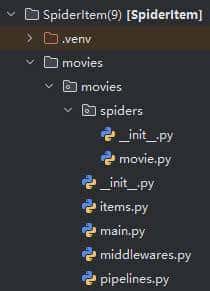
settings.py
DEFAULT_REQUEST_HEADERS = {
   "Accept": "text/html,application/xhtml+xml,application/xml;q=0.9,*/*;q=0.8",
   "Accept-Language": "en",
   "User-Agent":
               "Mozilla/5.0 (Windows NT 10.0; Win64; x64) AppleWebKit/537.36 (KHTML, like Gecko) Chrome/141.0.0.0 Safari/537.36"
}

ITEM_PIPELINES = {
   "movies.pipelines.MoviesPipeline": 300,
}
movie.py
import scrapy
from bs4 import BeautifulSoup
from ..items import MoviesItem

class MovieSpider(scrapy.Spider):
    name = "movie"
    allowed_domains = ["movie.douban.com"]
    base_url ="https://movie.douban.com/top250"
    start_urls = []

    def __init__(self):
        for start in range(0, 250, 25):
            self.start_urls.append(f"{self.base_url}?start={start}")

    def parse(self, response):
        soup = BeautifulSoup(response.text, 'html.parser')
        li_list = soup.select('ol.grid_view li')
        for li in li_list:
            item = MoviesItem()
            rank = li.select_one('.pic em').get_text()
            item['rank']=rank
            title = li.select_one('.hd a').get_text(strip=True, separator=' ')
            title = title.replace('xa0', '')
            item['title']=title
            p_text = li.select_one('.bd p').get_text(strip=True, separator='
')
            p_text = p_text.replace('xa0', '')
            p_parts = p_text.split('
', 1)
            director_actor = p_parts[0]
            year_country_genre = p_parts[1]
            item['director_actor']=director_actor
            item['year_country_genre'] = year_country_genre
            yield item
items.py
# Define here the models for your scraped items
#
# See documentation in:
# https://docs.scrapy.org/en/latest/topics/items.html

import scrapy


class MoviesItem(scrapy.Item):
    # define the fields for your item here like:
    # name = scrapy.Field()
    rank = scrapy.Field()
    title = scrapy.Field()
    director_actor = scrapy.Field()
    year_country_genre = scrapy.Field()
pipelines.py
# Define your item pipelines here
#
# Don't forget to add your pipeline to the ITEM_PIPELINES setting
# See: https://docs.scrapy.org/en/latest/topics/item-pipeline.html


# useful for handling different item types with a single interface
from itemadapter import ItemAdapter


class MoviesPipeline:
    def process_item(self, item, spider):
        print(item['rank'])
        print(item['title'])
        print(item['director_actor'])
        print(item['year_country_genre'])
        print('-'*60)
        return item
main.py
from scrapy import cmdline
cmdline.execute('scrapy crawl movie'.split())
10. 爬虫数据存Excel?
pipelines.py
# Define your item pipelines here
#
# Don't forget to add your pipeline to the ITEM_PIPELINES setting
# See: https://docs.scrapy.org/en/latest/topics/item-pipeline.html


# useful for handling different item types with a single interface
from itemadapter import ItemAdapter
import openpyxl


class MoviesPipeline:
    def open_spider(self, spider):
        self.workbook = openpyxl.Workbook()
        self.worksheet = self.workbook.active
        self.worksheet.title = "电影数据"
        self.worksheet.append(["排名", "标题", "导演与演员", "年份/国家/类型"])
        self.worksheet.column_dimensions["B"].width = 75
        self.worksheet.column_dimensions["C"].width = 80
        self.worksheet.column_dimensions["D"].width = 50

    def process_item(self, item, spider):
        try:
            rank = item.get("rank", "")
            title = item.get("title", "")
            director_actor = item.get("director_actor", "")
            year_country_genre = item.get("year_country_genre", "")
            self.worksheet.append([rank, title, director_actor, year_country_genre])
            return item
        except Exception as e:
            print(f"处理item时出错:{e}")
    def close_spider(self,spider):
        self.workbook.save("电影排行榜数据.xlsx")
        self.workbook.close()
11. Scrapy爬的数据不会存数据库?
pipelines.py
# Define your item pipelines here
#
# Don't forget to add your pipeline to the ITEM_PIPELINES setting
# See: https://docs.scrapy.org/en/latest/topics/item-pipeline.html


# useful for handling different item types with a single interface
from itemadapter import ItemAdapter
import sqlite3


class MoviesPipeline:
    def open_spider(self, spider):
        self.db_path = "movies.db"
        try:
            self.conn = sqlite3.connect(self.db_path, check_same_thread=False)
            self.cursor = self.conn.cursor()
            create_table_sql = """
            CREATE TABLE IF NOT EXISTS movies (
                id INTEGER PRIMARY KEY AUTOINCREMENT,
                rank TEXT,
                title TEXT,
                director_actor TEXT,
                year_country_genre TEXT
            )
            """
            self.cursor.execute(create_table_sql)
            self.conn.commit()
        except sqlite3.Error as e:
            print(f"数据库初始化失败,错误信息:{e}")
        except Exception as e:
            print(f"数据库启动异常,错误信息:{e}")

    def process_item(self, item, spider):
        try:
            rank = item.get("rank", "")
            title = item.get("title", "")
            director_actor = item.get("director_actor", "")
            year_country_genre = item.get("year_country_genre", "")
            insert_sql = """
            INSERT INTO movies (rank, title, director_actor, year_country_genre)
            VALUES (?, ?, ?, ?)
            """
            self.cursor.execute(insert_sql, (rank, title, director_actor, year_country_genre))
            self.conn.commit()
            return item
        except sqlite3.Error as e:
            self.conn.rollback()
            print(f"数据插入失败,错误信息:{e}")
            return item
        except Exception as e:
            self.conn.rollback()
            print(f"处理item时出错:{e}")
            return item

    def close_spider(self, spider):
        try:
            if hasattr(self, "cursor"):
                self.cursor.close()
            if hasattr(self, "conn") and self.conn:
                self.conn.close()
        except sqlite3.Error as e:
            print(f"关闭数据库资源失败,错误信息:{e}")

#python##python编程##网络爬虫##程序员##计算机##人工智能##数据分析#
© 版权声明
文章版权归作者所有,未经允许请勿转载。如内容涉嫌侵权,请在本页底部进入<联系我们>进行举报投诉!
THE END

















暂无评论内容