

很久之写给公司文员使用的文档批量生成PDF的Python小应用,主要为快速的将文件夹内的PPT、EXCEL、WORD生成对应的PDF。
当时刚学Python许多东西是从网上整合的比较乱,大神路过啊,附上源码及成品,给需要到的朋友。
PS:印象中如不能转换好像需要安装有office,成品是写定了为纵向也可以改为横向或者不设置。
下地地址:
下载:
https://wwt.lanzouq.com/iWtIo08fsrod
密码:qzwsa
有图有真像:
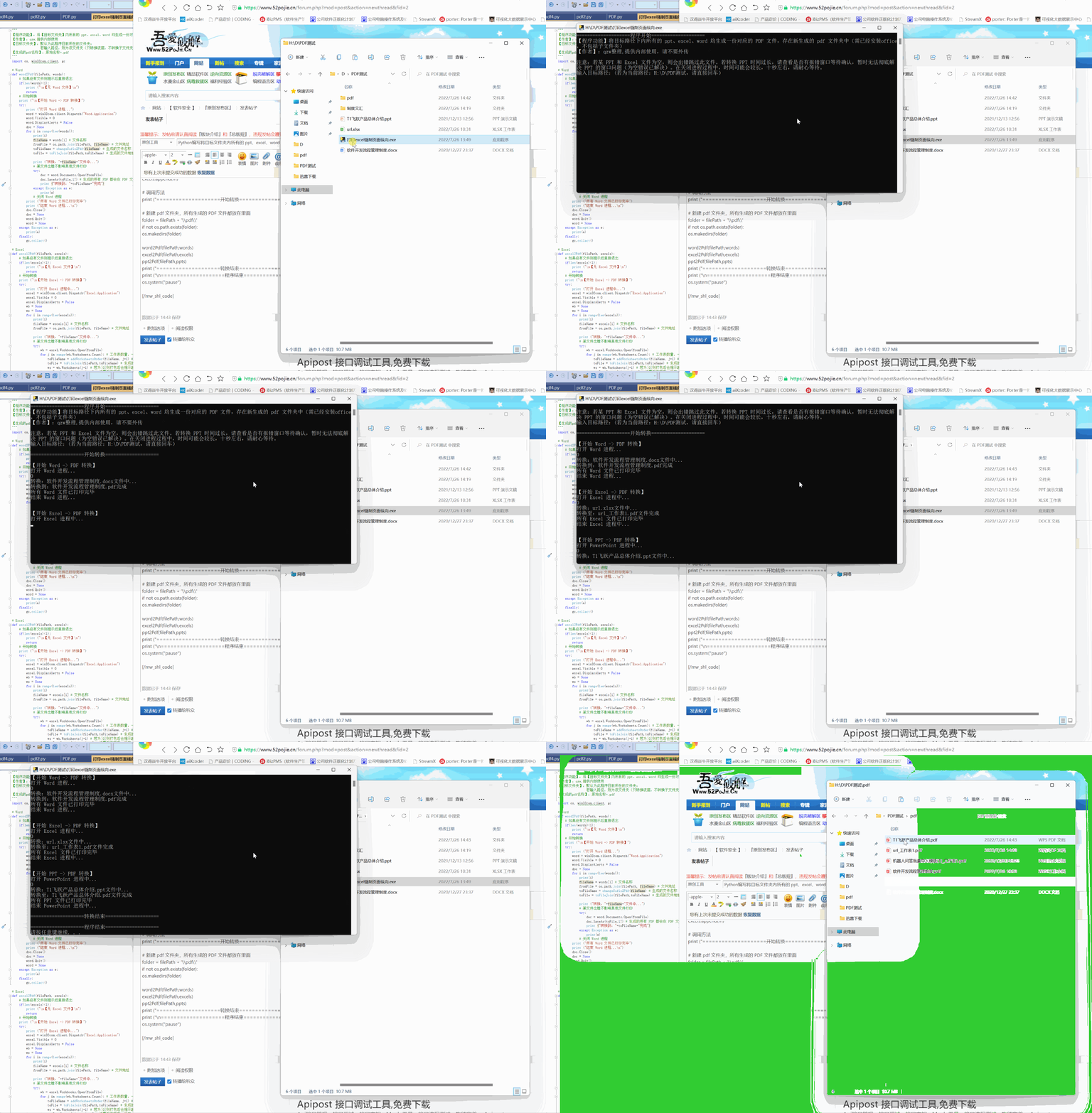
源码如下 :
"""
【程序功能】:将【目标文件夹】内所有的 ppt、excel、word 均生成一份对应的 PDF 文件
【作者】:qzw,提供内部使用
【目标文件夹】:默认为此程序目前所在的文件夹;
                若输入路径,则为该文件夹(只转换该层,不转换子文件夹下内容)
【生成的pdf名称】:原始名称+.pdf
"""
import os, win32com.client, gc

# Word
def word2Pdf(filePath, words):
    # 如果没有文件则提示后直接退出
    if(len(words)<1):
        print ("
【无 Word 文件】
")
        return
    # 开始转换
    print ("
【开始 Word -> PDF 转换】")
    try:
        print ("打开 Word 进程...")
        word = win32com.client.Dispatch("Word.Application")
        word.Visible = 0
        word.DisplayAlerts = False
        doc = None
        for i in range(len(words)):
            print(i)
            fileName = words[i] # 文件名称
            fromFile = os.path.join(filePath, fileName) # 文件地址
            toFileName = changeSufix2Pdf(fileName) # 生成的文件名称
            toFile = toFileJoin(filePath,toFileName) # 生成的文件地址

            print ("转换:"+fileName+"文件中...")
            # 某文件出错不影响其他文件打印
            try:
                doc = word.Documents.Open(fromFile)
                doc.SaveAs(toFile,17) # 生成的所有 PDF 都会在 PDF 文件夹中
                print ("转换到:"+toFileName+"完成")
            except Exception as e:
                print(e)
            # 关闭 Word 进程
        print ("所有 Word 文件已打印完毕")
        print ("结束 Word 进程...
")
        doc.Close()
        doc = None
        word.Quit()
        word = None
    except Exception as e:
        print(e)
    finally:
        gc.collect()

# Excel
def excel2Pdf(filePath, excels):
    # 如果没有文件则提示后直接退出
    if(len(excels)<1):
        print ("
【无 Excel 文件】
")
        return
    # 开始转换
    print ("
【开始 Excel -> PDF 转换】")
    try:
        print ("打开 Excel 进程中...")
        excel = win32com.client.Dispatch("Excel.Application")
        excel.Visible = 0
        excel.DisplayAlerts = False
        wb = None
        ws = None
        for i in range(len(excels)):
            print(i)
            fileName = excels[i] # 文件名称
            fromFile = os.path.join(filePath, fileName) # 文件地址

            print ("转换:"+fileName+"文件中...")
            # 某文件出错不影响其他文件打印
            try:
                wb = excel.Workbooks.Open(fromFile)
                for j in range(wb.Worksheets.Count): # 工作表数量,一个工作簿可能有多张工作表
                    toFileName = addWorksheetsOrder(fileName, j+1) # 生成的文件名称
                    toFile = toFileJoin(filePath,toFileName) # 生成的文件地址
                    ws = wb.Worksheets(j+1) # 若为[0]则打包后会提示越界
                    ws.PageSetup.Orientation=2 # 设置页面方向,纵向=1,横向=2
                    ws.ExportAsFixedFormat(0,toFile) # 每一张都需要打印
                    print ("转换至:"+toFileName+"文件完成")
            except Exception as e:
                print(e)
        # 关闭 Excel 进程
        print ("所有 Excel 文件已打印完毕")
        print ("结束 Excel 进程中...
")
        ws = None
        wb.Close()
        wb = None
        excel.Quit()
        excel = None
    except Exception as e:
        print(e)
    finally:
        gc.collect()

# PPT
def ppt2Pdf(filePath, ppts):
    # 如果没有文件则提示后直接退出
    if(len(ppts)<1):
        print ("
【无 PPT 文件】
")
        return
    # 开始转换
    print ("
【开始 PPT -> PDF 转换】")
    try:
        print ("打开 PowerPoint 进程中...")
        powerpoint = win32com.client.Dispatch("PowerPoint.Application")
        ppt = None
        # 某文件出错不影响其他文件打印

        for i in range(len(ppts)):
            print(i)
            fileName = ppts[i] # 文件名称
            fromFile = os.path.join(filePath, fileName) # 文件地址
            toFileName = changeSufix2Pdf(fileName) # 生成的文件名称
            toFile = toFileJoin(filePath,toFileName) # 生成的文件地址

            print ("转换:"+fileName+"文件中...")
            try:
                ppt = powerpoint.Presentations.Open(fromFile,WithWindow=False)
                if ppt.Slides.Count>0:
                    ppt.SaveAs(toFile, 32) # 如果为空则会跳出提示框(暂时没有找到消除办法)
                    print ("转换至:"+toFileName+"文件完成")
                else:
                    print("(错误,发生意外:此文件为空,跳过此文件)")
            except Exception as e:
                print(e)
        # 关闭 PPT 进程
        print ("所有 PPT 文件已打印完毕")
        print ("结束 PowerPoint 进程中...
")
        ppt.Close()
        ppt = None
        powerpoint.Quit()
        powerpoint = None
    except Exception as e:
        print(e)
    finally:
        gc.collect()

# 修改后缀名
def changeSufix2Pdf(file):
    return file[:file.rfind('.')]+".pdf"
# 添加工作簿序号
def addWorksheetsOrder(file, i):
    return file[:file.rfind('.')]+"_工作表"+str(i)+".pdf"
# 转换地址
def toFileJoin(filePath,file):
    return os.path.join(filePath,'pdf',file[:file.rfind('.')]+".pdf")


# 开始程序
print ("====================程序开始====================")
print ("【程序功能】将目标路径下内所有的 ppt、excel、word 均生成一份对应的 PDF 文件,存在新生成的 pdf 文件夹中(需已经安装office,不包括子文件夹)")
print ("注意:若某 PPT 和 Excel 文件为空,则会出错跳过此文件。若转换 PPT 时间过长,请查看是否有报错窗口等待确认,暂时无法彻底解决 PPT 的窗口问题。在关闭进程过程中,时间可能会较长,十秒左右,请耐心等待。")
filePath = input ("输入目标路径:(若为当前路径:"+os.getcwd()+",请直接回车)
")

# 目标路径,若没有输入路径则为当前路径
if(filePath==""):
    filePath = os.getcwd()

# 将目标文件夹所有文件归类,转换时只打开一个进程
words = []
ppts = []
excels = []

for fn in os.listdir(filePath):
    if fn.endswith(('.doc', 'docx')):
        words.append(fn)
    if fn.endswith(('.ppt', 'pptx')):
        ppts.append(fn)
    if fn.endswith(('.xls', 'xlsx')):
        excels.append(fn)

# 调用方法
print ("====================开始转换====================")

# 新建 pdf 文件夹,所有生成的 PDF 文件都放在里面
folder = filePath + '\pdf\'
if not os.path.exists(folder):
    os.makedirs(folder)

word2Pdf(filePath,words)
excel2Pdf(filePath,excels)
ppt2Pdf(filePath,ppts)
print ("====================转换结束====================")
print ("
====================程序结束====================")
os.system("pause")
© 版权声明
文章版权归作者所有,未经允许请勿转载。如内容涉嫌侵权,请在本页底部进入<联系我们>进行举报投诉!
THE END

















- 最新
- 最热
只看作者