

好久不见啊!这次做了一个好玩的!可以将文件夹里的图片生成一个网页预览,效果这样:

这样:

这样:
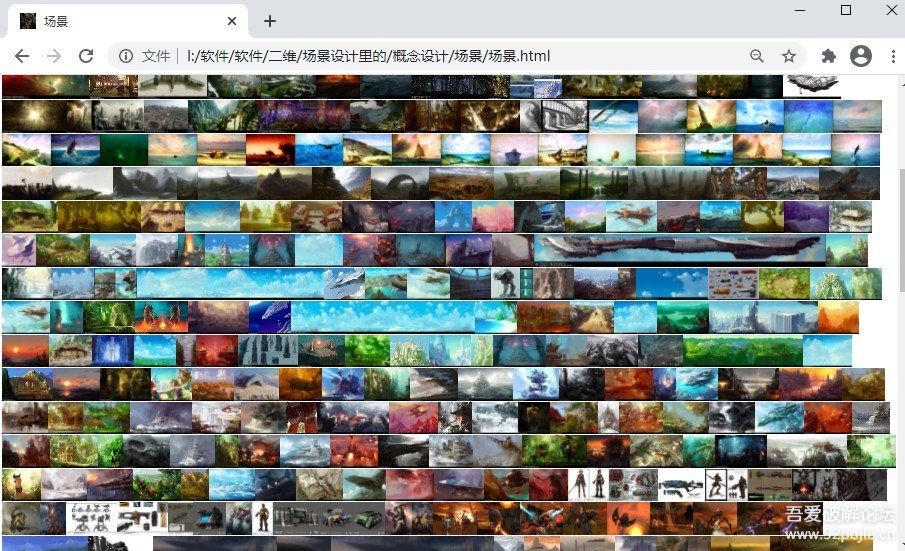
反正我可太喜爱这次做的这个小工具了!
.
电脑里有许多Gif图,
电脑的缩略图只能生成静帧的预览图,而
可以通过这个生成个网页,可以一下子预览全部的动态图了. 当然,也有个弊端,一次加载大量的gif到网页上, 会特别特别占内存,就需要一个大内存.不过这都2021年了.谁还没个十几二十几大几十几的内存嘞?
不过您内存要是真的没多大(列如电脑4g内存,2g内存), 必定慎重加载超多图片!!!
这次的创意. 来自获取了一堆Gif后,懒着懒着突然有的灵感!…这次软件特别好写, 要是有兄台想模仿或者二次创作, 请必定要艾特我呦!!!之前我写的一些原创, 有些被人模仿去了, 然没见艾特我的就很郁闷..有艾特的我的就超开心!
这回提供Python的源代码和生成好的exe文件. exe文件请到最下面的蓝奏云下载.
import os
import traceback

def makeweb(xpath):
    filespath=""
    contentfiles=[]
    try:
        list_dirs = os.walk(xpath)
        for root, _dirs, files in list_dirs:
            for f in files:
                f=f.lower()
                bool1 = f.endswith(".gif")
                bool2 = f.endswith(".jpg")
                bool3 = f.endswith(".png")
                bool4 = f.endswith(".bmp")

                if bool1 or bool2 or bool3 or bool4:
                    shortpath=root[len(xpath)+1:len(root)]
                    if len(shortpath)>0:
                        filespath=shortpath+"\"+f
                        contentfiles.append(filespath)
                    else:
                        filespath=f
                        contentfiles.append(filespath)

        if len(contentfiles)>0:

            effecttype = os.path.basename(xpath)#带后缀的文件名
            #effecttype="火焰"
            filename = xpath+'\'+effecttype+'.html'
            with open(filename, 'w',encoding="utf-8") as file_object:
                file_object.write("<!DOCTYPE html>
")
                file_object.write("<html>
")
                file_object.write("<title>"+effecttype+"</title>
")
                file_object.write("<style type="text/css">.left{float: left;}.pic {/*max-width: 300px;height:auto;*/max-height: 130px;width: auto;} </style>
")
                file_object.write("<head><link rel="icon" type="image/x-icon" href=""+contentfiles[0]+"" /></head>
")
                file_object.write("<body>
")
                file_object.write("<h5>可以按住Ctrl + 鼠标滚轮 放大缩小页面,Ctrl + 0 重置页面</h5>
")
                file_object.write("<h5>"+effecttype+"分类</h5>
")
                for i in contentfiles:
                    file_object.write("<div class="left"><a href=""+i+"" target="_blank"><img class="pic" src=""+i+"" ></a></div>
")
                file_object.write("</body>
")
                file_object.write("</html>
")

        else:
            print("目标文件夹里没有图片文件(bmp,jpg,png,gif),请选择一个有这些图片类型的文件夹后重新生成网页")
            return False
        totalpath=xpath+"\"+effecttype
        totalpath=totalpath.replace("\\","\")
        print(totalpath+".html 网页制作完成")
        os.system("explorer /select, "+'"'+filename+'"')
    except Exception as _ex:
        print("程序出现错误,请把下面的错误复制给制作者用于修改,谢谢!")
        print("--------------------------------------------------------")
        print('traceback.format_exc():
%s' % traceback.format_exc())
        print("--------------------------------------------------------")
        print(effecttype+"网页制作失败,请联系制作者")

if __name__ == '__main__':
    print("图片生成网页预览(gif,png,bmp,jpg)  论坛 .cn")
    path=input("请粘贴或者拖拽一个图片文件夹的路径,用来生成网页:
")
    while True:

        path=path.replace(""", "")
        if os.path.exists(path):
            bool1 = path.endswith("\")
            if bool1:
                path=path.strip('\')
            makeweb(path)
        else:
            print("目标文件夹不存在,请重新选择一个有效的文件夹来生成图片网页")
        path=input("本次操作完毕,继续操作请再次粘贴或者拖拽一个图片文件夹的路径,结束请直接关闭本窗口:
")
蓝奏云:
https://wwe.lanzoui.com/b01u4u4wh
密码:a1rm
© 版权声明
文章版权归作者所有,未经允许请勿转载。如内容涉嫌侵权,请在本页底部进入<联系我们>进行举报投诉!
THE END


















- 最新
- 最热
只看作者