

个人密码管理小工具
说明:
搜索论坛的大部分密码管理工具是由易语言写的,电脑有清毒和沙盘对易语言程序不是很友善.
老是忘记自己的某账户密码,想在电脑上记下自己的帐号密码方便查询.
很久学习的python 运用Qt5写的程序 忘的很透彻,轻喷.
附上代码:
import sys
import os
import win32con, win32api

from PyQt5.QtWidgets import (QWidget,QPushButton,QLineEdit,QLabel,
                             QVBoxLayout,QHBoxLayout,QApplication,QMessageBox)

b = os.getcwd() + '\password\'
name = ['知乎','QQ','学信网','email','52pj','新浪微博','交警12123',
        'google帐号','微软帐号','appleID']
class Windows(QWidget):
    def __init__(self):
        super().__init__()
        self.passCheck()
        self.resize(300, 150)
        self.setFixedSize(self.width(), self.height())#窗口禁止拉伸
        self.setWindowTitle('Jevor密码本')
        self.show()
    def passCheck(self):
        # 标签内容
        userLabel = QLabel('User:')
        userLabel.setFixedWidth(35)
        passwordLabel = QLabel('psd:')
        passwordLabel.setFixedWidth(35)
        #输入框
        self.userLineEdit = QLineEdit()
        self.userLineEdit.setPlaceholderText("请输入ID")
        self.passwordLinEdit = QLineEdit()
        self.passwordLinEdit.setPlaceholderText("请输入密码")
        self.passwordLinEdit.setEchoMode(QLineEdit.Password)#密码输入框加密
        loginButton = QPushButton('登录')
        clearButton = QPushButton('隐藏')
        h1=QHBoxLayout()
        h1.addWidget(userLabel)
        h1.addWidget(self.userLineEdit)
        h2=QHBoxLayout()
        h2.addWidget(passwordLabel)
        h2.addWidget(self.passwordLinEdit)
        mainLayout = QVBoxLayout(self)
        mainLayout.addLayout(h1)
        mainLayout.addLayout(h2)
        mainLayout.addWidget(loginButton)
        mainLayout.addWidget(clearButton)
        clearButton.clicked.connect(self.clearlot)
        loginButton.clicked.connect(self.loginslot)

    def loginslot(self):
        user = self.userLineEdit.text()
        #print(user)
        password = self.passwordLinEdit.text()
        #print(password)
        if user =='admin' and password =='jevor':
            QMessageBox.about(self, '提示', '成功')
            if not os.path.exists(b):
                os.makedirs(b)
            for file in name:
                open(b + str(file) + '.txt', "a")
            win32api.SetFileAttributes(b, win32con.FILE_ATTRIBUTE_NORMAL)
        elif user == '' or password =='':
            QMessageBox.about(self, '提示', '未输入帐号或密码')
        else:
            QMessageBox.about(self, '提示', '错误')

    def clearlot(self):
        user = self.userLineEdit.text()
        password = self.passwordLinEdit.text()
        if user == 'admin' and password == 'jevor':
            QMessageBox.about(self, '提示', '成功')
            win32api.SetFileAttributes(b, win32con.FILE_ATTRIBUTE_HIDDEN)
        elif user == '' or password == '':
            QMessageBox.about(self, '提示', '未输入帐号或密码')
        else:
            QMessageBox.about(self, '提示', '错误')

app = QApplication(sys.argv)
login = Windows()
sys.exit(app.exec_())
程序界面:
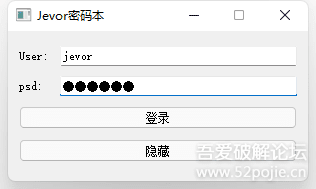
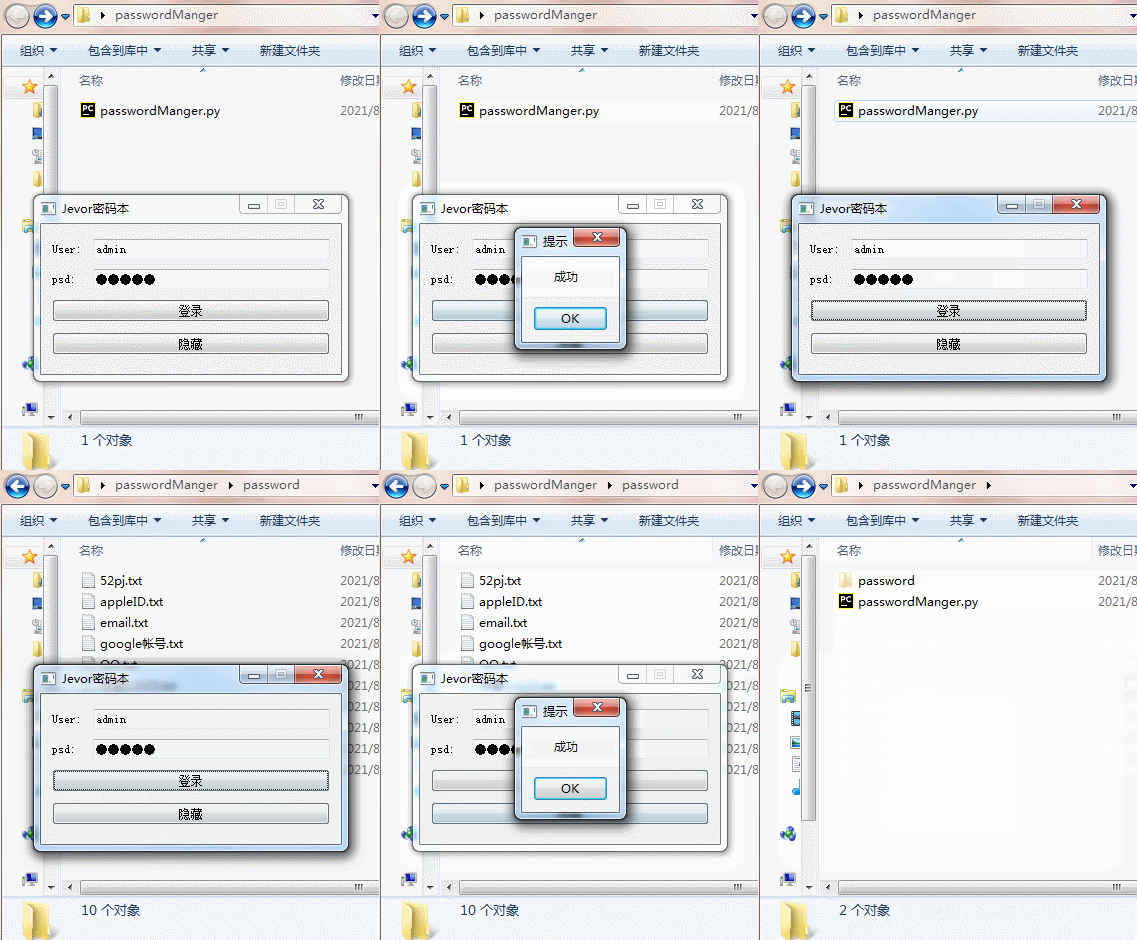
大致测试:
程序说明:
登录成功 可实现创建/显示 密码文件夹,修改文本内容第二次打开不会被清除,二次修改保留且覆盖.
登录成功 可实现隐藏 密码文件夹, 就是单纯的文件夹隐藏, 再次点击登录可显示.
后期有空会补上数据库版本…
程序和源码下载地址[蓝奏云]:
https://wwe.lanzoui.com/iMovKswmeij
有些情况打开不了可以把地址lanzouy后面的s去掉 和前面www补上即可
© 版权声明
文章版权归作者所有,未经允许请勿转载。如内容涉嫌侵权,请在本页底部进入<联系我们>进行举报投诉!
THE END




















- 最新
- 最热
只看作者