

mysql集成Qwen大模型MCP计算
题目分析
步骤 1:在 MySQL 中构建核素半衰期数据库
1.1 数据库设计
1.2 安装和设置 MySQL
1.3 创建数据库和表
步骤 2:构建放射性活度计算函数
2.1 依赖库
2.2 Python 函数
2.3 函数说明
步骤 3:修复 MySQL 访问权限
步骤 4:代码实践
用户输入指导
测试用例
测试 1:210Pb(题目用例)
测试 2:Cs-137
测试 3:不存在的核素
测试 4:无效输入
添加新核素
步骤5:引入mcp
代码概述
主要函数分析
关键变量
功能分析
步骤6:实战MCP+Qwen3
安装环境配置
配置 SQLite
MCP+核素SQL+计算模块
结语
题目分析
现有一放射性样品含有5mg 210 P b ^{210}Pb 210Pb ,请计算10年后该样品的放射性活度。
已知:
核素: 210 P b ^{210}Pb 210Pb (铅-210)。
初始质量:5 mg。
时间:10年。
目标:计算10年后放射性活度(单位:Bq,贝克勒尔)。
公式:
放射性活度: A = A 0 ⋅ ( 1 2 ) t T 1 / 2 A = A_0 cdot left(frac{1}{2}
ight)^{frac{t}{T_{1/2}}} A=A0⋅(21)T1/2t。
A 0 A_0 A0:初始活度(Bq)。
A A A:时间 t t t 后的活度(Bq)。
T 1 / 2 T_{1/2} T1/2:半衰期(年)。
t t t:时间(年)。
初始活度 A 0 A_0 A0:
摩尔数: n = m M n = frac{m}{M} n=Mm, m m m 为质量(g), M M M 为摩尔质量(g/mol)。
原子数: N = n ⋅ N A N = n cdot N_A N=n⋅NA, N A = 6.022 × 1 0 23 mol − 1 N_A = 6.022 imes 10^{23} , ext{mol}^{-1} NA=6.022×10²³mol−1(阿伏伽德罗常数)。
衰变常数: λ = ln ( 2 ) T 1 / 2 lambda = frac{ln(2)}{T_{1/2}} λ=T1/2ln(2)(s⁻¹,用于 Bq)。
初始活度: A 0 = λ ⋅ N A_0 = lambda cdot N A0=λ⋅N(Bq)。
通用性:数据库和函数需支持任意核素,通过添加数据库记录实现。
单位:
质量:mg(转换为 g)。
时间和半衰期:年。
活度:Bq(1 Bq = 1次衰变/秒)。
步骤 1:在 MySQL 中构建核素半衰期数据库
我们将创建一个 MySQL 数据库,存储核素参数,确保数据质量(IAEA 文档第4.4节)并便于与 Python 集成。
1.1 数据库设计
数据库:nuclear_decay
表:Nuclide
字段:
NuclideID:主键,自增整数。
Name:核素名称(如 “Pb-210”)。
HalfLife:半衰期(年)。
MolarMass:摩尔质量(g/mol)。
DecayConstant:衰变常数(年⁻¹,预计算为 λ = ln ( 2 ) T 1 / 2 lambda = frac{ln(2)}{T_{1/2}} λ=T1/2ln(2))。
优势:
结构化存储,优化快速读取(MySQL 优势)。
支持多智能体查询(如 SPADE 框架)。
符合 IAEA 第4.5节(数据管理实践)对标准化格式的要求。
1.2 安装和设置 MySQL
工具:MySQL Community Server(免费)。
安装:
Windows/Mac:从 MySQL 官网 下载,按向导安装。
Linux:运行 sudo apt-get install mysql-server(Ubuntu)。
验证:终端运行 mysql –version。
GUI 工具:DBeaver或 MySQL Workbench,用于可视化管理。
启动 MySQL:
Linux:sudo service mysql start。如图所示:
![图片[1] - mysql集成Qwen大模型MCP计算【附实战代码】 - 宋马](https://pic.songma.com/blogimg/20250516/31652383e1ed4ae98acd9c8c49e152ba.png)
Windows/Mac:自动启动或通过 MySQL Workbench 启动。
登录:
mysql -u root -p
输入安装时设置的密码。
1.3 创建数据库和表
创建数据库:
CREATE DATABASE nuclear_decay;
USE nuclear_decay;
创建表:
CREATE TABLE Nuclide (
    NuclideID INT AUTO_INCREMENT PRIMARY KEY,
    Name VARCHAR(50) NOT NULL,
    HalfLife FLOAT NOT NULL, -- 单位:年
    MolarMass FLOAT NOT NULL, -- 单位:g/mol
    DecayConstant FLOAT -- 单位:1/年
);
说明:MySQL 使用 AUTO_INCREMENT 表示自增主键。
1.4 插入数据
210Pb 及其他核素数据:
210Pb:半衰期 22.3 年,摩尔质量 210 g/mol。
Cs-137:半衰期 30.17 年,摩尔质量 137 g/mol。
I-131:半衰期 8.02 天 ≈ 0.02197 年,摩尔质量 131 g/mol。
INSERT INTO Nuclide (Name, HalfLife, MolarMass, DecayConstant)
VALUES
    ('Pb-210', 22.3, 210, 0.03109), -- LN(2)/22.3 ≈ 0.03109
    ('Cs-137', 30.17, 137, 0.02299), -- LN(2)/30.17 ≈ 0.02299
    ('I-131', 0.02197, 131, 31.58); -- LN(2)/0.02197 ≈ 31.58
说明:MySQL 支持 LN() 计算自然对数。若不支持,可在插入前手动计算衰变常数。
1.5 数据验证
查询:
SELECT * FROM Nuclide WHERE Name = 'Pb-210';
输出:
NuclideID | Name    | HalfLife | MolarMass | DecayConstant
----------+---------+----------+-----------+---------------
1         | Pb-210  | 22.3     | 210       | 0.03109

步骤 2:构建放射性活度计算函数
开发一个通用的 Python 函数,从 MySQL 数据库获取核素参数,计算活度。
2.1 依赖库
库:
mysql-connector-python:连接 MySQL。
numpy:科学计算。
安装:
pip install mysql-connector-python
2.2 Python 函数
import mysql.connector
import numpy as np

def calculate_activity(nuclide_name, initial_mass_mg, time_years):
    """
    计算指定核素在给定时间后的放射性活度。

    参数:
        nuclide_name (str): 核素名称,如 'Pb-210'。
        initial_mass_mg (float): 初始质量(mg)。
        time_years (float): 时间(年)。

    返回:
        float: 活度(Bq),或 None(若出错)。
    """
    try:
        # 连接 MySQL 数据库
        conn = mysql.connector.connect(
            database="nuclear_decay",
            user="root",  # 替换为您的 MySQL 用户名
            password="your_password",  # 替换为您的 MySQL 密码
            host="localhost"
        )
        cursor = conn.cursor()

        # 查询核素参数
        cursor.execute("SELECT HalfLife, MolarMass, DecayConstant FROM Nuclide WHERE Name = %s", (nuclide_name,))
        result = cursor.fetchone()
        if not result:
            print(f"错误:核素 {
              nuclide_name} 不在数据库中!请检查核素名称(如 'Pb-210'、'Cs-137')。")
            return None

        half_life, molar_mass, decay_constant = result

        # 常数
        N_A = 6.022e23  # 阿伏伽德罗常数 (1/mol)
        seconds_per_year = 365.25 * 24 * 3600  # 一年秒数

        # 计算初始活度
        mass_g = initial_mass_mg / 1000  # mg 转换为 g
        moles = mass_g / molar_mass  # 摩尔数
        atoms = moles * N_A  # 原子数
        initial_activity = decay_constant * atoms / seconds_per_year  # A_0 (Bq)

        # 计算时间 t 后的活度
        activity = initial_activity * (0.5 ** (time_years / half_life))

        return activity

    except Exception as e:
        print(f"错误:{
              e}")
        return None

    finally:
        if cursor:
            cursor.close()
        if conn:
            conn.close()

def main():
    """
    主函数,指导用户输入并调用计算函数。
    """
    print("=== 放射性活度计算器 ===")
    print("请按以下格式输入数据:")
    print("- 核素名称:如 'Pb-210'、'Cs-137'、'I-131'(注意大小写和连字符)。")
    print("- 初始质量:以毫克(mg)为单位,例如 5(表示 5 mg)。")
    print("- 时间:以年为单位,例如 10(表示 10 年)。")
    print("若核素不在数据库中,将显示错误提示。")
    print("========================
")

    try:
        # 获取用户输入
        nuclide_name = input("请输入核素名称(如 'Pb-210'):").strip()
        initial_mass_mg = float(input("请输入初始质量(mg):"))
        time_years = float(input("请输入时间(年):"))

        # 验证输入
        if initial_mass_mg < 0 or time_years < 0:
            print("错误:质量和时间不能为负数!")
            return

        # 调用计算函数
        activity = calculate_activity(nuclide_name, initial_mass_mg, time_years)
        if activity:
            print(f"{
              time_years}年后 {
              nuclide_name} 的放射性活度:{
              activity:.2e} Bq")

    except ValueError as e:
        print("错误:请输入有效的数字(质量和时间需为数字)!")
    except Exception as e:
        print(f"错误:{
              e}")

if __name__ == "__main__":
    main()
2.3 函数说明
用户输入功能:
添加 main() 函数,使用 input() 获取用户输入的核素名称、初始质量和时间。
提供详细的输入指导,说明格式(如核素名称需为 ‘Pb-210’,大小写敏感)。
使用 strip() 去除输入中的多余空格,增强鲁棒性。
输入验证:
检查质量和时间是否为负数,提示错误。
使用 try-except 捕获无效数字输入(如输入字母),显示友好提示。
错误处理:
如果核素不在数据库中(cursor.fetchone() 返回 None),显示“核素 {nuclide_name} 不在数据库中!”并建议检查名称。
保留原有的异常处理,打印其他错误(如数据库连接失败)。
输出格式:
成功计算时,显示“{时间}年后 {核素} 的放射性活度:{活度} Bq”,保留科学计数法(.2e)。
失败时,提供清晰的错误提示。
步骤 3:修复 MySQL 访问权限
有时会遇到错误
错误:cannot access local variable 'cursor' where it is not associated with a value
这是因为MySQL 8.0 默认对 root 用户使用 auth_socket 插件(基于系统用户认证)或 caching_sha2_password 插件,可能导致 root@localhost 无法通过密码登录。
解决方案——修复 MySQL 访问权限
我们需要确保程序能以 root 用户和密码 连接 MySQL,并检查 root 用户的认证插件。
登录 MySQL:
mysql -u root -p
输入密码 ,确认登录成功。
检查 root 用户的认证插件:
SELECT user, host, plugin FROM mysql.user WHERE user = 'root';
预期输出:
+------+-----------+-----------------------+
| user | host      | plugin                |
+------+-----------+-----------------------+
| root | localhost | auth_socket |
+------+-----------+-----------------------+
如果需要修改认证插件,执行:
ALTER USER 'root'@'localhost' IDENTIFIED WITH mysql_native_password BY '1'; FLUSH PRIVILEGES;
这将设置 root@localhost 使用密码 和 mysql_native_password 插件。
再次运行以下命令:
SELECT user, host, plugin FROM mysql.user WHERE user = 'root';
可以看到:
+------+-----------+-----------------------+
| user | host      | plugin                |
+------+-----------+-----------------------+
| root | localhost | mysql_native_password |
+------+-----------+-----------------------+
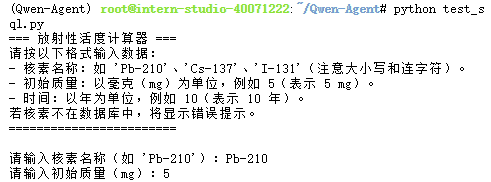
步骤 4:代码实践
用户输入指导
运行程序后,用户将看到以下提示:
=== 放射性活度计算器 ===
请按以下格式输入数据:
- 核素名称:如 'Pb-210'、'Cs-137'、'I-131'(注意大小写和连字符)。
- 初始质量:以毫克(mg)为单位,例如 5(表示 5 mg)。
- 时间:以年为单位,例如 10(表示 10 年)。
若核素不在数据库中,将显示错误提示。
========================
用户需要:
核素名称:输入数据库中存在的核素名称,如 ‘Pb-210’(大小写敏感,需包含连字符)。可通过 DBeaver 或 SQL 查询数据库查看可用核素:
SELECT Name FROM Nuclide;
初始质量:输入正数(如 5 表示 5 mg)。
时间:输入非负数(如 10 表示 10 年)。
若输入核素不在数据库中(如 ‘U-235’ 未插入),程序会提示:
错误:核素 U-235 不在数据库中!请检查核素名称(如 'Pb-210'、'Cs-137')。
测试用例
假设数据库 nuclear_decay 的 Nuclide 表包含:
NuclideID | Name    | HalfLife | MolarMass | DecayConstant
----------+---------+----------+-----------+---------------
1         | Pb-210  | 22.3     | 210       | 0.03109
2         | Cs-137  | 30.17    | 137       | 0.02299
3         | I-131   | 0.02197  | 131       | 31.58
测试 1:210Pb(题目用例)
输入:
请输入核素名称(如 'Pb-210'):Pb-210
请输入初始质量(mg):5
请输入时间(年):10
输出:
10年后 Pb-210 的放射性活度:1.03e+10 Bq

与理论计算一致( 1.04 × 1 0 10 Bq 1.04 imes 10^{10} , ext{Bq} 1.04×10¹⁰Bq)。
测试 2:Cs-137

与理论计算一致(约 1.726 × 1 0 10 Bq 1.726 imes 10^{10} , ext{Bq} 1.726×10¹⁰Bq)。
测试 3:不存在的核素

验证:正确提示核素不存在。
测试 4:无效输入
验证:正确捕获负数输入。
添加新核素
示例:添加 U-238:
INSERT INTO Nuclide (Name, HalfLife, MolarMass, DecayConstant)
VALUES ('U-238', 4.468e9, 238, 1.551e-10); -- LN(2)/4.468e9 ≈ 1.551e-10
后续步骤一样。
步骤5:引入mcp
Qwen-Agent官方assistant_mcp_sqlite_bot.py代码如下:
"""A sqlite database assistant implemented by assistant"""

import os
import asyncio
from typing import Optional

from qwen_agent.agents import Assistant
from qwen_agent.gui import WebUI

ROOT_RESOURCE = os.path.join(os.path.dirname(__file__), 'resource')


def init_agent_service():
    llm_cfg = {
            'model': 'qwen-max'}
    system = ('你扮演一个数据库助手,你具有查询数据库的能力')
    tools = [{

        "mcpServers": {

            "sqlite" : {

                "command": "uvx",
                "args": [
                    "mcp-server-sqlite",
                    "--db-path",
                    "test.db"
                ]
            }
        }
    }]
    bot = Assistant(
        llm=llm_cfg,
        name='数据库助手',
        description='数据库查询',
        system_message=system,
        function_list=tools,
    )

    return bot


def test(query='数据库里有几张表', file: Optional[str] = os.path.join(ROOT_RESOURCE, 'poem.pdf')):
    # Define the agent
    bot = init_agent_service()

    # Chat
    messages = []

    if not file:
        messages.append({
            'role': 'user', 'content': query})
    else:
        messages.append({
            'role': 'user', 'content': [{
            'text': query}, {
            'file': file}]})

    for response in bot.run(messages):
        print('bot response:', response)


def app_tui():
    # Define the agent
    bot = init_agent_service()

    # Chat
    messages = []
    while True:
        # Query example: 数据库里有几张表
        query = input('user question: ')
        # File example: resource/poem.pdf
        file = input('file url (press enter if no file): ').strip()
        if not query:
            print('user question cannot be empty!')
            continue
        if not file:
            messages.append({
            'role': 'user', 'content': query})
        else:
            messages.append({
            'role': 'user', 'content': [{
            'text': query}, {
            'file': file}]})

        response = []
        for response in bot.run(messages):
            print('bot response:', response)
        messages.extend(response)


def app_gui():
    # Define the agent
    bot = init_agent_service()
    chatbot_config = {

        'prompt.suggestions': [
            '数据库里有几张表',
            '创建一个学生表包括学生的姓名、年龄',
            '增加一个学生名字叫韩梅梅,今年6岁',
        ]
    }
    WebUI(
        bot,
        chatbot_config=chatbot_config,
    ).run()


if __name__ == '__main__':
    # test()
    # app_tui()
    app_gui()
代码概述
功能:实现一个 SQLite 数据库助手,通过 Qwen-Agent 和 MCP(Model Context Protocol)支持自然语言查询(NL2SQL),例如“数据库里有几张表”或“创建一个学生表”。支持终端界面(TUI)、Gradio 界面(GUI),并可处理文件输入(如 PDF)。
核心组件:
Qwen-Agent:解析自然语言,生成 SQL 或调用 MCP 工具。
MCP Server:使用 mcp-server-sqlite 处理 SQLite 数据库操作。
Gradio:提供 Web 界面。
主要函数分析
init_agent_service():
功能:初始化 Qwen-Agent,配置大模型(qwen-max)、系统提示和 MCP 工具。
配置:
llm_cfg:指定模型为 qwen-max,未设置 model_server 和 api_key(默认使用 DashScope 或环境变量 DASHSCOPE_API_KEY)。
system:定义助手角色为“数据库助手”,提示模型处理数据库查询。
tools:配置 MCP 服务器,使用 mcp-server-sqlite 连接 test.db。
bot:创建 Assistant 实例,绑定模型、提示和工具。
返回值:配置好的 Assistant 对象。
def init_agent_service():
    llm_cfg = {
            'model': 'qwen-max'}
    system = ('你扮演一个数据库助手,你具有查询数据库的能力')
    tools = [{

        "mcpServers": {

            "sqlite" : {

                "command": "uvx",
                "args": [
                    "mcp-server-sqlite",
                    "--db-path",
                    "test.db"
                ]
            }
        }
    }]
    bot = Assistant(
        llm=llm_cfg,
        name='数据库助手',
        description='数据库查询',
        system_message=system,
        function_list=tools,
    )

    return bot
test(query, file):
功能:测试助手,接受查询(如“数据库里有几张表”)和可选文件(如 poem.pdf)。
逻辑:
调用 init_agent_service() 创建助手。
构造消息(messages),支持纯文本或文本+文件。
调用 bot.run(messages),打印响应。
用途:快速调试。
def test(query='数据库里有几张表', file: Optional[str] = os.path.join(ROOT_RESOURCE, 'poem.pdf')):
    # Define the agent
    bot = init_agent_service()

    # Chat
    messages = []

    if not file:
        messages.append({
            'role': 'user', 'content': query})
    else:
        messages.append({
            'role': 'user', 'content': [{
            'text': query}, {
            'file': file}]})

    for response in bot.run(messages):
        print('bot response:', response)
app_tui():
功能:提供终端界面(TUI),用户输入查询和文件路径,循环处理交互。
逻辑:
提示用户输入查询和文件(可选)。
构造消息,调用 bot.run(messages),打印响应并保存对话历史。
支持退出(输入空查询提示错误)。
用途:命令行交互。
def app_tui():
    # Define the agent
    bot = init_agent_service()

    # Chat
    messages = []
    while True:
        # Query example: 数据库里有几张表
        query = input('user question: ')
        # File example: resource/poem.pdf
        file = input('file url (press enter if no file): ').strip()
        if not query:
            print('user question cannot be empty!')
            continue
        if not file:
            messages.append({
            'role': 'user', 'content': query})
        else:
            messages.append({
            'role': 'user', 'content': [{
            'text': query}, {
            'file': file}]})

        response = []
        for response in bot.run(messages):
            print('bot response:', response)
        messages.extend(response)
app_gui():
功能:提供 Gradio Web 界面,支持自然语言查询和预设建议。
配置:
chatbot_config:预设查询建议(如“数据库里有几张表”)。
使用 WebUI 启动 Gradio 界面(默认 http://localhost:7860)。
用途:用户友好的 Web 交互。
def app_gui():
    # Define the agent
    bot = init_agent_service()
    chatbot_config = {

        'prompt.suggestions': [
            '数据库里有几张表',
            '创建一个学生表包括学生的姓名、年龄',
            '增加一个学生名字叫韩梅梅,今年6岁',
        ]
    }
    WebUI(
        bot,
        chatbot_config=chatbot_config,
    ).run()
main:
默认运行 app_gui(),可切换为 test() 或 app_tui()。
if __name__ == '__main__':
    # test()
    # app_tui()
    app_gui()
关键变量
ROOT_RESOURCE:指向 resource 目录(存放文件,如 poem.pdf)。
llm_cfg:模型配置,未明确服务器地址,可能依赖环境变量。
tools:MCP 工具配置,绑定 mcp-server-sqlite 和 test.db。
chatbot_config:Gradio 界面的预设查询建议。
功能分析
自然语言查询(NL2SQL):
Qwen-Agent 解析自然语言(如“数据库里有几张表”),生成 SQL(如 SELECT name FROM sqlite_master WHERE type=‘table’)。
MCP 服务器(mcp-server-sqlite)执行 SQL,返回结果。
文件处理:
支持上传文件(如 PDF),Qwen-Agent 可提取文本并结合查询处理。
示例:上传 poem.pdf,查询“文件中提到的人名”。
交互方式:
终端(app_tui):适合开发调试。
Gradio(app_gui):适合非技术用户,提供建议查询。
数据库:
SQLite(test.db):轻量,适合开发测试。
未指定 schema,假设通用表(如学生表:name, age)。
步骤6:实战MCP+Qwen3
安装环境配置
apt update
apt upgrade -y
apt install -y python3 python3-pip python3-venv git sqlite3 curl
curl -LsSf https://astral.sh/uv/install.sh | sh
pip install starlette anyio
pip install pydantic pydantic-settings
验证安装环境:
python3 --version  # 3.10+
uv --version       # 0.4.18+
git --version
sqlite3 --version
有版本号说明一切正常。
配置 SQLite
创建 nuclear_decay.db
sqlite3 nuclear_decay.db
再输入:
CREATE TABLE Nuclide (
    NuclideID INTEGER PRIMARY KEY AUTOINCREMENT,
    Name TEXT NOT NULL,
    HalfLife REAL NOT NULL,
    MolarMass REAL NOT NULL,
    DecayConstant REAL
);
INSERT INTO Nuclide (Name, HalfLife, MolarMass, DecayConstant) VALUES
    ('Pb-210', 22.3, 210, 0.03109),
    ('Cs-137', 30.17, 137, 0.02299),
    ('I-131', 0.02197, 131, 31.58);
.exit
验证创建成功
![图片[2] - mysql集成Qwen大模型MCP计算【附实战代码】 - 宋马](https://pic.songma.com/blogimg/20250516/7e530b6ef07c4b25b212890311486a8d.png)
设置文件权限:
chmod 600 nuclear_decay.db
ls -l nuclear_decay.db
输出
-rw------- 1 root root 12288 May 7 13:21 nuclear_decay.db
说明创立成功
1.7 准备资源目录
touch resource/.placeholder
1.8 移动数据库
mv ~/nuclear_decay.db .
ls -l nuclear_decay.db
配置api
export DASHSCOPE_API_KEY="your_api_key"
MCP+核素SQL+计算模块
测试能不能跑通
import os
import sqlite3
import json5
import json
import numpy as np
from typing import Union, Dict, Optional
from qwen_agent.agents import Assistant
from qwen_agent.tools.base import BaseTool, register_tool
from qwen_agent.gui import WebUI
import traceback

ROOT_RESOURCE = os.path.join(os.path.dirname(__file__), 'resource')

@register_tool('query_nuclide')
class QueryNuclide(BaseTool):
    description = '执行 SQLite 查询核素数据库'
    parameters = [
        {

            'name': 'query',
            'type': 'string',
            'description': 'SQL 查询语句',
            'required': True
        }
    ]

    def __init__(self, cfg: Optional[Dict] = None):
        super().__init__(cfg)
        self.db_path = 'nuclear_decay.db'

    def call(self, params: Union[str, dict], **kwargs) -> str:
        params = self._verify_json_format_args(params)
        query = params['query']
        try:
            conn = sqlite3.connect(self.db_path)
            cursor = conn.cursor()
            cursor.execute(query)
            results = cursor.fetchall()
            if not results:
                return json.dumps({
            "result": "查询无结果"})
            return json.dumps({
            "result": results})
        except Exception as e:
            return json.dumps({
            "error": f"查询错误:{str(e)}"})
        finally:
            conn.close()

@register_tool('calculate_activity')
class CalculateActivity(BaseTool):
    description = '计算核素在给定时间后的放射性活度'
    parameters = [
        {

            'name': 'nuclide_name',
            'type': 'string',
            'description': '核素名称,如 Pb-210',
            'required': True
        },
        {

            'name': 'initial_mass_mg',
            'type': 'number',
            'description': '初始质量(mg)',
            'required': True
        },
        {

            'name': 'time_years',
            'type': 'number',
            'description': '时间(年)',
            'required': True
        }
    ]

    def __init__(self, cfg: Optional[Dict] = None):
        super().__init__(cfg)
        self.db_path = 'nuclear_decay.db'

    def call(self, params: Union[str, dict], **kwargs) -> str:
        params = self._verify_json_format_args(params)
        nuclide_name = params['nuclide_name']
        initial_mass_mg = params['initial_mass_mg']
        time_years = params['time_years']
        try:
            conn = sqlite3.connect(self.db_path)
            cursor = conn.cursor()
            cursor.execute("SELECT HalfLife, MolarMass, DecayConstant FROM Nuclide WHERE Name = ?", (nuclide_name,))
            result = cursor.fetchone()
            if not result:
                return json.dumps({
            "error": f"核素 {nuclide_name} 不在数据库中!"})
            half_life, molar_mass, decay_constant = result
        except Exception as e:
            return json.dumps({
            "error": f"数据库错误:{str(e)}"})
        finally:
            conn.close()

        N_A = 6.022e23
        seconds_per_year = 365.25 * 24 * 3600
        mass_g = initial_mass_mg / 1000
        moles = mass_g / molar_mass
        atoms = moles * N_A
        initial_activity = decay_constant * atoms / seconds_per_year
        activity = initial_activity * (0.5 ** (time_years / half_life))

        return json.dumps({
            "result": f"{time_years}年后 {nuclide_name} 的放射性活度:{activity:.2e} Bq"})

def init_agent_service():
    llm_cfg = {

        'model': 'qwen-plus',
        'model_server': 'https://dashscope.aliyuncs.com/compatible-mode/v1',
        'api_key': os.getenv('DASHSCOPE_API_KEY')
    }
    system = '''
    你是一个核素数据库助手,擅长将自然语言转换为 SQL 查询,并支持放射性活度计算。
    数据库:nuclear_decay.db
    表:Nuclide (NuclideID, Name, HalfLife, MolarMass, DecayConstant)
    可用工具:
    - query_nuclide: 执行 SQL 查询,接收一个字符串参数 'query',表示 SQL 语句。返回 JSON 格式结果,如 {
            "result": [...] 或 "error": "..."}。
    - calculate_activity: 计算核素活度,接收参数 'nuclide_name'(字符串,如 'Pb-210')、'initial_mass_mg'(数字,单位 mg)、'time_years'(数字,单位年)。返回 JSON 格式结果,如 {
            "result": "..."} 或 {
            "error": "..."}。
    要求:
    - 函数调用参数必须为有效的 JSON 字符串(如 '{"query": "SELECT HalfLife FROM Nuclide WHERE Name = 'Pb-210'"}')。
    - 函数调用结果必须为 JSON 格式(如 '{"result": "10年后 Pb-210 的放射性活度:1.03e+10 Bq"}')。
    - 如果查询不明确,返回 JSON 错误信息(如 '{"error": "查询不明确,请澄清"}')。
    示例:
    - 输入: "数据库里有几张表"
      调用: query_nuclide,参数: {
            "query": "SELECT name FROM sqlite_master WHERE type='table'"}
      输出: {
            "result": ["Nuclide"]}
    - 输入: "查询 Pb-210 的半衰期"
      调用: query_nuclide,参数: {
            "query": "SELECT HalfLife FROM Nuclide WHERE Name = 'Pb-210'"}
      输出: {
            "result": [[22.3]]}
    - 输入: "计算 Pb-210 在 5mg 10年后的活度"
      调用: calculate_activity,参数: {
            "nuclide_name": "Pb-210", "initial_mass_mg": 5, "time_years": 10}
      输出: {
            "result": "10年后 Pb-210 的放射性活度:1.03e+10 Bq"}
    '''
    tools = ['query_nuclide', 'calculate_activity']
    bot = Assistant(
        llm=llm_cfg,
        name='核素数据库助手',
        description='查询核素数据库或计算放射性活度',
        system_message=system,
        function_list=tools
    )
    return bot

def app_tui():
    bot = init_agent_service()
    messages = []
    print("=== 核素数据库助手 ===")
    print("请输入自然语言查询,例如:")
    print("- 数据库里有几张表")
    print("- 查询 Pb-210 的半衰期")
    print("- 计算 Pb-210 在 5mg 10年后的活度")
    print("输入 'exit' 退出。")

    while True:
        query = input('用户查询: ').strip()
        if not query:
            print('查询不能为空!')
            continue
        if query.lower() == 'exit':
            print('退出程序。')
            break

        messages.append({
            'role': 'user', 'content': query})
        try:
            response = []
            assistant_content = ""  # 合并助手的流式响应
            for msg in bot.run(messages):
                if isinstance(msg, list):
                    for sub_msg in msg:
                        # 处理函数调用
                        if sub_msg.get('role') == 'function':
                            function_name = sub_msg.get('name')
                            content = sub_msg.get('content', '{}')
                            try:
                                # 尝试解析 JSON
                                parsed_content = json5.loads(content)
                                if 'result' in parsed_content:
                                    print(f"函数调用结果 ({function_name}): {parsed_content['result']}")
                                elif 'error' in parsed_content:
                                    print(f"函数调用错误 ({function_name}): {parsed_content['error']}")
                                response.append(sub_msg)
                            except ValueError:
                                # 处理非 JSON 响应(如中文文本)
                                print(f"函数调用返回非 JSON 响应 ({function_name}): {content}")
                                error_response = {

                                    'role': 'function',
                                    'name': function_name,
                                    'content': json.dumps({
            'error': f'Invalid JSON response: {content}'})
                                }
                                messages.append(error_response)
                                print(f"错误: {json.dumps(error_response, ensure_ascii=False, indent=2)}")
                        # 处理助手响应
                        elif sub_msg.get('role') == 'assistant' and 'content' in sub_msg and sub_msg['content']:
                            assistant_content += sub_msg['content']  # 合并流式响应
                            response.append(sub_msg)
                else:
                    # 处理非列表响应
                    if msg.get('role') == 'function':
                        function_name = msg.get('name')
                        content = msg.get('content', '{}')
                        try:
                            parsed_content = json5.loads(content)
                            if 'result' in parsed_content:
                                print(f"函数调用结果 ({function_name}): {parsed_content['result']}")
                            elif 'error' in parsed_content:
                                print(f"函数调用错误 ({function_name}): {parsed_content['error']}")
                            response.append(msg)
                        except ValueError:
                            print(f"函数调用返回非 JSON 响应 ({function_name}): {content}")
                            error_response = {

                                'role': 'function',
                                'name': function_name,
                                'content': json.dumps({
            'error': f'Invalid JSON response: {content}'})
                            }
                            messages.append(error_response)
                            print(f"错误: {json.dumps(error_response, ensure_ascii=False, indent=2)}")
                    elif msg.get('role') == 'assistant' and 'content' in msg and msg['content']:
                        assistant_content += msg['content']
                        response.append(msg)
            # 输出合并后的助手响应
            if assistant_content.strip():
                print(f"助手: {assistant_content}")
            messages.extend(response)
            with open('query_log.txt', 'a') as f:
                f.write(f"查询: {query}
响应: {response}

")
        except ValueError as e:
            print(f"错误: 函数调用参数无效 - {e}")
            print("详细错误:")
            traceback.print_exc()
            error_response = {

                'role': 'assistant',
                'content': f"错误:无法处理查询 '{query}',函数调用参数无效。请检查输入或稍后重试。"
            }
            messages.append(error_response)
            print(f"助手: {error_response['content']}")
        except Exception as e:
            print(f"错误: 处理模型响应时发生问题 - {e}")
            print("详细错误:")
            traceback.print_exc()
            error_response = {

                'role': 'assistant',
                'content': f"错误:无法处理查询 '{query}',请检查输入或稍后重试。"
            }
            messages.append(error_response)
            print(f"助手: {error_response['content']}")

def app_gui():
    bot = init_agent_service()
    chatbot_config = {

        'prompt.suggestions': [
            '数据库里有几张表',
            '查询 Pb-210 的半衰期',
            '查询 I-131 的衰变常数',
            '计算 Pb-210 在 5mg 10年后的活度'
        ]
    }
    WebUI(bot, chatbot_config=chatbot_config).run()

if __name__ == "__main__":
    app_tui()  # 终端界面
    # app_gui()  # Gradio 界面
最终效果

结语
感觉mysql集成Qwen大模型MCP计算好麻烦。。。我还是看看其他langchain的方法好了。。。



















暂无评论内容