

使用yolov11+ISAT实现全自动的图像分割标注
yolo目标检测yolo格式转voc格式ISAT获得json格式的分割结果yolov11分割训练
yolo目标检测
一般我们拿到的数据集或者通过标注较为容易得到的数据集都是检测框的数据集,不是分割的数据集,所以需要进一步处理。
在这里我们会实现通过部分数据集去标注全部数据集,且是分割的标注。
首先使用已有的数据集训练得到能用的yolo检测模型;
下面的脚本就是用已经训练好的模型去得到yolo格式的标签文件。
batch_detection.py
#!/usr/bin/env python3
"""
批量图片检测脚本
使用YOLOv11模型对指定文件夹下的所有图片进行检测
保存检测结果图片和YOLO格式标签文件
"""

import os
import cv2
import numpy as np
from pathlib import Path
import time
from ultralytics import YOLO
import shutil

class BatchDetector:
    def __init__(self, model_path, images_dir, output_images_dir, output_labels_dir):
        """
        初始化批量检测器

        Args:
            model_path: YOLO模型文件路径
            images_dir: 输入图片文件夹路径
            output_images_dir: 输出带标签图片文件夹路径
            output_labels_dir: 输出YOLO标签文件夹路径
        """
        self.model_path = model_path
        self.images_dir = images_dir
        self.output_images_dir = output_images_dir
        self.output_labels_dir = output_labels_dir

        # 创建输出目录
        self.create_output_directories()

        # 加载模型
        self.model = None
        self.load_model()

        # 支持的图片格式
        self.image_extensions = {'.jpg', '.jpeg', '.png', '.bmp', '.tiff', '.tif'}

        # 检测统计
        self.stats = {
            'total_images': 0,
            'processed_images': 0,
            'failed_images': 0,
            'total_detections': 0,
            'start_time': None,
            'end_time': None
        }

    def create_output_directories(self):
        """创建输出目录"""
        os.makedirs(self.output_images_dir, exist_ok=True)
        os.makedirs(self.output_labels_dir, exist_ok=True)
        print(f"输出目录已创建:")
        print(f"  图片输出: {self.output_images_dir}")
        print(f"  标签输出: {self.output_labels_dir}")

    def load_model(self):
        """加载YOLO模型"""
        try:
            print(f"正在加载模型: {self.model_path}")
            self.model = YOLO(self.model_path)
            print("✓ 模型加载成功")

            # 获取模型信息
            try:
                model_info = self.model.info()
                print(f"模型信息:")
                if isinstance(model_info, dict):
                    print(f"  类别数量: {model_info.get('nc', 'Unknown')}")
                    print(f"  输入尺寸: {model_info.get('imgsz', 'Unknown')}")
                else:
                    print(f"  模型信息: {model_info}")
            except Exception as info_error:
                print(f"  无法获取详细模型信息: {info_error}")

            # 尝试获取类别数量
            try:
                if hasattr(self.model, 'names'):
                    num_classes = len(self.model.names)
                    print(f"  类别数量: {num_classes}")
                    print(f"  类别名称: {list(self.model.names.values())}")
            except Exception as names_error:
                print(f"  无法获取类别信息: {names_error}")

        except Exception as e:
            print(f"✗ 模型加载失败: {e}")
            raise

    def get_image_files(self):
        """获取所有图片文件"""
        image_files = []
        images_path = Path(self.images_dir)

        for ext in self.image_extensions:
            image_files.extend(images_path.glob(f"*{ext}"))
            image_files.extend(images_path.glob(f"*{ext.upper()}"))

        # 去重并排序
        image_files = list(set(image_files))
        image_files.sort()

        return image_files

    def detect_image(self, image_path):
        """
        检测单张图片

        Args:
            image_path: 图片文件路径

        Returns:
            tuple: (检测结果, 处理后的图片, 是否成功)
        """
        try:
            # 读取图片
            image = cv2.imread(str(image_path))
            if image is None:
                return None, None, False

            # 进行检测
            results = self.model(image, verbose=False)

            # 解析检测结果
            detections = []
            for result in results:
                boxes = result.boxes
                if boxes is not None:
                    for box in boxes:
                        # 获取边界框坐标
                        x1, y1, x2, y2 = box.xyxy[0].cpu().numpy()

                        # 获取置信度
                        confidence = float(box.conf[0].cpu().numpy())

                        # 获取类别ID和名称
                        class_id = int(box.cls[0].cpu().numpy())
                        class_name = result.names[class_id]

                        detections.append({
                            'bbox': [x1, y1, x2, y2],
                            'confidence': confidence,
                            'class_id': class_id,
                            'class_name': class_name
                        })

            return detections, image, True

        except Exception as e:
            print(f"  检测图片 {image_path.name} 时出错: {e}")
            return None, None, False

    def draw_detections(self, image, detections):
        """
        在图片上绘制检测结果

        Args:
            image: 输入图片
            detections: 检测结果列表

        Returns:
            numpy.ndarray: 绘制了检测结果的图片
        """
        # 定义不同类别的颜色
        colors = [
            (0, 255, 0),    # 绿色
            (255, 0, 0),    # 蓝色
            (0, 0, 255),    # 红色
            (255, 255, 0),  # 青色
            (255, 0, 255),  # 洋红
            (0, 255, 255),  # 黄色
            (128, 0, 128),  # 紫色
            (255, 165, 0),  # 橙色
            (0, 128, 0),    # 深绿色
            (128, 128, 0)   # 橄榄色
        ]

        for i, detection in enumerate(detections):
            bbox = detection['bbox']
            confidence = detection['confidence']
            class_name = detection['class_name']

            # 获取坐标
            x1, y1, x2, y2 = map(int, bbox)

            # 选择颜色
            color = colors[i % len(colors)]

            # 绘制边界框
            cv2.rectangle(image, (x1, y1), (x2, y2), color, 2)

            # 绘制标签背景
            label = f"{class_name}: {confidence:.2f}"
            label_size = cv2.getTextSize(label, cv2.FONT_HERSHEY_SIMPLEX, 0.6, 2)[0]
            cv2.rectangle(image, (x1, y1 - label_size[1] - 10),
                         (x1 + label_size[0], y1), color, -1)

            # 绘制标签文字
            cv2.putText(image, label, (x1, y1 - 5),
                       cv2.FONT_HERSHEY_SIMPLEX, 0.6, (255, 255, 255), 2)

        return image

    def save_yolo_labels(self, detections, image_shape, output_path):
        """
        保存YOLO格式的标签文件

        Args:
            detections: 检测结果列表
            image_shape: 图片尺寸 (height, width)
            output_path: 输出标签文件路径
        """
        try:
            height, width = image_shape[:2]

            with open(output_path, 'w') as f:
                for detection in detections:
                    bbox = detection['bbox']
                    class_id = detection['class_id']

                    # 转换为YOLO格式 (归一化坐标)
                    x1, y1, x2, y2 = bbox

                    # 计算中心点和宽高
                    x_center = (x1 + x2) / 2.0
                    y_center = (y1 + y2) / 2.0
                    w = x2 - x1
                    h = y2 - y1

                    # 归一化到0-1范围
                    x_center_norm = x_center / width
                    y_center_norm = y_center / height
                    w_norm = w / width
                    h_norm = h / height

                    # 写入YOLO格式: class_id x_center y_center width height
                    yolo_line = f"{class_id} {x_center_norm:.6f} {y_center_norm:.6f} {w_norm:.6f} {h_norm:.6f}"
                    f.write(yolo_line + '
')

            return True

        except Exception as e:
            print(f"  保存标签文件失败: {e}")
            return False

    def process_single_image(self, image_path):
        """
        处理单张图片

        Args:
            image_path: 图片文件路径

        Returns:
            bool: 是否处理成功
        """
        try:
            print(f"处理图片: {image_path.name}")

            # 检测图片
            detections, image, success = self.detect_image(image_path)
            if not success:
                self.stats['failed_images'] += 1
                return False

            # 统计检测结果
            self.stats['total_detections'] += len(detections)

            # 准备输出文件名(不带扩展名)
            base_name = image_path.stem

            # 保存带标签的图片
            output_image_path = os.path.join(self.output_images_dir, f"{base_name}_labeled{image_path.suffix}")
            if detections and len(detections) > 0:
                # 绘制检测结果
                labeled_image = self.draw_detections(image.copy(), detections)
                cv2.imwrite(output_image_path, labeled_image)
                print(f"  ✓ 保存带标签图片: {os.path.basename(output_image_path)}")
            else:
                # 没有检测到目标,直接保存原图
                cv2.imwrite(output_image_path, image)
                print(f"  ✓ 保存原图: {os.path.basename(output_image_path)}")

            # 保存YOLO格式标签
            output_label_path = os.path.join(self.output_labels_dir, f"{base_name}.txt")
            if detections and len(detections) > 0:
                if self.save_yolo_labels(detections, image.shape, output_label_path):
                    print(f"  ✓ 保存标签文件: {os.path.basename(output_label_path)} ({len(detections)} 个目标)")
                else:
                    print(f"  ✗ 标签文件保存失败")
            else:
                # 没有检测到目标,创建空的标签文件
                with open(output_label_path, 'w') as f:
                    pass
                print(f"  ✓ 创建空标签文件: {os.path.basename(output_label_path)}")

            self.stats['processed_images'] += 1
            return True

        except Exception as e:
            print(f"  处理图片 {image_path.name} 时出错: {e}")
            self.stats['failed_images'] += 1
            return False

    def run_batch_detection(self):
        """运行批量检测"""
        print("=" * 60)
        print("开始批量图片检测")
        print("=" * 60)

        # 记录开始时间
        self.stats['start_time'] = time.time()

        # 获取所有图片文件
        image_files = self.get_image_files()
        self.stats['total_images'] = len(image_files)

        if self.stats['total_images'] == 0:
            print("未找到任何图片文件")
            return

        print(f"找到 {self.stats['total_images']} 张图片")
        print(f"开始处理...")
        print("-" * 60)

        # 处理每张图片
        for i, image_path in enumerate(image_files, 1):
            print(f"[{i}/{self.stats['total_images']}] ", end="")
            self.process_single_image(image_path)

        # 记录结束时间
        self.stats['end_time'] = time.time()

        # 显示统计结果
        self.show_statistics()

    def show_statistics(self):
        """显示检测统计结果"""
        print("=" * 60)
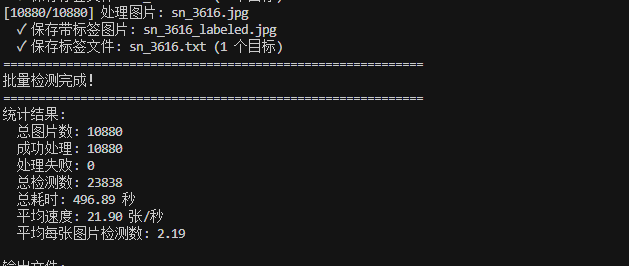
        print("批量检测完成!")
        print("=" * 60)

        total_time = self.stats['end_time'] - self.stats['start_time']

        print(f"统计结果:")
        print(f"  总图片数: {self.stats['total_images']}")
        print(f"  成功处理: {self.stats['processed_images']}")
        print(f"  处理失败: {self.stats['failed_images']}")
        print(f"  总检测数: {self.stats['total_detections']}")
        print(f"  总耗时: {total_time:.2f} 秒")
        print(f"  平均速度: {self.stats['processed_images']/total_time:.2f} 张/秒")

        if self.stats['total_detections'] > 0:
            print(f"  平均每张图片检测数: {self.stats['total_detections']/self.stats['processed_images']:.2f}")

        print(f"
输出文件:")
        print(f"  带标签图片: {self.output_images_dir}")
        print(f"  YOLO标签: {self.output_labels_dir}")

def main():
    """主函数"""
    # 配置路径
    model_path = r"D:DesktopXLWDdatasetultralytics-8.3.39
unsdetect	rainweightsest.pt"
    images_dir = r"D:DesktopXLWDdatasetdataset-padInsulatorAndPerson_detectimages"
    output_images_dir = r"D:DesktopXLWDdatasetdataset-padInsulatorAndPerson_detectimages_label"
    output_labels_dir = r"D:DesktopXLWDdatasetdataset-padInsulatorAndPerson_detectlabels"

    print("批量图片检测脚本")
    print("=" * 60)
    print(f"模型路径: {model_path}")
    print(f"输入图片: {images_dir}")
    print(f"输出图片: {output_images_dir}")
    print(f"输出标签: {output_labels_dir}")
    print("=" * 60)

    # 检查模型文件是否存在
    if not os.path.exists(model_path):
        print(f"错误: 模型文件不存在: {model_path}")
        return

    # 检查输入图片目录是否存在
    if not os.path.exists(images_dir):
        print(f"错误: 输入图片目录不存在: {images_dir}")
        return

    try:
        # 创建检测器并运行
        detector = BatchDetector(
            model_path=model_path,
            images_dir=images_dir,
            output_images_dir=output_images_dir,
            output_labels_dir=output_labels_dir
        )

        # 运行批量检测
        detector.run_batch_detection()

    except Exception as e:
        print(f"运行失败: {e}")
        import traceback
        traceback.print_exc()

if __name__ == "__main__":
    main()

整体结构如上:其中images保存的是需要处理的图片
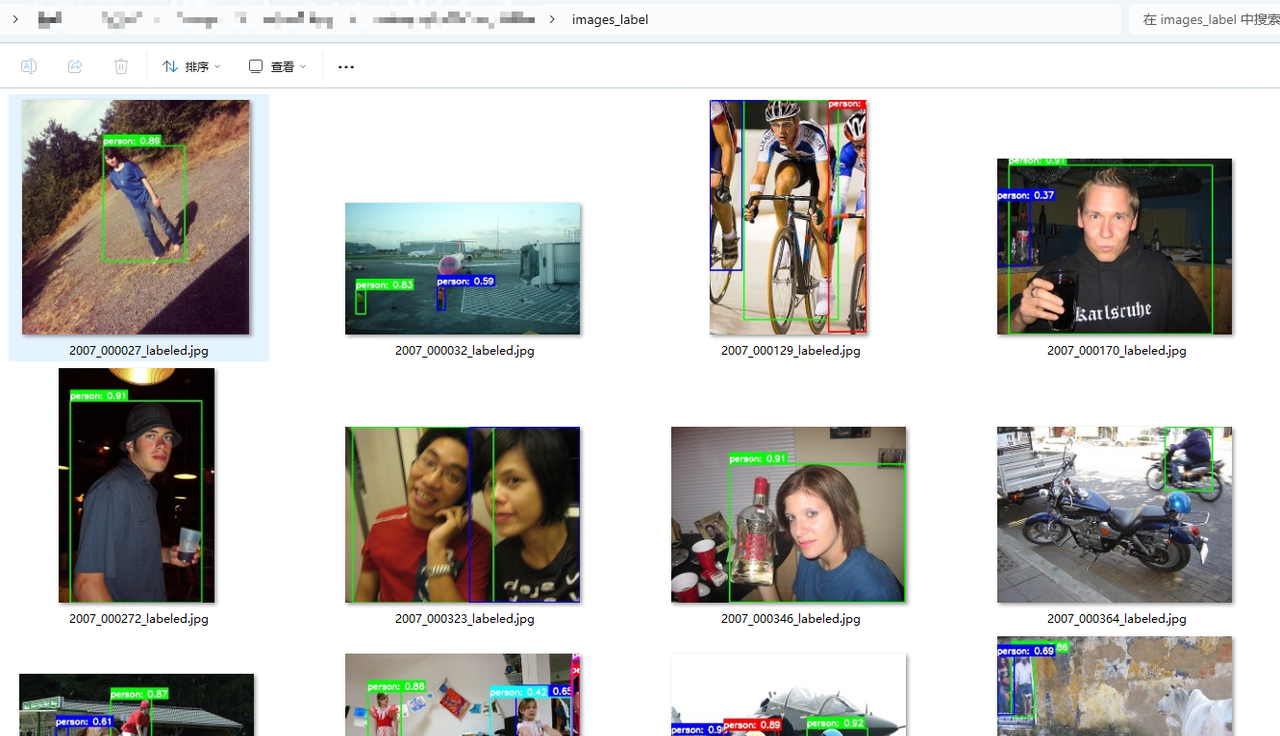
images_label 是为了通过视觉简单判断一下模型处理的有没有问题
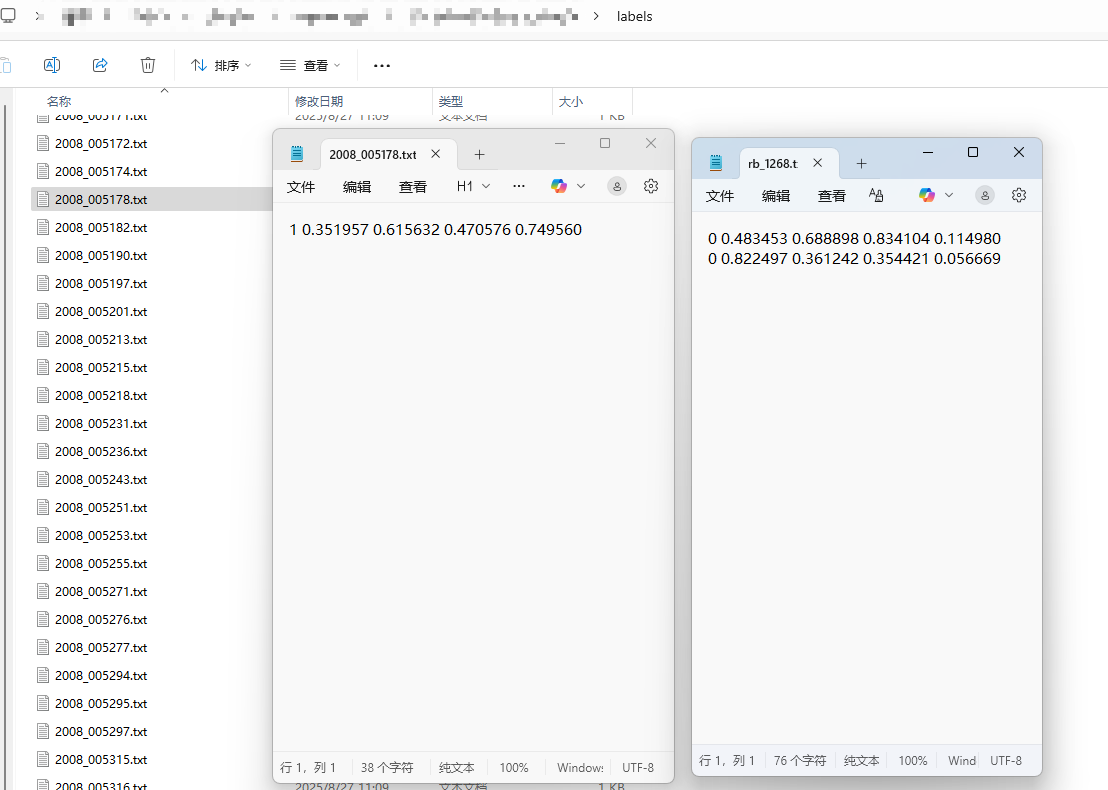
labels是最终的yolo格式的标签
yolo格式转voc格式
yolo_to_voc_converter.py
#!/usr/bin/env python3
"""
YOLO格式标签转换为VOC格式XML脚本
将YOLO格式的.txt标签文件转换为VOC格式的.xml文件
"""

import os
import xml.etree.ElementTree as ET
from pathlib import Path
import glob
import cv2
import numpy as np

class YOLOToVOCConverter:
    def __init__(self, yolo_labels_dir, output_voc_dir, images_dir=None):
        """
        初始化转换器

        Args:
            yolo_labels_dir: YOLO标签文件夹路径
            output_voc_dir: 输出VOC格式文件夹路径
            images_dir: 图片文件夹路径(用于获取图片尺寸,如果为None则使用默认尺寸)
        """
        self.yolo_labels_dir = yolo_labels_dir
        self.output_voc_dir = output_voc_dir
        self.images_dir = images_dir

        # 创建输出目录
        os.makedirs(self.output_voc_dir, exist_ok=True)

        # 支持的图片格式
        self.image_extensions = {'.jpg', '.jpeg', '.png', '.bmp', '.tiff', '.tif'}

        # 转换统计
        self.stats = {
            'total_files': 0,
            'converted_files': 0,
            'failed_files': 0,
            'total_annotations': 0
        }

        print(f"YOLO到VOC格式转换器")
        print(f"输入目录: {yolo_labels_dir}")
        print(f"输出目录: {output_voc_dir}")
        if images_dir:
            print(f"图片目录: {images_dir}")
        print("=" * 60)

    def get_image_size(self, image_name):
        """
        获取图片尺寸

        Args:
            image_name: 图片文件名(不含扩展名)

        Returns:
            tuple: (width, height) 或 None
        """
        if not self.images_dir:
            return None

        # 尝试不同的图片扩展名
        for ext in self.image_extensions:
            image_path = os.path.join(self.images_dir, f"{image_name}{ext}")
            if os.path.exists(image_path):
                try:
                    img = cv2.imread(image_path)
                    if img is not None:
                        height, width = img.shape[:2]
                        return width, height
                except Exception as e:
                    print(f"  读取图片 {image_path} 失败: {e}")
                    continue

        return None

    def yolo_to_voc_coordinates(self, yolo_coords, img_width, img_height):
        """
        将YOLO坐标转换为VOC坐标

        Args:
            yolo_coords: YOLO格式坐标 [class_id, x_center, y_center, width, height]
            img_width: 图片宽度
            img_height: 图片高度

        Returns:
            tuple: (xmin, ymin, xmax, ymax)
        """
        class_id, x_center, y_center, width, height = yolo_coords

        # YOLO坐标是归一化的,需要转换为像素坐标
        x_center_px = x_center * img_width
        y_center_px = y_center * img_height
        width_px = width * img_width
        height_px = height * img_height

        # 计算边界框坐标
        xmin = int(x_center_px - width_px / 2)
        ymin = int(y_center_px - height_px / 2)
        xmax = int(x_center_px + width_px / 2)
        ymax = int(y_center_px + height_px / 2)

        # 确保坐标在图片范围内
        xmin = max(0, xmin)
        ymin = max(0, ymin)
        xmax = min(img_width, xmax)
        ymax = min(img_height, ymax)

        return xmin, ymin, xmax, ymax

    def create_voc_xml(self, image_name, img_width, img_height, annotations, class_names=None):
        """
        创建VOC格式的XML文件

        Args:
            image_name: 图片文件名
            img_width: 图片宽度
            img_height: 图片高度
            annotations: 标注列表,每个元素包含 [class_id, xmin, ymin, xmax, ymax]
            class_names: 类别名称字典,如果为None则使用默认名称

        Returns:
            str: XML字符串
        """
        # 如果没有提供类别名称,使用默认名称
        if class_names is None:
            class_names = {
                0: 'insulator',
                1: 'person'
            }

        # 创建XML根元素
        annotation = ET.Element('annotation')

        # 添加基本信息
        folder = ET.SubElement(annotation, 'folder')
        folder.text = 'images'

        filename = ET.SubElement(annotation, 'filename')
        filename.text = f"{image_name}.jpg"  # 假设是jpg格式

        path = ET.SubElement(annotation, 'path')
        path.text = f"path/to/images/{image_name}.jpg"

        # 添加图片尺寸信息
        size = ET.SubElement(annotation, 'size')
        width_elem = ET.SubElement(size, 'width')
        width_elem.text = str(img_width)
        height_elem = ET.SubElement(size, 'height')
        height_elem.text = str(img_height)
        depth_elem = ET.SubElement(size, 'depth')
        depth_elem.text = '3'  # 假设是3通道彩色图片

        # 添加目标标注
        for ann in annotations:
            class_id, xmin, ymin, xmax, ymax = ann

            # 获取类别名称
            class_name = class_names.get(class_id, f'class_{class_id}')

            # 创建object元素
            obj = ET.SubElement(annotation, 'object')

            name = ET.SubElement(obj, 'name')
            name.text = class_name

            pose = ET.SubElement(obj, 'pose')
            pose.text = 'Unspecified'

            truncated = ET.SubElement(obj, 'truncated')
            truncated.text = '0'

            difficult = ET.SubElement(obj, 'difficult')
            difficult.text = '0'

            # 添加边界框信息
            bndbox = ET.SubElement(obj, 'bndbox')
            xmin_elem = ET.SubElement(bndbox, 'xmin')
            xmin_elem.text = str(xmin)
            ymin_elem = ET.SubElement(bndbox, 'ymin')
            ymin_elem.text = str(ymin)
            xmax_elem = ET.SubElement(bndbox, 'xmax')
            xmax_elem.text = str(xmax)
            ymax_elem = ET.SubElement(bndbox, 'ymax')
            ymax_elem.text = str(ymax)

        # 转换为字符串
        xml_str = ET.tostring(annotation, encoding='unicode')

        # 美化XML格式
        import xml.dom.minidom
        dom = xml.dom.minidom.parseString(xml_str)
        pretty_xml = dom.toprettyxml(indent='  ')

        return pretty_xml

    def convert_single_file(self, label_file_path):
        """
        转换单个YOLO标签文件

        Args:
            label_file_path: YOLO标签文件路径

        Returns:
            bool: 是否转换成功
        """
        try:
            # 获取文件名(不含扩展名)
            file_name = Path(label_file_path).stem

            # 获取图片尺寸
            img_size = self.get_image_size(file_name)
            if img_size is None:
                # 使用默认尺寸
                img_width, img_height = 640, 640
                print(f"  使用默认图片尺寸: {img_width}x{img_height}")
            else:
                img_width, img_height = img_size
                print(f"  图片尺寸: {img_width}x{img_height}")

            # 读取YOLO标签文件
            with open(label_file_path, 'r') as f:
                lines = f.readlines()

            # 解析YOLO格式标注
            annotations = []
            for line in lines:
                line = line.strip()
                if line:
                    try:
                        # YOLO格式: class_id x_center y_center width height
                        parts = line.split()
                        if len(parts) == 5:
                            class_id = int(parts[0])
                            x_center = float(parts[1])
                            y_center = float(parts[2])
                            width = float(parts[3])
                            height = float(parts[4])

                            # 转换为VOC坐标
                            xmin, ymin, xmax, ymax = self.yolo_to_voc_coordinates(
                                [class_id, x_center, y_center, width, height],
                                img_width, img_height
                            )

                            annotations.append([class_id, xmin, ymin, xmax, ymax])
                        else:
                            print(f"    警告: 跳过格式不正确的行: {line}")
                    except Exception as e:
                        print(f"    警告: 解析行失败 '{line}': {e}")
                        continue

            # 创建VOC XML文件
            xml_content = self.create_voc_xml(file_name, img_width, img_height, annotations)

            # 保存XML文件
            output_xml_path = os.path.join(self.output_voc_dir, f"{file_name}.xml")
            with open(output_xml_path, 'w', encoding='utf-8') as f:
                f.write(xml_content)

            print(f"  ✓ 转换完成: {len(annotations)} 个标注")
            self.stats['total_annotations'] += len(annotations)
            return True

        except Exception as e:
            print(f"  ✗ 转换失败: {e}")
            return False

    def run_conversion(self):
        """运行批量转换"""
        print("开始批量转换...")
        print("-" * 60)

        # 获取所有YOLO标签文件
        label_files = glob.glob(os.path.join(self.yolo_labels_dir, "*.txt"))
        self.stats['total_files'] = len(label_files)

        if self.stats['total_files'] == 0:
            print("未找到任何.txt标签文件")
            return

        print(f"找到 {self.stats['total_files']} 个标签文件")
        print("开始转换...")
        print("-" * 60)

        # 转换每个文件
        for i, label_file in enumerate(label_files, 1):
            print(f"[{i}/{self.stats['total_files']}] 转换: {os.path.basename(label_file)}")

            if self.convert_single_file(label_file):
                self.stats['converted_files'] += 1
            else:
                self.stats['failed_files'] += 1

        # 显示统计结果
        self.show_statistics()

    def show_statistics(self):
        """显示转换统计结果"""
        print("=" * 60)
        print("转换完成!")
        print("=" * 60)

        print(f"统计结果:")
        print(f"  总文件数: {self.stats['total_files']}")
        print(f"  成功转换: {self.stats['converted_files']}")
        print(f"  转换失败: {self.stats['failed_files']}")
        print(f"  总标注数: {self.stats['total_annotations']}")

        if self.stats['converted_files'] > 0:
            avg_annotations = self.stats['total_annotations'] / self.stats['converted_files']
            print(f"  平均每文件标注数: {avg_annotations:.2f}")

        print(f"
输出目录: {self.output_voc_dir}")

def main():
    """主函数"""
    # 配置路径
    yolo_labels_dir = r"D:DesktopXLWDdatasetdataset-padInsulatorAndPerson_detectlabels"
    output_voc_dir = r"D:DesktopXLWDdatasetdataset-padInsulatorAndPerson_detectlabels_VOC"
    images_dir = r"D:DesktopXLWDdatasetdataset-padInsulatorAndPerson_detectimages"

    print("YOLO到VOC格式转换脚本")
    print("=" * 60)
    print(f"YOLO标签目录: {yolo_labels_dir}")
    print(f"VOC输出目录: {output_voc_dir}")
    print(f"图片目录: {images_dir}")
    print("=" * 60)

    # 检查输入目录是否存在
    if not os.path.exists(yolo_labels_dir):
        print(f"错误: YOLO标签目录不存在: {yolo_labels_dir}")
        return

    # 检查图片目录是否存在(可选)
    if images_dir and not os.path.exists(images_dir):
        print(f"警告: 图片目录不存在: {images_dir}")
        print("将使用默认图片尺寸 (640x640)")
        images_dir = None

    try:
        # 创建转换器并运行
        converter = YOLOToVOCConverter(
            yolo_labels_dir=yolo_labels_dir,
            output_voc_dir=output_voc_dir,
            images_dir=images_dir
        )

        # 运行转换
        converter.run_conversion()

    except Exception as e:
        print(f"运行失败: {e}")
        import traceback
        traceback.print_exc()

if __name__ == "__main__":
    main()
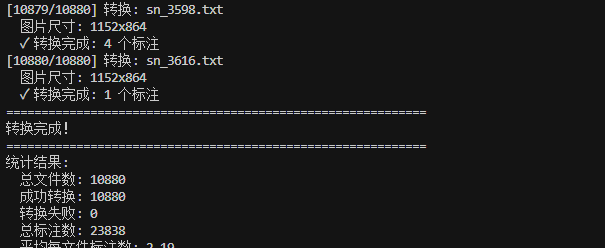
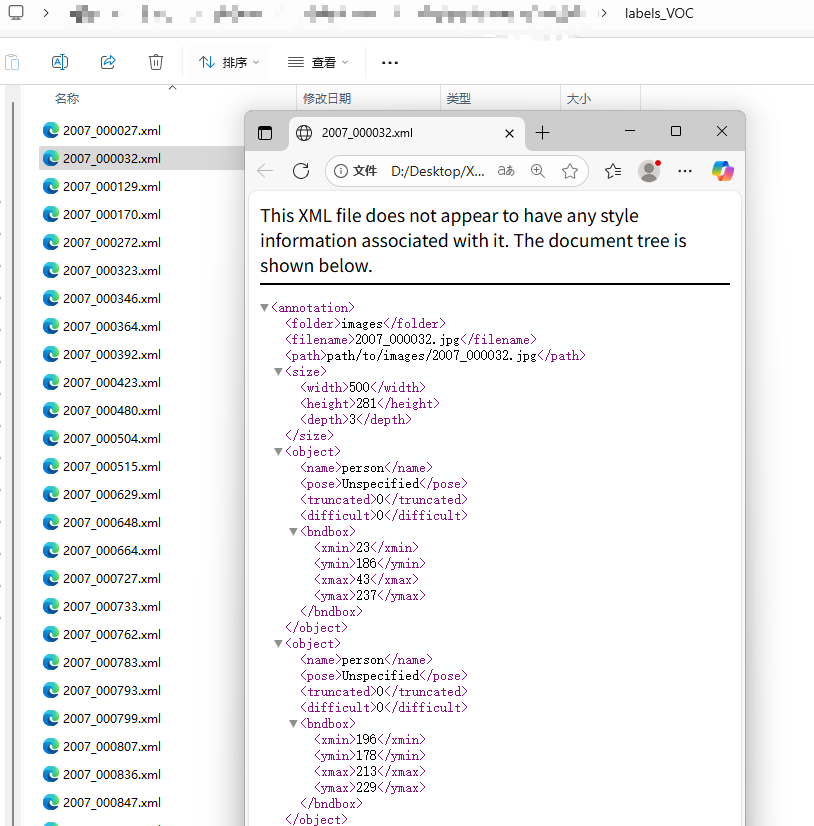
得到对应的xml也就是voc格式的标签,为下一步做准备
ISAT获得json格式的分割结果
ISAT工具详见我的另一篇文章【yolov11 标注 部署 训练 全流程】
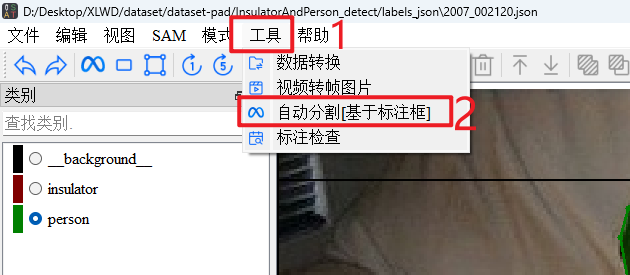
点击>工具>自动分割[基于标注框]
![图片[1] - 使用yolov11+ISAT实现全自动的图像分割标注 - 宋马](https://pic.songma.com/blogimg/20251001/94a6052f62a44a8db798787626c0c135.png)
选择>图像目录>xml文件夹>保存目录>开始
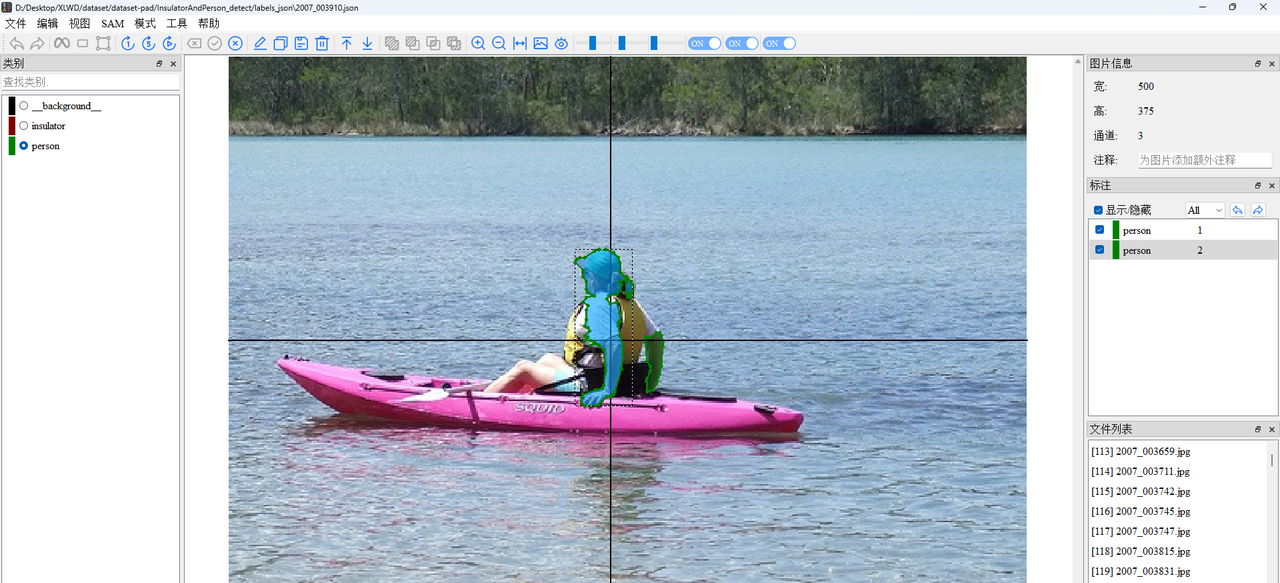
稍微检查一下自动处理的结果,稍微优化一下
yolov11分割训练
已经得到json格式的数据集了,先转换成yolo格式
![图片[2] - 使用yolov11+ISAT实现全自动的图像分割标注 - 宋马](https://pic.songma.com/blogimg/20251001/dd9bf2fcb6f74bdca60335c307a10749.png)
![图片[3] - 使用yolov11+ISAT实现全自动的图像分割标注 - 宋马](https://pic.songma.com/blogimg/20251001/93342837d5d74a61ab5b1460ef555834.png)
如果报错Error: unsupported operand type(s) for /: ‘int’ and ‘str’
修改这个文件:ISATscriptsisat.py
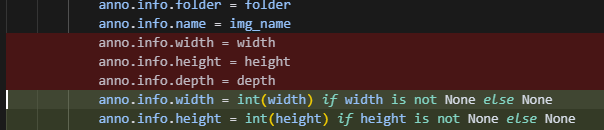
            anno.info.width = int(width) if width is not None else None
            anno.info.height = int(height) if height is not None else None
            anno.info.depth = int(depth) if depth is not None else None
原因:json width和height这俩后面应该是数字,这里是字符串。
![图片[4] - 使用yolov11+ISAT实现全自动的图像分割标注 - 宋马](https://pic.songma.com/blogimg/20251001/8ee4c4cb9dee48938cc70fdb50515b91.png)
![图片[5] - 使用yolov11+ISAT实现全自动的图像分割标注 - 宋马](https://pic.songma.com/blogimg/20251001/aebedfaf3b394e4da41fd3d2bd5fbf18.png)
初步分析了一下,我这里有两类,但是呢,类别应该是从0开始的,需要做一下修改。
convert_class_ids.py
#!/usr/bin/env python3
"""
分割标签类别ID转换脚本
将类别ID 1 改为 0,类别ID 2 改为 1
"""

import os
import glob
import shutil
from pathlib import Path

class ClassIDConverter:
    def __init__(self, labels_dir, backup_dir=None):
        """
        初始化转换器

        Args:
            labels_dir: 分割标签文件夹路径
            backup_dir: 备份文件夹路径(可选)
        """
        self.labels_dir = labels_dir
        self.backup_dir = backup_dir

        # 类别ID映射
        self.class_mapping = {
            1: 0,  # 类别1 -> 类别0
            2: 1   # 类别2 -> 类别1
        }

        # 转换统计
        self.stats = {
            'total_files': 0,
            'processed_files': 0,
            'skipped_files': 0,
            'total_annotations': 0,
            'converted_annotations': 0
        }

        print(f"分割标签类别ID转换器")
        print(f"输入目录: {labels_dir}")
        if backup_dir:
            print(f"备份目录: {backup_dir}")
        print("类别映射:")
        for old_id, new_id in self.class_mapping.items():
            print(f"  类别 {old_id} -> 类别 {new_id}")
        print("=" * 60)

    def create_backup(self):
        """创建备份文件夹"""
        if not self.backup_dir:
            return True

        try:
            os.makedirs(self.backup_dir, exist_ok=True)
            print(f"✓ 备份目录已创建: {self.backup_dir}")
            return True
        except Exception as e:
            print(f"✗ 创建备份目录失败: {e}")
            return False

    def backup_file(self, file_path):
        """备份单个文件"""
        if not self.backup_dir:
            return True

        try:
            filename = os.path.basename(file_path)
            backup_path = os.path.join(self.backup_dir, filename)
            shutil.copy2(file_path, backup_path)
            return True
        except Exception as e:
            print(f"    警告: 备份文件 {filename} 失败: {e}")
            return False

    def convert_single_file(self, file_path):
        """
        转换单个标签文件

        Args:
            file_path: 标签文件路径

        Returns:
            bool: 是否转换成功
        """
        try:
            filename = os.path.basename(file_path)

            # 创建备份
            if not self.backup_file(file_path):
                print(f"  ✗ 备份失败,跳过文件: {filename}")
                return False

            # 读取原文件内容
            with open(file_path, 'r', encoding='utf-8') as f:
                lines = f.readlines()

            # 转换类别ID
            converted_lines = []
            file_annotations = 0
            file_conversions = 0

            for line_num, line in enumerate(lines, 1):
                line = line.strip()
                if line:
                    try:
                        # 分割每行数据
                        parts = line.split()
                        if len(parts) >= 1:
                            # 获取类别ID
                            old_class_id = int(parts[0])

                            # 检查是否需要转换
                            if old_class_id in self.class_mapping:
                                # 转换类别ID
                                new_class_id = self.class_mapping[old_class_id]
                                parts[0] = str(new_class_id)
                                new_line = ' '.join(parts) + '
'
                                converted_lines.append(new_line)
                                file_conversions += 1
                            else:
                                # 保持原样
                                converted_lines.append(line + '
')

                            file_annotations += 1
                        else:
                            # 空行或格式错误,保持原样
                            converted_lines.append(line + '
')
                    except ValueError as e:
                        # 解析失败,保持原样
                        print(f"    警告: 文件 {filename} 第{line_num}行解析失败: {line} - {e}")
                        converted_lines.append(line + '
')
                        continue
                else:
                    # 空行
                    converted_lines.append('
')

            # 写回文件
            with open(file_path, 'w', encoding='utf-8') as f:
                f.writelines(converted_lines)

            # 更新统计
            self.stats['total_annotations'] += file_annotations
            self.stats['converted_annotations'] += file_conversions

            if file_conversions > 0:
                print(f"  ✓ {filename}: {file_conversions}/{file_annotations} 个标注已转换")
            else:
                print(f"  - {filename}: 无需要转换的标注")

            return True

        except Exception as e:
            print(f"  ✗ 转换文件 {filename} 失败: {e}")
            return False

    def run_conversion(self):
        """运行批量转换"""
        print("开始批量转换...")
        print("-" * 60)

        # 创建备份目录
        if not self.create_backup():
            print("警告: 备份目录创建失败,继续执行...")

        # 获取所有txt文件
        txt_files = glob.glob(os.path.join(self.labels_dir, "*.txt"))
        self.stats['total_files'] = len(txt_files)

        if self.stats['total_files'] == 0:
            print("未找到任何.txt标签文件")
            return

        print(f"找到 {self.stats['total_files']} 个标签文件")
        print("开始转换...")
        print("-" * 60)

        # 转换每个文件
        for i, txt_file in enumerate(txt_files, 1):
            print(f"[{i}/{self.stats['total_files']}] 处理: {os.path.basename(txt_file)}")

            if self.convert_single_file(txt_file):
                self.stats['processed_files'] += 1
            else:
                self.stats['skipped_files'] += 1

        # 显示统计结果
        self.show_statistics()

    def show_statistics(self):
        """显示转换统计结果"""
        print("=" * 60)
        print("转换完成!")
        print("=" * 60)

        print(f"统计结果:")
        print(f"  总文件数: {self.stats['total_files']}")
        print(f"  成功处理: {self.stats['processed_files']}")
        print(f"  跳过文件: {self.stats['skipped_files']}")
        print(f"  总标注数: {self.stats['total_annotations']:,}")
        print(f"  转换标注: {self.stats['converted_annotations']:,}")

        if self.stats['total_annotations'] > 0:
            conversion_rate = self.stats['converted_annotations'] / self.stats['total_annotations'] * 100
            print(f"  转换比例: {conversion_rate:.2f}%")

        if self.backup_dir:
            print(f"
备份目录: {self.backup_dir}")
            print("如需恢复,请将备份文件复制回原目录")

def main():
    """主函数"""
    # 配置路径
    labels_dir = r"D:DesktopXLWDdatasetdataset-padInsulatorAndPerson_detectlabels_seg"
    backup_dir = r"D:DesktopXLWDdatasetdataset-padInsulatorAndPerson_detectlabels_seg_backup"

    print("分割标签类别ID转换脚本")
    print("=" * 60)
    print(f"标签目录: {labels_dir}")
    print(f"备份目录: {backup_dir}")
    print("=" * 60)

    # 检查输入目录是否存在
    if not os.path.exists(labels_dir):
        print(f"错误: 标签目录不存在: {labels_dir}")
        return

    # 确认操作
    print("警告: 此操作将修改原始文件!")
    print("建议先备份重要数据。")
    print("
类别映射:")
    print("  类别 1 -> 类别 0")
    print("  类别 2 -> 类别 1")

    confirm = input("
确认继续吗?(输入 'yes' 继续): ")
    if confirm.lower() != 'yes':
        print("操作已取消")
        return

    try:
        # 创建转换器并运行
        converter = ClassIDConverter(
            labels_dir=labels_dir,
            backup_dir=backup_dir
        )

        # 运行转换
        converter.run_conversion()

    except Exception as e:
        print(f"运行失败: {e}")
        import traceback
        traceback.print_exc()

if __name__ == "__main__":
    main()
.yaml文件如下:
![图片[6] - 使用yolov11+ISAT实现全自动的图像分割标注 - 宋马](https://pic.songma.com/blogimg/20251001/2913fd93fcbe4dca8e0343397e0c2be2.png)
然后训练即可。
© 版权声明
文章版权归作者所有,未经允许请勿转载。如内容涉嫌侵权,请在本页底部进入<联系我们>进行举报投诉!
THE END

















暂无评论内容