

微信小程序生成各种类型的二维码
二维码分享设计

微信接口
1、getQRCode 获取小程序码
该接口用于获取小程序码,适用于需要的码数量较少的业务场景。通过该接口生成的小程序码,永久有效,有数量限制,详见获取小程序码。
POST
https://api.weixin.qq.com/wxa/getwxacode?access_token=ACCESS_TOKEN
2、getUnlimitedQRCode 获取不限制的小程序码
该接口用于获取小程序码,适用于需要的码数量极多的业务场景。通过该接口生成的小程序码,永久有效,数量暂无限制
POST
https://api.weixin.qq.com/wxa/getwxacodeunlimit?access_token=ACCESS_TOKEN
3、createQRCode 获取小程序二维码
获取小程序二维码,适用于需要的码数量较少的业务场景。通过该接口生成的小程序码,永久有效,有数量限制,详见获取二维码。
POST
https://api.weixin.qq.com/cgi-bin/wxaapp/createwxaqrcode?access_token=ACCESS_TOKEN
前端
二维码展示
<!-- 底部二维码区域 -->
				<view class="qrcode-section">
					<view class="qrcode-container">
						<image :src="'data:image/png;base64,'+detailInfo.qrCode" class="qrcode-img" mode="widthFix" />
						<text class="qrcode-text">扫描二维码查看钱币详情</text>
					</view>
					<!-- 新增分享按钮  open-type="share"-->
					<u-button class="share-btn" @click="handleShare" open-type="share">
						<u-icon name="share" :color="themeColor" size="44"></u-icon>
						<text class="share-text">分享给朋友</text>
					</u-button>
				</view>
二维码接口调用
// 获取二维码数据
method:
			async getQrCode(auctionId, envVersion) {

				const res = await request.request('shareQrcode', {

					auctionId,
					envVersion
				}, 'GET')
				if (res.code === 200 && res.data.length > 0) {

					// this.detailInfo.qrCode = res.data
					this.$set(this.detailInfo, 'qrCode', res.data)
					// console.log(this.detailInfo.qrCode);
				}
			},

二维码扫码回调
	async onLoad(options) {

			// 处理扫码进入的场景
			if (options.scene) {

				console.log("记录id:" + options.scene);
				await this.getDetail(options.scene);
			}
		}
这里二维码回调是带参数的,再根据参数来获取整个页面的数据
注意:
1、这里的字段名称就是叫scene,不能修改为其他的
2、scene后面接着的就直接是字段的值,不需要再另外添加XXXKEY = XXX值
回调调试方式
回调调试在小程序中选择带参数,进入场景为扫描二维码
![图片[1] - 微信小程序二维码生成 - 宋马](https://pic.songma.com/blogimg/20250620/30eb43b420564a09bdb6867a8e4309ea.png)
这样直接进入就是带参数,直接调用后台的onload方法,对应的参数为scene
后端
接口层
@GetMapping("/shareQrcode")
	@ApiOperation(value = "V1.0.0 二维码分享", response = AjaxResult.class)
	public AjaxResult shareQr(@RequestParam("auctionId") String auctionId,@RequestParam("envVersion") String envVersion) {

		byte[] qrCodeBytes = iAtcoinDealhistoryService.generateQrCode(auctionId,envVersion);//release,develop
		String base64Encoded = Base64.getEncoder().encodeToString(qrCodeBytes);
		return AjaxResult.success("操作成功",base64Encoded);
	}
Service业务层处理
application.yml配置文件
# 微信小程序配置
wxconfig:
  # appId 小程序id
  appID:
  # AppSecret 小程序密码
  appSecret:
  # uploadFolder 二维码服务器保存路径
  uploadFolder:
  # page 二维码扫描打开的页面
  page: pages/report/reportDetail
  # envVersion 正式版为 "release",体验版为 "trial",开发版为 "develop"。默认是正式版。
  envVersion: release
  # API_GET_TOKEN 获取token的连接地址
  API_GET_TOKEN: https://api.weixin.qq.com/cgi-bin/token?grant_type=client_credential&appid=%s&secret=%s
  # 获取小程序码,适用于需要的码数量极多的业务场景。通过该接口生成的小程序码,永久有效,数量暂无限制。 更多用法详见 获取二维码。 %s为ACCESS_TOKEN
  API_GET_QR_CODE: https://api.weixin.qq.com/wxa/getwxacodeunlimit?access_token=%s
  # 获取小程序码,适用于需要的码数量较少的业务场景。通过该接口生成的小程序码,永久有效,有数量限制,详见获取二维码。
  #API_GET_QR_CODE: https://api.weixin.qq.com/cgi-bin/wxaapp/createwxaqrcode?access_token=%s"
  # 获取小程序二维码,适用于需要的码数量较少的业务场景。通过该接口生成的小程序码,永久有效,有数量限制,详见获取二维码。
  #API_GET_QR_CODE: "https://api.weixin.qq.com/wxa/getwxacode?access_token=%s"
配置文件获取
	@Value("${wxconfig.appID}")
	private String appID;

	@Value("${wxconfig.appSecret}")
	private String appSecret;

	@Value("${wxconfig.page}")
	private String page;

	@Value("${wxconfig.uploadFolder}")
	private String uploadFolder;

	@Value("${wxconfig.envVersion}")
	private String envVersion;

	@Value("${wxconfig.API_GET_TOKEN}")
	private String API_GET_TOKEN;

	@Value("${wxconfig.API_GET_QR_CODE}")
	private String API_GET_QR_CODE;
获取配置文件配置
生成二维码
	// 生成二维码
	@Override
	public byte[] generateQrCode(String auctionId, String envVersion) {

		byte[] image = null;
		try {

			//获得 accessToken
			String accessToken = MiniProgramQRCode.getToken(AppID, AppSecret);
			System.out.println(accessToken);

			String page = "pages/report/reportDetail";
			String filePath = "/home/atcoin/uploadPath/upload/qrCodeImage/" + auctionId + ".png";
//			String envVersion = "release";//release,develop

//			{"auctionId":"jn-25-0611-386"}
//			scene 参数是一个合法的字符串,长度不超过 32 个字符。
//			URLEncoder en = new URLEncoder();
			// 修改参数格式为 URL 查询字符串
//		    String scene = "auctionId=" + en.encode(auctionId, StandardCharsets.UTF_8);

			String scene = auctionId;
			//生成二维码图片bytes
		    image = MiniProgramQRCode.getQRCodeWeb(AppID, AppSecret, scene, page, filePath,
		            envVersion, true);
		} catch (Exception e) {

			e.printStackTrace();
		}
		return image;
	}
注意:
这里使用url encode一下就超过了32位的长度,最后还是原样上送了
![图片[2] - 微信小程序二维码生成 - 宋马](https://pic.songma.com/blogimg/20250620/d12906e508364f218ec43e79f5eebd38.png)
传入的页面路径,pages前不可用加 ” / “。相对路径pages/report/reportDetail
常见错误
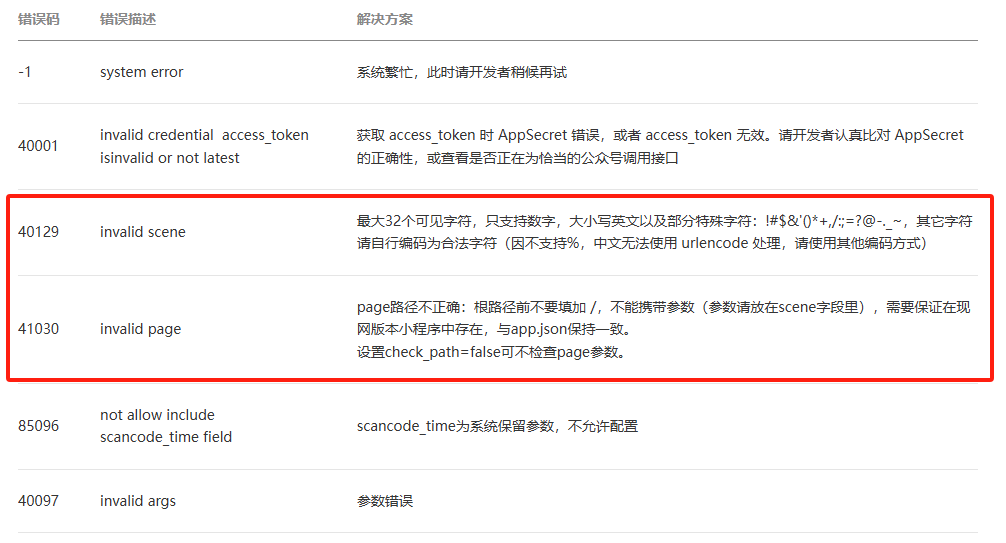
关键方法实现
获取access_token
public static String getToken(String appId, String appSecret) throws Exception {

		// === 使用JSON解析access_token ===
		String url = String.format(API_GET_TOKEN, appId, appSecret); // 无需URL编码
		HttpURLConnection conn = (HttpURLConnection) new URL(url).openConnection();
		InputStream is = conn.getInputStream();
		String json = IOUtils.toString(is, "UTF-8");
		is.close();
		conn.disconnect();

		// 使用JSON解析
		JSONObject obj = new JSONObject(json);
		if (obj.has("access_token")) {

			return obj.getString("access_token");
		} else {

			throw new Exception("获取Token失败: " + json);
		}
	}
调用微信接口获取二维码
微信二维码请求参数
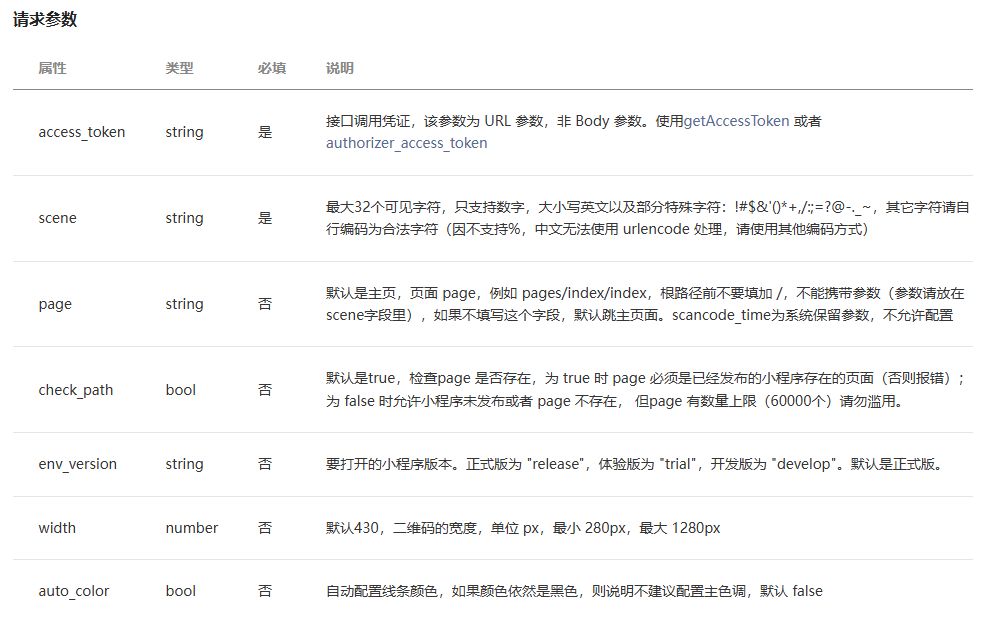
接口调用实现
public static byte[] getQRCodeMini(String accessToken, String scene, String page, int width, String envVersion,
			Boolean checkPath) throws Exception {

		String url = String.format(API_GET_QR_CODE, accessToken);
		HttpURLConnection conn = (HttpURLConnection) new URL(url).openConnection();
		conn.setRequestMethod("POST");
		conn.setRequestProperty("Content-Type", "application/json");
		conn.setDoOutput(true);

		// === 构建JSON参数 ===
		JSONObject jsonObj = new JSONObject();
		if (StringUtils.isNotBlank(scene)) {

			// 检查scene长度
			if (scene.length() > 32) {

				throw new Exception("scene参数长度不能超过32个字符");
			}
			jsonObj.put("scene", scene); // 使用校验后的scene字段
		}
		if (StringUtils.isNotBlank(page)) {

			jsonObj.put("page", page); // 使用page
		}
		jsonObj.put("width", width);
		jsonObj.put("env_version", envVersion); // 移除非法空格
		jsonObj.put("check_path", checkPath); // 布尔值无需引号

		String json = jsonObj.toString();
		System.out.println("请求参数:" + json); // 调试用

		// 发送请求
		conn.getOutputStream().write(json.getBytes("UTF-8"));

		// === 检查响应状态和内容类型 ===
		int status = conn.getResponseCode();
		InputStream is;
		if (status != 200) {

			is = conn.getErrorStream();
		} else {

			is = conn.getInputStream();
		}

		byte[] responseBytes = IOUtils.toByteArray(is);
		is.close();
		conn.disconnect();

		// 检查是否是错误响应(JSON格式)
		if (responseBytes.length > 0 && responseBytes[0] == '{') {

			String errorMsg = new String(responseBytes, "UTF-8");
			throw new Exception("微信API错误: " + errorMsg);
		}

		return responseBytes;
	}
参考资料
小程序无限制
小程序分享
© 版权声明
文章版权归作者所有,未经允许请勿转载。如内容涉嫌侵权,请在本页底部进入<联系我们>进行举报投诉!
THE END

















暂无评论内容